Generative AI: what concrete opportunities for business departments?
Generative AI: discover concrete opportunities for marketing, sales, customer support, and HR with Microsoft Copilot. Use cases and ROI.

Your customer data is fragmented between your CRM, your emailing platform, your website, your customer service and your advertising campaigns. The result: you never have a unified vision of your customers, your teams work with contradictory information and your marketing campaigns lack precision.
This proves to be a strategic handicap that prevents you from personalizing the customer experience and accurately measuring the ROI of your actions. In a context where customers interact through multiple channels and expect a consistent experience, this situation becomes untenable.
This article shows you the complete methodology for building and deploying a Customer Data Platform (CDP) with the Microsoft ecosystem, from initial audit to operational activation, by exploiting Dynamics 365 Customer Insights and its native integration with Power Platform.

A Customer Data Platform (CDP) collects, unifies, and activates customer data from all your sources to create a single, persistent view of each customer. This definition can therefore be broken down into four fundamental capacities:
A CDP is different from a CRM that manages commercial interactions without capturing the entire digital journey and from a DMP that works with anonymous data for programmatic advertising. CDP unifies identified and persistent customer profiles.
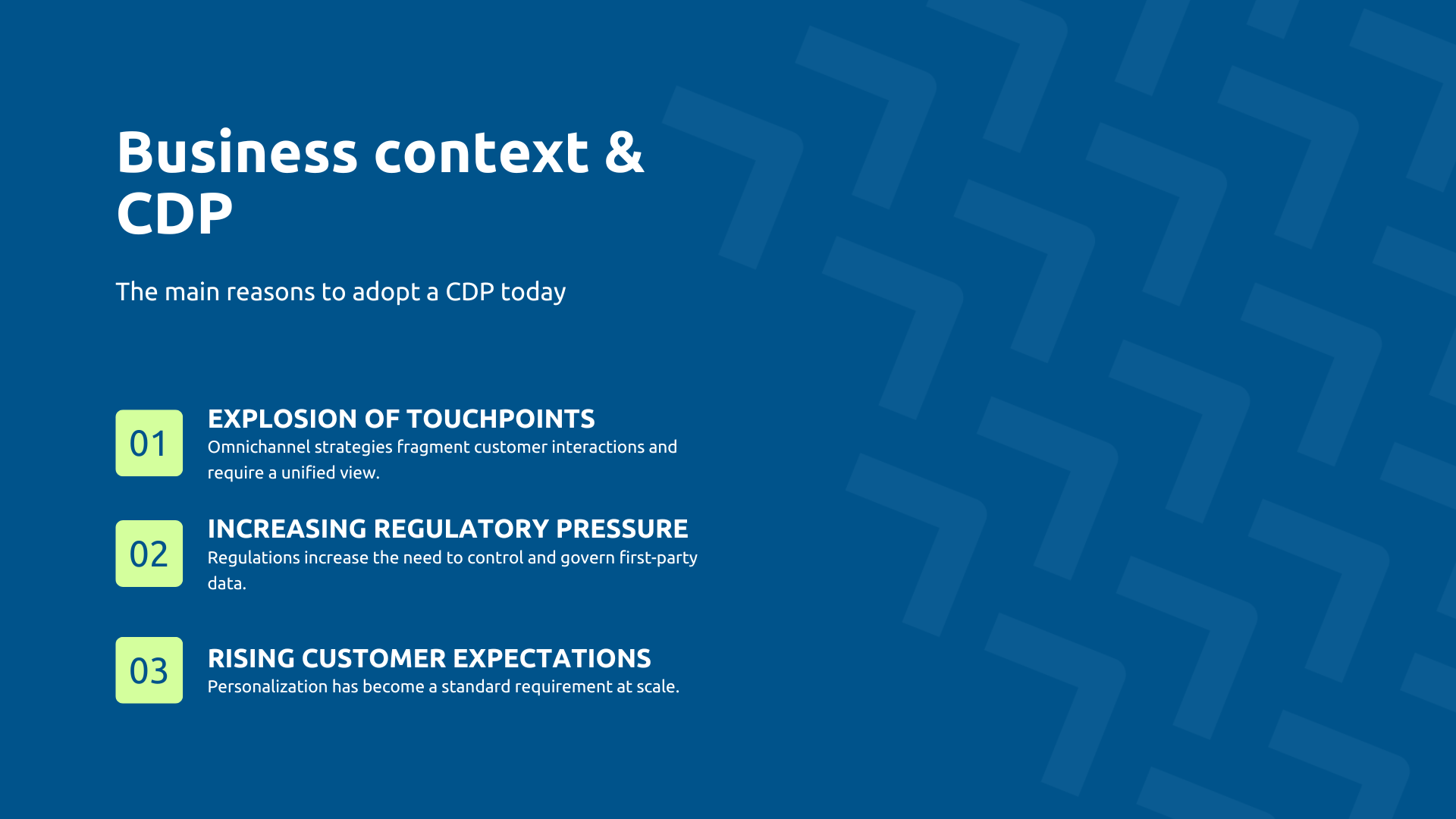
Several structural changes make CDP indispensable. One of them, Generalized omnicanality, is transforming the customer journey. So, according to the study State of the Connected Customer In Salesforce, customers interact on average through 8 different channels. Your customer compares your products on mobile, visits your store, contacts customer service by chat, receives your emails and interacts on social networks. Without CDP, each channel has a partial view, making a consistent experience impossible.
In addition, the evolution of privacy regulations and the gradual restriction of third-party tracking by browsers (Safari, Firefox) make controlling your first-party data more strategic than ever. Indeed, a CDP allows you to collect and use your own customer data in compliance with the GDPR, without depending on increasingly limited external sources.
Another contextual change that motivates the adoption of a CDP: the fact that the customization requirement intensified. McKinsey reveals that 71% of consumers expect personalized interactions and 76% are frustrated when that doesn't happen. Personalization is no longer a differentiator but a prerequisite and only a CDP provides the necessary basis to deliver it on a large scale.
For Marketing, personalization is becoming industrializable. Instead of segmenting by demographics, you target based on real behaviors. Businesses that excel in personalization generate 40% more revenue through these activities compared to average players. Cart abandonment campaigns and product recommendations become automatic and contextual.
On the side of Sales, your salespeople have access to the complete history of the prospect: pages visited, content downloaded, engagement score. Personalized recommendations generated by AI can increase conversions by 30 to 60% depending on the use case, by targeting each customer with products that match their real preferences.
For customer service, your advisor immediately sees the complete history, eliminating repetitive questions. A CDP significantly reduces processing time by giving teams immediate access to all the context. In terms of management, consolidated dashboards offer a reliable view of Customer Lifetime Value and ROI by channel.
The architecture of Dynamics 365 Customer Insights - Data is based on Dataverse and Azure. In fact, Dataverse provides the common data model and granular security, while Azure provides scalability. This approach ensures that your CDP manages millions of profiles with consistent performance, while meeting your compliance requirements.
Likewise, AI is native and therefore deeply integrated via Azure AI Services. For example, prediction models (churn, lifetime value, recommendations) work without specific development and segmentation assisted by Copilot makes it possible to create complex audiences in natural language.
In terms of security, the platform benefits from Microsoft SOC 2 and ISO 27001 certifications, as well as GDPR compliance. End-to-end encryption and access controls via Entra ID ensure your data is protected.
Customer Insights structures its functionalities around four essential pillars, which go even further than the building blocks of any CDP (as presented earlier in the definition):
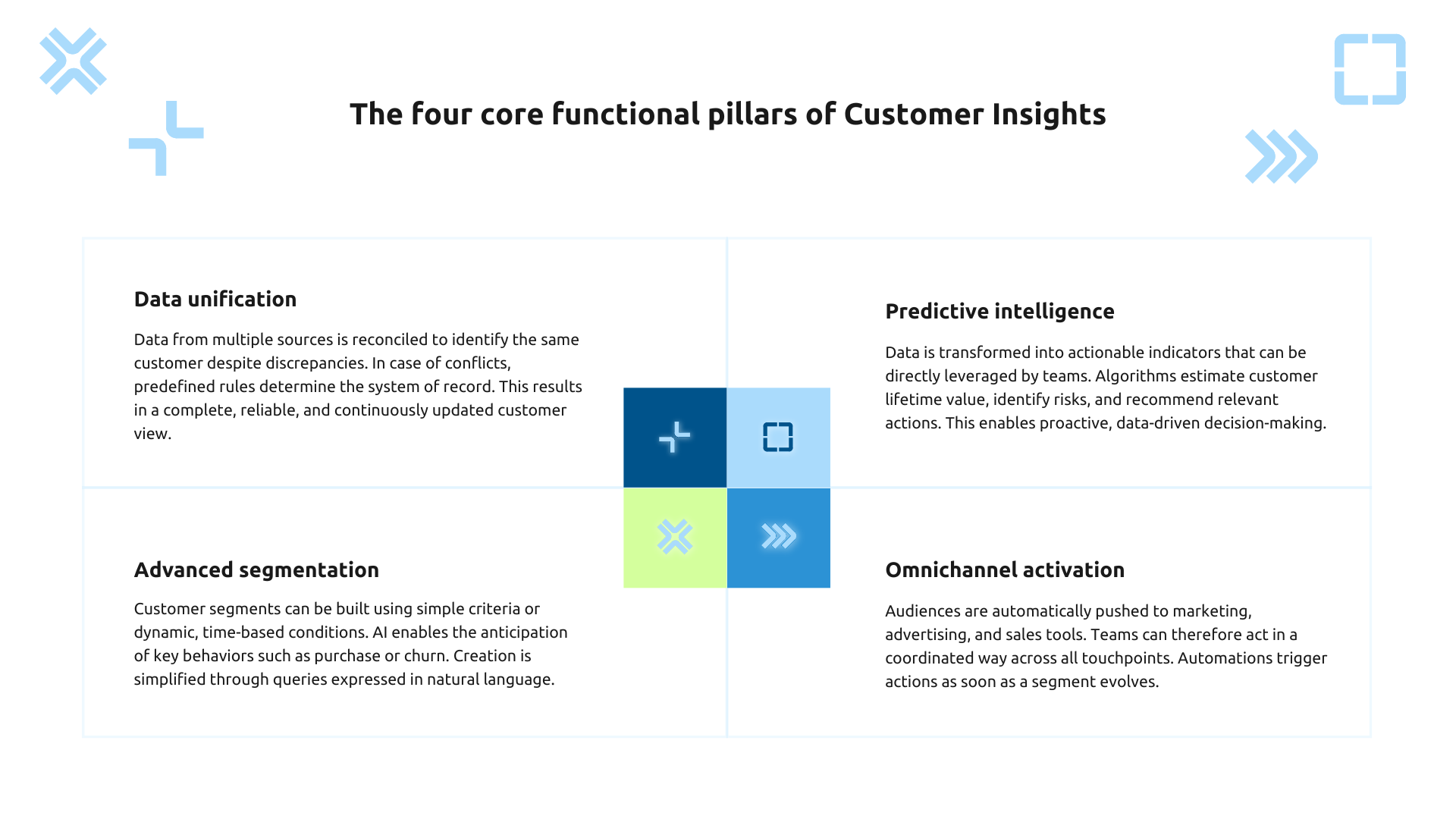
Deep integration with the Microsoft ecosystem makes Customer Insights a real control center for your customer knowledge.
First, with Dynamics 365 Customer Insight, your segments become directly usable in your customer journeys. Predictive scores fuel automatic triggers. The enrichment of profiles with engagement data takes place in real time without development.
Then, with Dynamics 365 Sales, salespeople benefit from the complete context. The contact sheet shows purchase history, products viewed, engagement score, and AI recommendations. Automatic alerts notify when a lead reaches a critical score.
Finally, with Power Platform, the scalability becomes unlimited. Power BI connects natively to create dashboards. Power Apps builds business applications that consume CDP data. Power Automate orchestrates complex workflows as segments change.
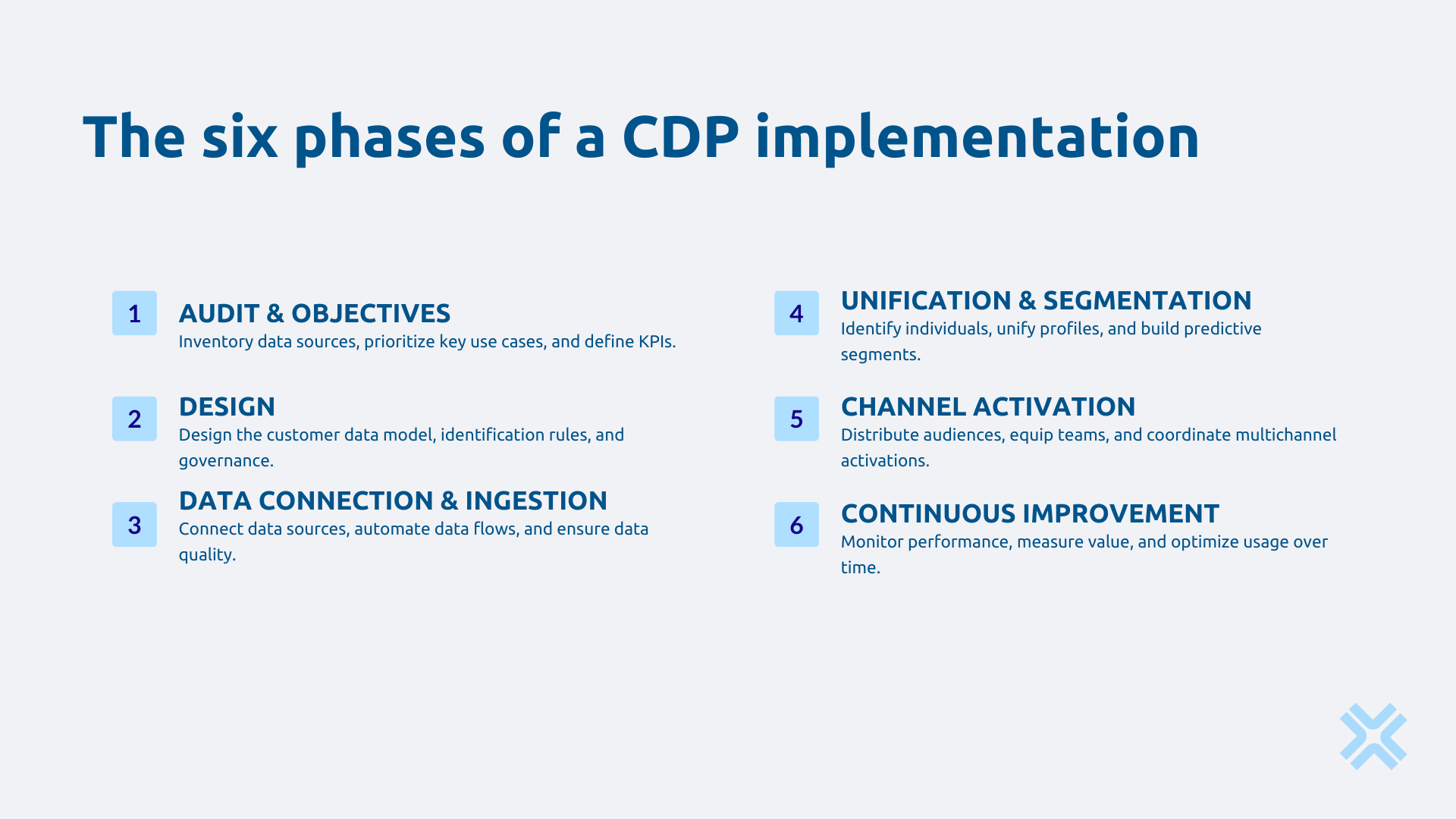
Start with map all of your customer data sources. Where does your data live today? In your CRM certainly, but also on your website, in your transaction systems, your marketing platforms, your customer service, your mobile applications. For each source, document not only the type of data but also its volume, freshness, and estimated quality. This inventory often reveals surprises: valuable data unexploited in a legacy system, massive duplications between departments, critical information stored in personal Excel files.
At the same time, Identify your priority use cases by interviewing your stakeholders. What decisions should your marketing, sales, and customer service teams make every day? Focus on 3 to 5 high-impact use cases that will serve as a guideline for your deployment rather than aiming for total transformation from the start.
Finally, Establish your success KPIs for each area concerned. How will you measure if your CDP is actually creating value?
Here, you lay the technical and organizational foundations that determine your ability to evolve in the future.
The unified data model Define how you will represent your customers in Customer Insights. What are your main entities? This modeling should reflect your business reality while remaining flexible enough to evolve. Also establish your quality rules: which fields are mandatory, which formats are accepted, what consistency do you require between sources?
Then, the matching and unification strategy allows you to know how to identify that the same customer appears in different sources despite input variations? Define your reconciliation keys in order of priority. Also, establish your merger rules to manage conflicts: if two sources give different birth dates, which one do you prefer?
Finally, structure your governance framework to clarify who is responsible for what. Name the data owners for each data domain. Define quality validation processes, roles and permissions in Customer Insights, procedures for requesting access to sensitive data, and retention and archiving policies that ensure your GDPR compliance.
First, choose your connectors knowing that Customer Insights connects to numerous sources via Power Query, which supports hundreds of connectors (Azure, Salesforce, Google, Google, Google, SQL, SQL, files). For unsupported sources, use REST APIs or Azure Data Factory.
What's more, Configure ingestion by defining the refresh rate according to your needs, by implementing transformations in Power Query data flows and by setting up automatic error alerts.
Consistently validate the quality ingested data. Create Power BI dashboards that measure completeness rates by source in real time, identify potential duplicates, check consistency across systems, and detect statistical anomalies. These dashboards become your daily management tools to ensure that your CDP is based on reliable data.
Via the configuring matching you define the identification rules. Test on a sample to validate accuracy before full deployment. Additionally, note that Customer Insights offers pre-configured rules that you can refine.
To build business segments, start with the fundamental segments: high-value customers, hot prospects, at-risk customers. Use dynamic segmentation to make them evolve automatically. Copilot makes it easy to create complex segments.
Then activate the predictive models preconfigured Customer Insights: Customer Lifetime Value, propensity to buy, churn risk, product recommendations. To conclude this step, train and validate with your historical data.
Integrate your marketing tools by exporting your audiences to Dynamics 365 Customer Insight, LinkedIn, Meta, Google Ads, and your email marketing platform. Set up automatic syncs to keep audiences up to date.
At the same time, enrich your commercial tools. The integration with Dynamics 365 Sales displays directly in the contact sheet the predictive score of each prospect, their complete behavioral history and the AI recommendations of products to offer. Your sales representatives access this enriched context without leaving their usual tool. Set up automatic alerts that notify them when a lead reaches a critical score that warrants immediate contact.
It will also be necessary to completely transform your customer service. This is easy thanks to the integration with Dynamics 365 Customer Service, which gives agents instant access to the complete history, known preferences, and content of recent interactions, eliminating repetitive questions, speeding resolution, and truly personalizing the experience.
Set up rigorous monitoring that monitors the health of your system on a daily basis. Track ingestion success rates for each source, data volumes processed, matching rates, and profile completeness. Set up automatic alerts that trigger as soon as a metric crosses a critical threshold: an ingestion flow that fails, a matching rate that falls sharply, a source that no longer updates.
Systematically analyze the value created. Is your CDP really being adopted by marketing, sales, and service teams? Are your business KPIs progressing as expected? Which segments generate the best performances once activated? These analyses guide your improvement priorities and justify your investments to management.
Gradually enrich your platform in successive waves. Connect new data sources to complement your profiles, create new segments as new needs emerge, refine your predictive models with more historical data, automate new business processes based on your customer insights.
Email campaigns use rudimentary segmentation and generic content, with open rates stagnating around 15% and conversions at 2%. Customer Insights unifies your data to create behavioral micro segments.
Instead of a generic email, you automatically send personalized variants: customers who bought running shoes receive recommendations for running accessories, visitors who viewed without buying receive a targeted offer, inactive customers receive a reactivation offer. The AI automatically selects the 3 most relevant products for each recipient.
In a typical e-commerce scenario, opening rates can thus increase from 15% to 28% and conversions from 2.3% to 4.1% thanks to personalization based on real behaviors.
A telecom operator loses 2% of its customers every month. Customer service does not find out The original intention only at the time of the cancellation request, too late to act effectively. Retaining an existing customer is 5 to 7 times cheaper than acquiring a new one.
Customer Insights ingests usage, support, and behavioral data. The prediction model identifies early signs: a decrease in use, an increase in service contacts, consultation of the cancellation section. A 0-100 risk score is calculated for each customer.
We can thus easily imagine a scenario where above 70, a Power Automate workflow is automatically triggered: alert to the retention team with a complete customer profile, personalized offer generated according to history and preferences, proactive contact before showing intention to leave. An operator could typically reduce churn by 25% by exploiting AI prediction (~ 80% accuracy) to preventively target at-risk customers.
Askware combines technical mastery of the Microsoft ecosystem and an understanding of business challenges to deploy CDP strategies that create measurable value. From initial audit to operational activation, we support you to transform your fragmented customer data into sustainable competitive advantage.
Ready to unify your customer data? Request your audit to identify your opportunities and establish your roadmap.
A CRM manages sales interactions and the sales cycle by focusing on qualified leads and active customers. A CDP unifies all customer data from all sources (web, mobile, support, transactions, marketing, stores) to create a unique view of each individual. CRM is an operational tool for sales, CDP is the data foundation that feeds CRM and all your tools with rich profiles and predictive insights.
Customer Insights collects your data from all your sources via native connectors or APIs, unifies this data by identifying that the same customer appears in multiple systems, and then creates a single profile consolidating all its history. You create behavioral segments, the AI generates predictions, and you activate these audiences in your operational tools. Native integration with Power Platform allows for expanded capabilities through Power BI, Power Apps, and Power Automate.
There are three reasons why CDP is urgent. Omnichannel has become widespread: your customers use 8 channels on average and expect a consistent experience. Changing regulations are making your first-party data more valuable, and a CDP is the best way to use it in compliance. Personalization has become a basic expectation (71% of consumers require it according to McKinsey) and impossible to deliver without the unified customer view that a CDP offers.
Our experts share their vision of best practices and technological trends to ensure the success of your digital transformation.