The fundamentals of cloud computing: understanding before acting
What is cloud computing?
The Cloud computing refers to access to computer resources (servers, storage, databases, databases, networks, software) via the Internet, on demand and without managing the underlying physical infrastructure. It's a complete paradigm shift, not just “servers hosted elsewhere.”
Think about electricity: you don't need to manage a power plant to light your offices. You consume what you need, when you need it and you only pay for your consumption. The cloud works on the same principle.
This model is based on five essential characteristics:
- Self-service access,
- The elasticity to adjust your resources to your needs,
- The sharing of infrastructure,
- Pay-per-use,
- Broad network access from anywhere.
The fundamental change? You are moving from a high-capital investment model (CapEx) to a variable operating expenses (OpEx) model.
The 3 cloud service models: IaaS, PaaS, SaaS
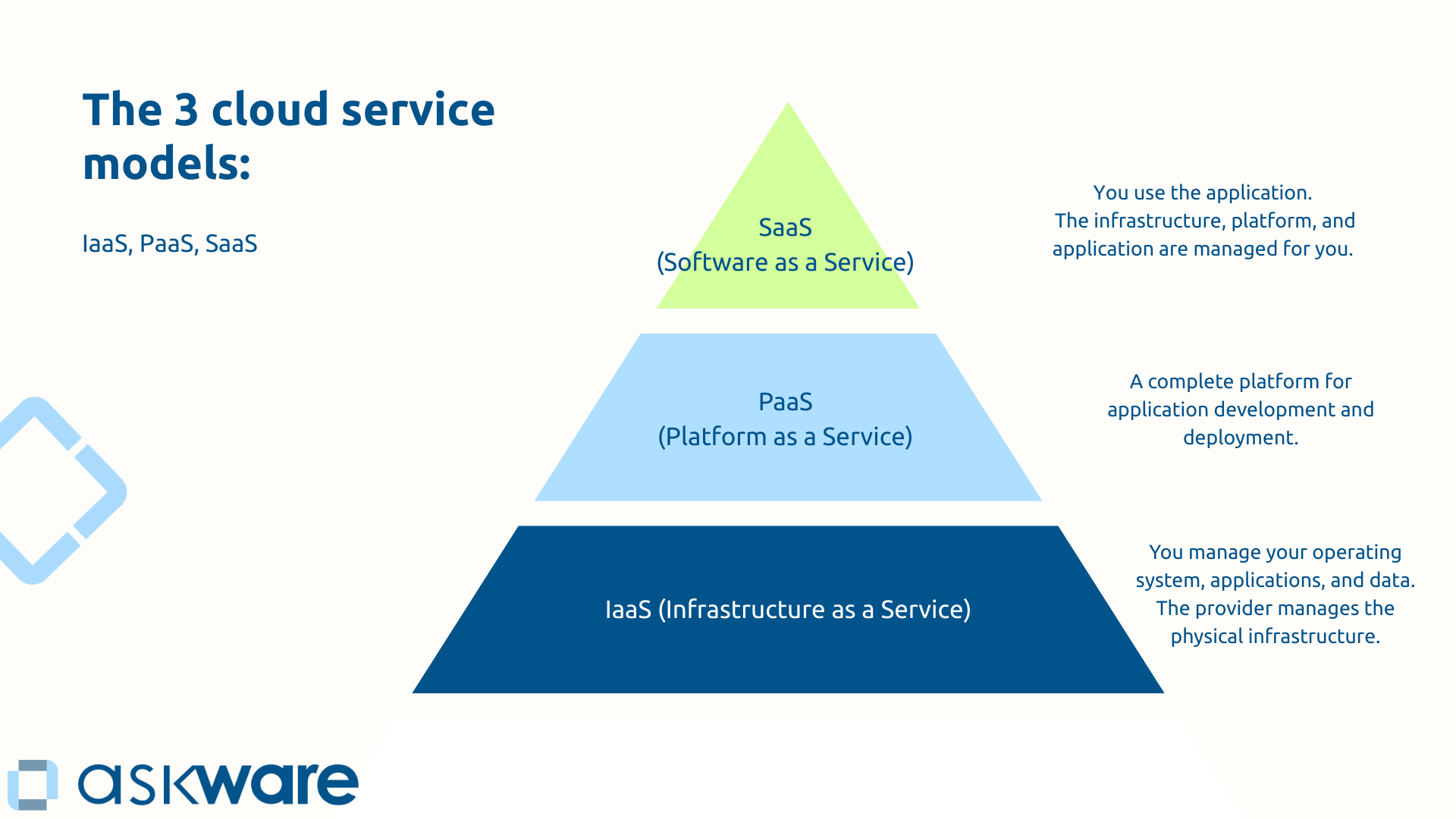
Confusion around the cloud often comes from a lack of knowledge of these three levels of services: IaaS, Paas and Saas.
IaaS (Infrastructure as a Service) gives you access to basic resources: virtual servers, storage, networks. You manage your OS, applications, and data. The provider manages the physical infrastructure. On Azure, this corresponds to services Virtual Machines and Azure Storage. Ideal for lift-and-shift migrations (migrating existing applications) or when you need total control.
PaaS (Platform as a Service) offers you a complete platform for application development and deployment. You only focus on your applications and data, everything else is managed. Azure App Service, Azure SQL Database, Azure Functions illustrate this model. This level of service is ideal for expanding rapidly without managing the infrastructure.
SaaS (Software as a Service) represents the highest level: complete software accessible via the Internet. You use the application, configure it according to your needs, everything else is transparent (the infrastructure, the platform and the application). Microsoft 365, Dynamics 365 work on this model.
The higher you go up this pyramid, the less technical infrastructure you manage, the more you focus on business value. The choice depends on your need for control and simplicity.
Public, private, hybrid cloud: which approach should you choose?
The public cloud (like Azure, AWS, Google Cloud) is based on a shared infrastructure. Its advantages: almost infinite scalability, zero initial investment, managed maintenance. But that means dependence on the supplier and less control. The majority of organizations can use a public cloud.
The private cloud offers an infrastructure dedicated to your organization alone. This allows you more control and customization but the costs and complexity of management are greater. This option remains interesting for companies in highly regulated sectors where sovereignty needs are high.
The hybrid cloud combines the best of both: some applications in the public cloud, others remain on-premise. This approach offers maximum flexibility and allows for gradual migration. Azure is particularly good at hybrid cloud thanks to Azure Arc and Azure Stack.
For most organizations in transformation, the hybrid cloud represents the most pragmatic path.
Microsoft Azure in a nutshell: the cloud platform for the Microsoft ecosystem
What is Microsoft Azure and why does it exist?
Launched in 2010, Microsoft Azure is much more than a competitor to AWS. It is the Cloud Platform, the technical foundation of the entire modern Microsoft ecosystem. Microsoft 365, Dynamics 365, Power Platform, Teams, GitHub, LinkedIn: everything runs on Azure.
This shared infrastructure creates a unique coherence. When you use Teams, your data goes through Azure. When you create an application Power Apps, it runs on Azure. When you deploy Dynamics 365, everything is based on Azure.
With its presence in more than 60 regions worldwide, you can choose the data center that's right for your business. Likewise, Azure has a hundred compliance certifications and has invested heavily ($20 billion over 5 years) in cybersecurity.
For organizations already in the Microsoft ecosystem, Azure represents natural continuity. Same skills, same identity management, same governance.
The main categories of Azure services
Azure offers a catalog of numerous services organized into large families. Each one meets the specific needs of your IT infrastructure.
Calculus (Compute) to run your applications and workloads (the amount of processing):
- Azure Virtual Machines to create Windows or Linux servers
- App Service to host your web applications
- Functions for serverless computing
- Kubernetes Service to orchestrate your containers
Storage allows you to store and manage your data. We find the services:
- Blob Storage for storing unstructured objects and files
- Azure Files for SMB compatible file sharing
- Disk Storage to attach disks to your virtual machines
Databases to structure and query your business data with:
- Azure SQL Database (managed relational database)
- Cosmos DB (NoSQL database distributed worldwide)
- Database for MySQL and PostgreSQL
Network to connect and secure your environments with in particular:
- Virtual Network to create virtual private networks
- Load Balancer to distribute the load
- VPN Gateway and ExpressRoute to securely connect your on-premise environments to Azure
Identity and security to protect your accesses and resources thanks to:
- Entra ID (e.g. Azure Active Directory) to manage identities and accesses
- Security Center to monitor security
- Key Vault to store your secrets and certificates
AI and machine learning to integrate artificial intelligence with:
- Azure AI Services for ready-to-use AI capabilities
- Azure Machine Learning to build your own models
DevOps and monitoring to automate and supervise with:
- Azure DevOps and GitHub Actions for your CI/CD pipelines
- Azure Monitor to monitor the performance of your environments
Integration to connect your systems and orchestrate your processes thanks to:
- Logic Apps to create automated workflows
- Service Bus to make your applications communicate
These services combine to create complete architectures that meet all your IT needs. For example, a web application hosted on App Service can store its data in SQL Database, authenticate its users through Entra ID, and trigger workflows through Logic Apps.
.png)
Azure and the Microsoft ecosystem: a native integration
If you are already using Microsoft solutions, Azure has a decisive advantage: native integration.
Let's take an example. Your organization uses Microsoft 365. You are developing a business application that must be authenticated with the accounts of your employees. With Azure, your users connect via Entra ID (Azure Active Directory), the same directory that already manages Outlook, Teams, and SharePoint. No new identity system, no complex synchronization, no additional passwords.
This continuity brings concrete benefits:
- Same skills : your IT teams capitalize on their Microsoft knowledge
- Unified management : a single portal, a single governance
- Optimizing licenses : Azure Hybrid Benefit significantly reduces costs
For an organization already invested in Microsoft 365 that wants to modernize its processes with Dynamics 365 or the Power Platform, Azure becomes the logical foundation that unifies the whole.
The concrete benefits of Azure for organizations
Agility and scalability: responding quickly to needs
In a traditional on-premise environment, provisioning a new server takes weeks: ordering, receiving, installing, configuring. With Azure, the same server is up and running in minutes.
This agility transforms your capacity for innovation. Do you want to test a new idea? Create an environment, test it and destroy it if it doesn't work. The cost of experimentation is becoming negligible.
Elastic scalability is the other major force. Traffic peak? Azure automatically increases resources. Peak past? Resources are decreasing and so are your costs. This elasticity prevents the systematic oversizing of the on-premise.
Organizations migrating to the cloud are gaining speed in their deployments, considerably speeding up their time-to-market.
Cost optimization: from CapEx to OpEx
The cloud business model is changing your IT investments.
Before, with on-premise, companies had to make massive initial investments, sometimes support structural oversizing for peak loads, and renew the infrastructure every 3 to 5 years to avoid obsolescence. All with ongoing maintenance costs (personnel, electricity, air conditioning).
With Azure, we go from an investment logic to a pay-per-use logic without initial overinvestment and an adjustable sizing according to your real needs. Since the cloud infrastructure is maintained by Microsoft, you don't have to anticipate obsolescence or take care of physical maintenance.
Azure offers powerful optimization tools. Azure Cost Management tracks your expenses in real time. Bookings offer up to 70% savings on stable charges. You can schedule development environments to automatically shut down outside of business hours. As a result, Azure users save up to 49% on infrastructure costs compared to on-premises deployments.
Be careful, however, the cloud is not automatically cheaper. Without governance, costs can spiral out of control. The real benefit lies in flexibility, predictability and the ability to continuously optimize.
Security and compliance: a Microsoft priority
Security remains the number one concern for CIOs evaluating the cloud. However, the reality is counterintuitive.
Microsoft is investing a budget in cybersecurity that very few organizations can match. Azure employs more than 3,500 security engineers who analyze over 43 trillion signals daily to detect threats.
It is a model of shared responsibility. Microsoft secures the physical infrastructure, the data centers, the network. You remain responsible for the security of your applications, data, and configurations.
Azure offers over 100 certifications such as ISO 27001, SOC 1/2/3, RGPD, HDS for hosting health data in France. For regulated organizations, Azure makes it easy to demonstrate compliance.
Data sovereignty is ensured on the Azure side with datacenters in France (Paris and Marseille), to ensure that your data remains on the national territory.
Azure is probably more secure than the majority of on-premise infrastructures. But cloud security requires the right configuration and specific skills.
.png)
Important Considerations Before Migrating to Azure
Evaluate your organization's cloud maturity and strategy
Migrating to Azure is not a purely technical project, It's a strategic transformation.
Start with Audit your existing : inventory your applications, identify dependencies and constraints. What applications are critical? Which are candidates for priority migration to Azure?
Then define your cloud strategy. Are you aiming for a full migration (cloud-only) or a hybrid approach ? Are you going to proceed in successive waves to limit the risks?
The classic mistake? The blind “lift-and-shift”, migrating without optimizing. You then lose a large part of the profits. Migrating intelligently means rethinking architecture to take advantage of scalability and managed services.
Evaluate the skills of your teams. Do they know Azure, Infrastructure as Code, DevOps? Plan training courses to increase skills. Azure certifications (Fundamentals, Administrator, Solutions Architect) structure this learning.
Define your governance right from the start: who can create what resources? What security policies are there on Azure? What approval processes? This governance avoids uncontrolled proliferation.
It is in this strategic phase that Askware intervenes: auditing your IS, defining your cloud roadmap, supporting your teams throughout the transformation.
Control costs and avoid surprises
The cloud promises savings, but without discipline, it can become a financial abyss. Azure cost governance is critical.
Among the typical causes of slippage: oversized resources, forgotten resources that run unnecessarily or the uncontrolled multiplication of services without supervision.
Best practices help you keep costs under control. For example:
- Set budgets and alerts via Azure Cost Management
- Switch off systematically your dev/test environments outside business hours
- Size properly : test with modest machines, adjust according to measured needs
- Use reservations for foreseeable expenses (up to 70% savings)
- Audit regularly your expenses and identify underused resources
Governance also involves approval policies, tags to track costs per project and a culture of responsibility where each team is aware of its consumption.
Managing change and supporting teams
The human factor is often overlooked in cloud projects, although it largely determines their success.
Your IT teams, who have been used to on-premise for years, may feel resistance. The cloud is profoundly changing their business: less physical management, more automation, more code, a DevOps culture that shakes up traditional silos.
Azure requires new skills : understand IaaS/PaaS/SaaS models, master Azure services, manage cloud security (different from on-premise), optimize costs, automate via PowerShell or Terraform.
Support involves several levers: structured training (Azure certifications), Field coaching by experts, pilot projects that allow you to learn by doing.
The DevOps culture, fostered by the cloud, also requires organizational change. No more silos between development and operations, make way for multidisciplinary teams that are responsible from end to end.
The migration to Azure is not just a technical project, it is a project of human and cultural transformation. Successful organizations invest as much in their teams as they do in technology.
Microsoft Azure is not just a cloud server provider. It is the technical foundation of the modern Microsoft ecosystem and the foundation of your digital transformation. Whether you're looking to modernize your infrastructure, host your Dynamics 365 and Power Platform applications, or build new cloud-native solutions, Azure offers a comprehensive, secure, and scalable platform.
For organizations already invested in the Microsoft ecosystem, Azure represents the natural continuity that allows you to capitalize on your existing skills, licenses, and governance.
Succeeding with Azure requires a strategic approach: auditing what exists, defining a clear vision, training teams, implementing rigorous governance and actively managing costs. Microsoft provides the technology, but support from an expert Azure partner accelerates transformation and secures results.
At Askware, we support you from initial audit to migration, from integration with your ecosystem to the training of your teams, through the establishment of solid governance and continuous optimization. Our approach combines strategic vision and technical expertise to make Azure a real performance driver.