Power Platform: Microsoft's low-code platform
What is Power Platform?
The Microsoft Power Platform is an integrated suite of four tools that allows you to create applications, automate processes, analyze data, and create websites with little or no code.
Its objective? Democratising the creation of digital value by making everything that was formerly part of the IT department accessible to everyone.
These four components are:
- Power Apps : to create business applications (mobile or web)
- Power Automate : to automate workflows between applications
- Power BI : to analyze your data and create dashboards
- Power Pages : to build external websites and portals
These 4 tools share a common base thanks to Microsoft Dataverse, a secure database that centralizes your information and allows the interconnection of tools. This architecture ensures that your Power Apps app can trigger Power Automate automation, which powers a Power BI dashboard, all without complex API development.
But Power Platform isn't just a collection of Microsoft tools. It is a guided innovation platform designed for business teams to become creators of their own solutions, while remaining within a framework defined and governed by IT. It integrates natively with the Microsoft ecosystem (Microsoft 365, Teams, Dynamics 365, Azure) and offers more than 700 connectors to third-party applications.
Low-code/no-code: what are we really talking about?
The Power Platform is a low-code/no-code platform. Behind these trendy terms is a revolution in the way digital solutions are designed.
The no-code refers to an approach where you create by pure visual configuration, without writing a single line of code. Imagine assembling an automation flow by dragging and dropping actions like Lego bricks.
For example, “When an email arrives with this attachment, save it in SharePoint and notify the team in Teams.” No programming skills required.
The low-code goes a step further by allowing code to be added for advanced needs, but 80% of the work remains visual. A professional developer can thus go 10 times faster than with traditional development, while a business user with a minimum of technical aptitude can create functional solutions.
Low-code is to application creation what prefabricated modules are to construction. You can build a house brick by brick or you can assemble prefabricated modules to build faster, cheaper while maintaining strength.
Low-code is neither DIY nor a “cheap” solution reserved for small projects. It is a modern professional approach that allows rapid prototyping, rapid iteration, and deployment of robust and secure solutions. Citizen development (the fact that business users create their own apps) allows you to work within a defined framework, with validated templates and clear governance.
This approach responds to an economic reality: according to Gartner, 75% of new applications enterprises will be built with low-code technologies by 2026.
Power Platform vs traditional development: what's the difference?
The question is not choosing between Power Platform and traditional development, but understanding when to use one or the other.
Power Platform has several advantages:
- The speed : Deploy an application or automation in days or weeks, not months
- Accessibility : professions create themselves without monopolizing IT
- The cost : a Power Apps application costs on average 10 times less than a custom development
- The iteration : modify and improve your solutions in a few hours based on user feedback
- The maintenance : Microsoft manages infrastructure, updates, and security
Traditional development remains relevant for:
- Ultra-complex systems that require high performance
- Critical applications with customization requirements
- Very specific technical architectures
In reality, Power Platform and classical development are complementary. The platform covers 70 to 80% of current business needs, creating a kind of IT self-service. Developers can thus focus on the 20% of projects with real technical complexity.
Poorly controlled technical debt can quickly paralyze your organization: Power Platform precisely makes it possible to avoid the accumulation of poorly integrated solutions.
The 4 components of the Power Platform: an overview
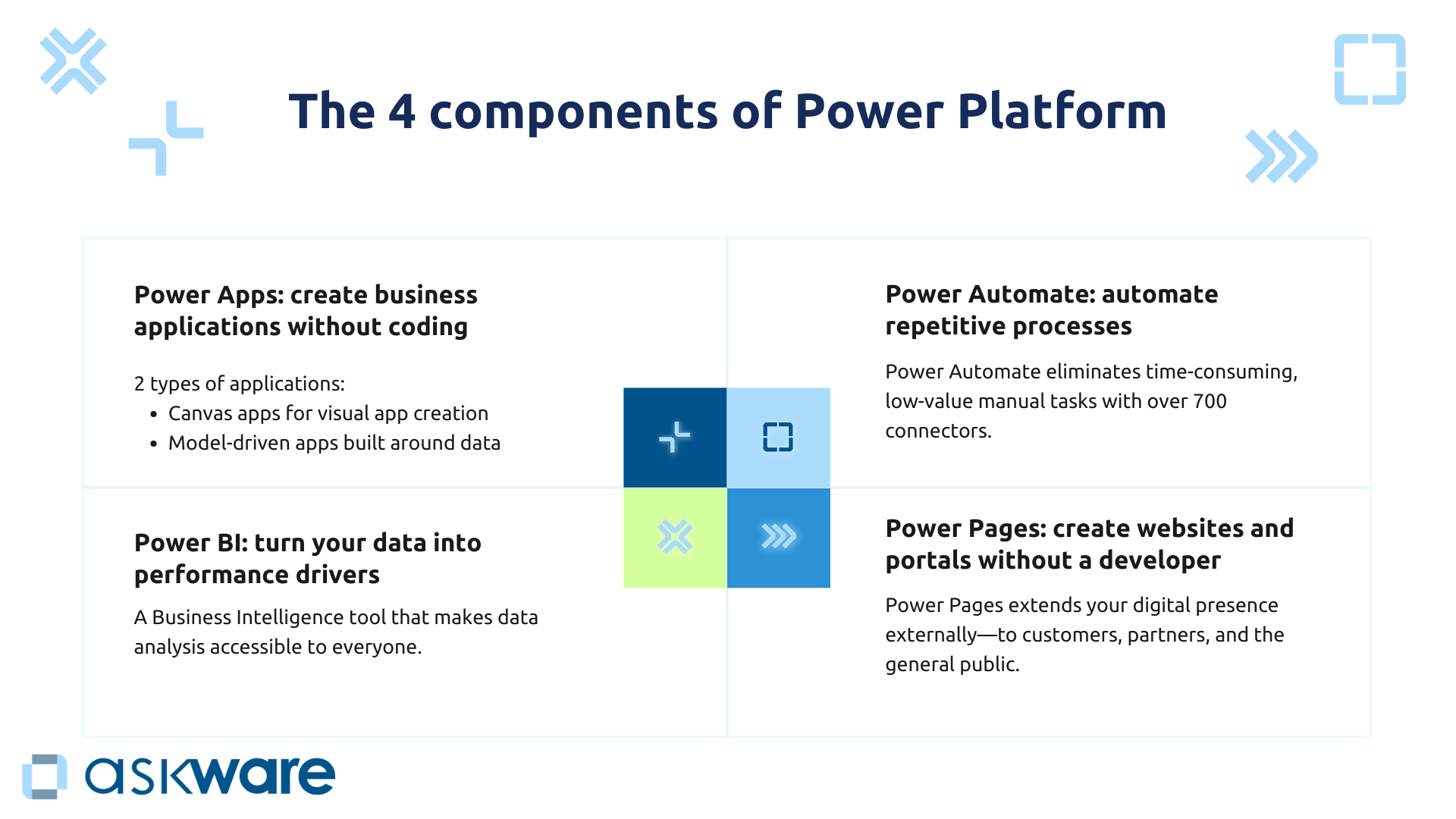
Power Apps: Building Business Applications Without Coding
Power Apps turns business users into application creators. You replace your Excel spreadsheets that have become unmanageable, your paper forms and you create applications specific to your processes in a few days and with a minimal budget.
The platform offers two types of applications:
- Canvas apps for free and visual creation (ideal for mobile interfaces or specific workflows),
- Model-driven apps built around your structured data in Dataverse (perfect for complex management applications).
Finance teams can thus develop an expense management app that eliminates paper. Customer service teams can develop an application for tracking intervention requests that replaces emails. The use cases for creating applications without code are endless.
According to a Forrester study, Power Apps Premium delivers a ROI of 206% over three years, with a recovery period of less than 6 months.
Power Automate: automating repetitive processes
Power Automate eliminates time-consuming manual tasks with low added value that drain the energy of your teams: copy and paste between systems, repetitive email sending, validation workflows, data synchronization.
With more than 700 connectors to Microsoft and third-party applications (Salesforce, Google Workspace, ERP systems, etc.), Power Automate orchestrates your business processes from end to end.
Automate the sending of a welcome email with a checklist when a new employee is created in your HRIS, create an invoice approval workflow that automatically notifies the right people. Power Automate adapts to your business process automation needs.
The gain? Up to 250 hours saved per year per employee on high-impact use cases, according to Forrester data. Multiply this figure by the number of automatable processes and you understand why so many companies consider the automation of business processes to be a priority lever in their low-code digital transformation.
Power BI: transforming your data into performance drivers
Power BI is Microsoft's Business Intelligence tool that makes data analysis accessible to everyone. No need to wait for a data analyst to create an Excel report for you that will be obsolete the next day. Connect to your various data sources (ERP, CRM, CRM, Excel files, Excel files, SQL databases...), create your interactive dashboards and share them in a few clicks.
Businesses can explore their data, create their own reports and share their analyses independently. Thus, a sales manager can monitor his pipeline in real time, a CFO can consolidate his financial indicators from several subsidiaries or a production manager can monitor his industrial KPIs.
Power BI is a real ally in your digital agility, it centralizes your data that is no longer scattered across dozens of systems. Poor data quality leads to an average 20% drop in productivity and a 30% increase in operational costs for organizations, according to McKinsey Global Institute.
Power Pages: create websites and portals without a developer
Power Pages extends your digital presence externally : customers, partners, general public. You can create a portal where your customers consult their orders, invoices, and find answers to the most frequently asked questions. You can imagine a partner space to share documentation or an event site with a registration system.
These sites are directly connected to Dataverse, which means that data entered into your portal can automatically feed into your internal applications or CRM. Is a customer opening a support ticket through your Power Pages portal? It appears instantly in Dynamics 365 Customer Service for your teams to process. Is a lead registering for an event? It appears in the Marketing module.
Your teams can create professional and functional sites quickly, without mobilizing a team of web developers.
Why is Power Platform so appealing to businesses?
Gain agility and speed of execution
In today's economy, Agility is no longer a buzzword but a matter of survival. Your competitors who deploy low-code business solutions in weeks while you wait for months are building up a devastating competitive advantage.
Power Platform divides your time-to-market. For example, the HR team needs an application to manage annual interviews. With Power Apps, she created it in 2 weeks, tested it with a pilot group, improved it based on feedback and deployed it in 1 month. With traditional development, this would have taken 6 to 12 months and the need will probably have changed in the meantime.
This speed encourages a culture of experimentation : test an idea without heavy investment, iterate quickly, pivot if necessary. Your teams are no longer held back by IT deadlines and can respond to market changes in real time. Building a clear digital roadmap becomes realistic when you can prototype and validate your hypotheses in a few weeks. The creation of apps has an impact on execution because on average, Power App allows employees to gain up to 250 hours/year, or 12% more productivity according to Forrester.
Empowering businesses without losing IT governance
The specter of shadow IT, these unofficial tools that businesses deploy in secret from IT, haunts all CIOs. Power Platform solves this equation by allowing a guided innovation : professions create, but within a defined framework.
How? Thanks to the concept of Center of Excellence (CoE) : a mixed IT-business team that defines best practices, creates reusable templates, trains champions in each department and regularly audits what is created. IT keeps visibility on all the solutions deployed, can take back control if necessary, and guarantees security and compliance.
According to Gartner, by 2026, 80% of users of low-code platforms will work outside of IT departments, but with Power Platform, that doesn't mean losing control.
Authentication goes through Azure Active Directory, accesses are finely managed, RGPD compliance is native. As a result, IT is freeing itself from small business demands to focus on strategic projects.
Reduce development and IT costs
IT budgets are tight and every euro must be justified. Power Platform drastically reduces development costs : according to a Forrester study, Power Apps reduces application development time by 50%. In concrete terms, you can double your production capacity without hiring.
The ROI is 206% over three years for Power Apps Premium, with a recovery period of less than 6 months. There are multiple sources of savings:
- Reduction of the IT load with fewer “small” requests,
- A predictable licensing model with one subscription per user (rather than unpredictable project budgets),
- Reuse of components and templates.
Thus, an ETI can replace 10 business tools “tinkered” in Excel with professional Power Apps at a much lower cost than traditional development, for a result that is at least as robust, secure and scalable.
Integrate naturally with the Microsoft ecosystem
If you're already using Microsoft 365, Teams, or Dynamics 365, Power Platform integrates without friction.
A Power Apps application retrieves data from SharePoint, sends notifications to Teams, sends notifications to Teams, triggers automation that updates Dynamics 365 Sales, and displays KPIs in a Power BI dashboard. All without API development, without the maintenance of complex integrations.
This synergy extends to Azure: your Power Platform solutions are hosted on Microsoft cloud infrastructure, benefit from Azure Active Directory security, and can connect to advanced services (IoT, AI, databases). You can thus benefit from Copilot, Microsoft's AI to go even further.
.png)
How do I get started with Power Platform?
Define a strategy and set up a Center of Excellence
Don't let anything “wild” happen : without governance, you risk creating a new technological silo. The key to success? Structure your approach from the start.
One Power Platform Center of Excellence brings together IT and business champions to:
- Define governance rules and best practices
- Create reusable templates and components (avoid reinventing the wheel)
- Train the “makers” in each department
- Maintain a catalog of existing solutions
- Regularly audit what is created
This structure ensures that innovation remains in line with your overall digital strategy while maintaining the autonomy of the teams.
Identify quick wins to demonstrate value
Start with quick wins : simple automations or small applications that replace tedious Excel processes. Why? Because these simple, high-value use cases create buy-in and envy across the organization.
Identify these quick wins and measure the gains in the form of time saved, errors avoided or even user satisfaction.
For example, automating the sending of invoice reminders can save 2 hours per day for the team in charge of reminders.
Then communicate internally about the gains and value the successes to arouse the envy of other departments. Go through iterations to create a snowball effect.
Get support from an expert partner
Power Platform is accessible, but expert support maximizes your chances of success and the added value produced.
A partner like Askware combines Power Platform technical expertise and a deep understanding of business challenges to:
- Framing your Power Platform strategy and defining your CoE
- Identify high-impact use cases in your specific context
- Create pilot solutions that will serve as a reference
- Train your internal makers so that they become autonomous
- Supporting you over the long term, not just on a one-off project
Our approach is based on a proven methodology that avoids the classic pitfalls: poorly defined perimeter, absent governance, lack of training, isolated solutions. A business-oriented IS audit also makes it possible to identify precisely where Power Platform will bring the most value in your organization.
.png)
Power Platform isn't just a suite of Microsoft tools. It is an approach that democratizes the creation of digital value. by allowing businesses to become actors in their own transformation. By reducing the systematic dependence on IT for every application need, you gain speed of execution, reduce costs and unleash innovation at all levels of the organization.
Success is not just about technology: it is based on a clear strategy, structured governance, inspiring quick wins and expert support. Askware is with you every step of the way : from the definition of your Power Platform strategy to the training of your makers, including the creation of pilot solutions and continuous support.