Power Pages: the web brick of Power Platform
What is Power Pages and what is it for?
Power Pages is the tool for creating customer portals and B2B portals on the Microsoft Power Platform. Its role: to allow users outside your organization to access your data stored in Dataverse, through a secure and controlled web portal.
Concretely, Power Pages allows you, for example, to create:
- Of customer portals for order consultation, after-sales service follow-up, the knowledge base,
- Of partner portals for lead management, commission monitoring, marketing resources,
- Of supplier portals for purchases and invoices,
- Of external HR portals for the follow-up of applications and the onboarding of new employees,
- Of knowledge bases with dynamic FAQs.
The strength of Power Pages? The native connection to Dataverse. All of the data shown comes directly from your Dataverse tables, which contain information from Dynamics 365 Sales, Customer Service, Business Central, or Field Service. No manual sync: information is always up to date.
Power Pages allows you to create web portals Low-code with pre-built Power Pages templates and a visual interface. You assemble your portal without writing code but you still have the option of adding HTML or CSS code for your specific needs.
Power Pages is not a CMS to create your marketing site like WordPress, nor a static website. Think of Power Pages as a “secure external counter” that opens your internal data to the outside world with total control.
Power Pages vs Power Apps: What's the difference?
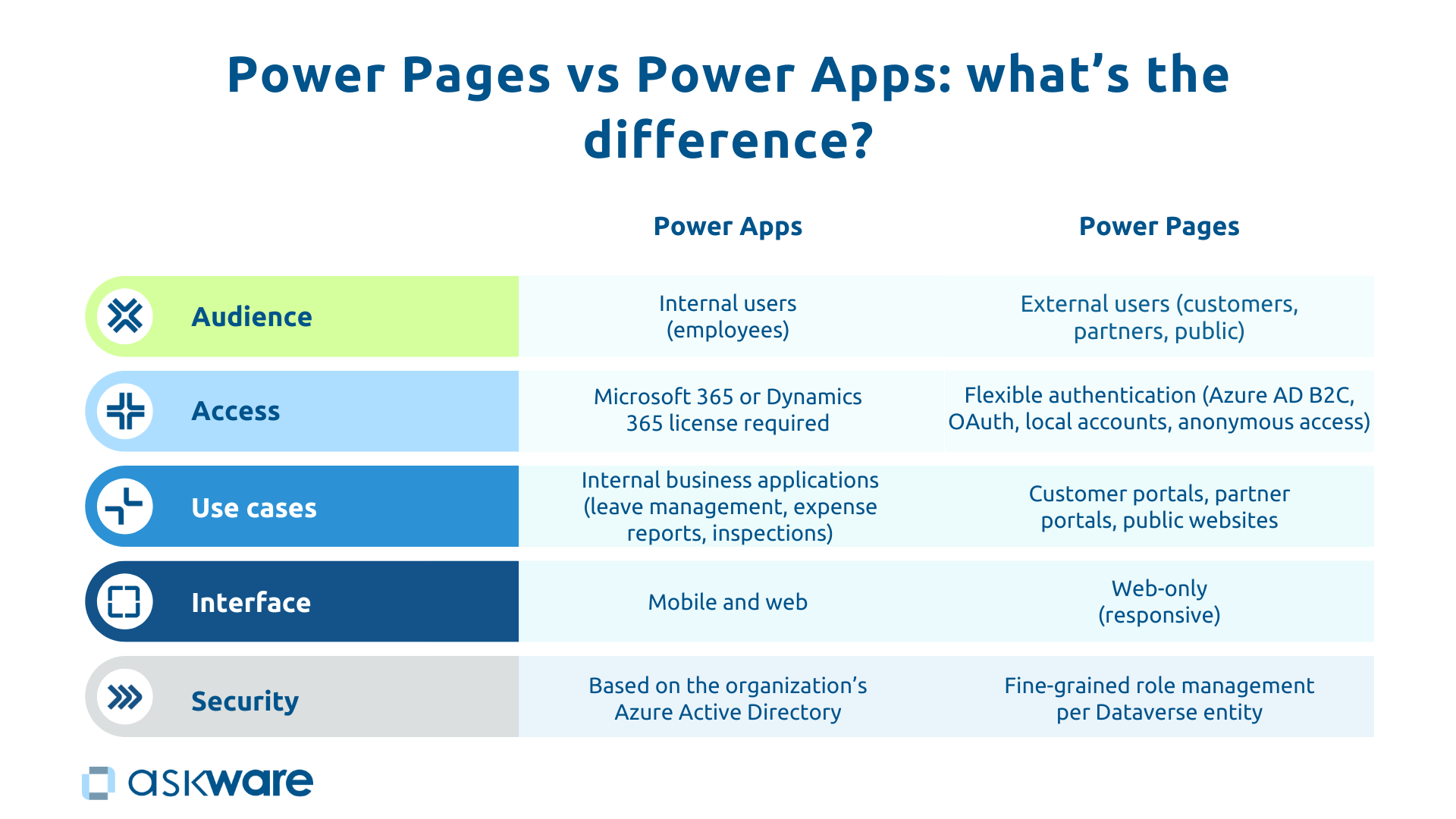
Power Pages vs Power Apps, confusion is common. The fundamental difference is the target audience. Power Apps is for internal users of your organization (your collaborators), while Power Pages is for external users (customers, partners, suppliers, general public).
This difference in audience leads to technical specificities for Access to the news. Power Apps requires a Microsoft 365 or Dynamics 365 license for each user, which is suitable for employees integrated into your company. Power Pages offers a varied authentication : local accounts, Azure AD B2C, OAuth (Google, LinkedIn) or even anonymous access for public parties.
Use cases logically diverge: Power Apps creates internal business applications (leave management, expense reports, field inspections), where Power Pages generates web portals (customer areas, partner portals, application sites). The interface also differs: Power Apps works on mobile and web, while Power Pages remains Web only, although responsive.
The simple rule:
- If it's an internal need: Power Apps
- If it's an external need: Power Pages
These tools are complementary. You can have an internal Power App for your sales representatives to manage opportunities and a Power Pages portal for your partners to submit leads. Both access the same data in Dataverse, each with their appropriate permissions.
The architecture of Power Pages: sites, pages, components
A Power Pages portal is structured in three levels:
- The site is your complete portal with its personalized URL, its visual theme (colors, logo, fonts) and its navigation through the menu.
- The pages represent the screens: home, customer area, order list, contact form, FAQ. Power Pages offers pre-built page templates that you can customize.
- The components are the reusable bricks (header, footer, forms, data lists, charts) that you assemble visually.
The connection to Dataverse is central: each page displays data directly from the Dataverse tables. A “My Orders” page shows filtered records for the logged in user.
The Studio Power Pages offers a visual creation interface where you build your portal by drag and drop.
.png)
Types of Power Pages portals: concrete examples by use case
Customer Portal (Customer Self-Service): empowering your customers
The Customer self-service portal transform your customers into autonomous users who can manage their interactions without asking for your support. It integrates a custom space with secure login, the consultation of orders and invoices with download, the After-sales follow-up (ticket submission and follow-up), a knowledgebase (FAQ, articles, tutorials) and the account management.
This data comes from Dynamics 365 Customer Service or Sales via Dataverse. When an agent updates a ticket, the customer sees the change immediately. The benefits are measurable: a 40% reduction in the average ticket processing time according to a Forrester study.
Likewise, an Accenture study showed that 89% of consumers are likely to be more loyal to a business after a positive and personalized customer experience. Power Pages allows you to meet this demand.
Partner Portal: collaborate with your ecosystem
The Microsoft partner portal professionalizes your distribution network. It offers the lead management via structured forms, the tracking opportunities, a commission dashboard in real time, marketing resources downloadable, training modules with certification and a space communication (news, events).
Submitted leads are automatically created in Dynamics 365 Sales with all the information, eliminating manual entry.
The partner portal makes it possible to strengthen partner engagement, automate the lead submission process, and be transparent about commissions for a win-win relationship.
Supplier Portal: streamline purchasing
The supplier portal digitizes your supply chain with the consultation of orders (delivery dates, status and history), the submission of quote, the response to tenders online, the invoice management (electronic dispatch, payment tracking), the update of the product catalog, prices and availability and access to contracts.
Synchronized with Dynamics 365 Supply Chain Management or Business Central, it guarantees complete traceability. For example, an industrial company can create a portal where suppliers can view orders, submit invoices, and receive alerts on new tenders to increase efficiency in their purchasing process.
External HR Portal (Careers Portal): attracting and engaging talent
The modern career portal offers job offers with advanced filters by location and function. It also allows the online application with CV upload, a candidate space to follow the status of his application, the Onboarding of service providers for temporary workers or freelancers (with documents to sign and practical information), and training modules for service providers.
Applications created in Dataverse feed into your HR system. The career portal makes it possible to modernize the experience offered to your candidates and facilitates your recruitment.
Dynamic knowledge base and FAQ
A dedicated self-service portal includes help articles structured and classified by category, a search bar to quickly find the desired item, the evaluation of articles by users to receive feedback on the usefulness of the information.
The connection to Dynamics 365 Customer Service allows publishing directly from the CRM. This way, customers are more autonomous and can find information on their main questions directly in the articles published by your support team.
.png)
How does Power Pages connect to your data and applications?
Native connection to Dataverse and Dynamics 365
Dataverse is the core of the system. Because Dynamics 365 stores its data in Dataverse, Power Pages accesses it naturally. So when a customer submits a ticket through the portal, it's automatically created in Dynamics 365 Customer Service. An agent processes it and updates the status, the customer sees the change in real time.
You choose which Dataverse tables to expose (Contacts, Orders, Tickets) while keeping other tables private. This unified architecture eliminates data silos.
Security and permissions management
Power Pages offers a granular control. Authentication supports:
- Local accounts : email and password,
- Azure AD B2C : external Microsoft accounts,
- OAuth : authentication via Google or LinkedIn,
- Anonymous access for public areas.
Permissions allow you to control who can see, create, or modify data and what data is affected by the various permissions. They are governed by web roles (Customer, Partner, Administrator). For example, a customer will only see their orders.
This governance reassures CIOs: Power Pages respects Dataverse security rules by default.
Extend with Power Automate and 3rd party integrations
When a form is submitted, you automatically trigger a Power Automate flow that sends notifications (email, Teams), creates tasks in Planner, generates documents in SharePoint, or updates third-party systems.
Power Pages can call webhooks and connect to over 1000 services through Power Automate.
So, if a candidate applies, they will trigger a flow notifying the recruiter and creating the case in SharePoint.
The benefits of Power Pages for organizations
Fast development and controlled costs
Developing a traditional portal requires months of development and mobilizes complete teams (front-end developers, back-end developers, designers, security experts) with budgets of several tens of thousands of euros. Once released, the portal will require maintenance by the IT team.
Power Pages is changing the game with ready-to-use templates, development in weeks, no need for web developers (businesses can create with IT support), simplified maintenance (Microsoft manages infrastructure and security), and a quick ROI (4 to 8 weeks). The savings are substantial: reduction of 50 to 70% in costs compared to a custom approach.
Data that is always in sync and consistent
Traditional portals create silos: the portal has its own base disconnected from CRM and ERP, generating inconsistencies and manual synchronizations.
Power Pages eliminates this problem with a single source of truth in Dataverse, an automatic synchronization that allows you to immediately see all the updates made in Dynamics 365 and the end of the discrepancies between what customers and agents see.
Scalability and IT governance
Power Pages grows with your organization. Azure hosting ensures the scalability of your tools by supporting thousands of users simultaneously if necessary. Power Pages evolves gradually so you can get started simply before adding to your tools. You can thus start by allowing the consultation of orders and then add after-sales follow-up, the knowledge base and then allow online payments.
IT governance is under control. IT maintains control over security, performance, and compliance. This balanced approach combines business agility and IT control.
How do I get started with Power Pages?
Identify the use case and the data to be exposed
A good frame represents 50% of success. First, you need to define your objective:
- What type of portal do you want to create (customer, partner, supplier, HR)?
- For how many users?
- What are their expectations?
- What data should I disclose (orders, tickets, invoices)?
- What actions should be authorized (consultation, ticket creation, upload)?
- What permissions should I set?
Advice: Start simple. A portal with 3-4 essential functionalities well done is better than a complex portal that is poorly executed and ultimately not used.
Use a template or create from scratch
Power Pages offers pre-built templates like:
- Customer self-service (customer area with tickets and knowledge base),
- Partner portal (lead and resource management),
- Employee self-service (HR portal),
- Blank (blank for personalized creations).
The recommended approach: Templates have the advantage of having a structure and functionalities already in place. All you have to do is customize it to match your brand colors and adapt it to your needs. It's a significant time-saver, especially when you're getting started with Power Pages.
Get support for complex portals
Simple portals can be created internally with training, the Power Pages tutorial page and the use of Copilot.
For complex portals that require multiple Power Pages integrations, advanced customizations, or large volumes, expert support maximizes value.
Askware supports you On:
- Framing (identification of your needs, data mapping),
- Architecture (design of the structure and flows),
- The creation (development of the portal),
- Integration (connection to Dynamics 365, Azure, third-party applications),
- Training (transferring skills),
- Governance (establishing security rules and evolution).
Our dual expertise in consulting and Microsoft integration allows us to create portals that meet business needs and respect IT standards.
Power Pages securely opens your data to the outside world. While Power Apps empowers your employees and Power Automate streamlines your processes, Power Pages is transforming your relationships with customers, partners, and suppliers. Whether you are looking to reduce the support load, professionalize your network or digitize your supplier relationships, Power Pages allows it quickly, without complex development, with a native connection to Dynamics 365.
Success requires a precise framework, the right template, and attention to safety from the start. Microsoft provides the tools, Askware helps you from identifying the need to putting into production.
Ready to open your data to the outside world with Power Pages? Explore your use cases with our experts.