Why is Azure governance critical?
Chaos without governance: an all too frequent scenario
The scenario is repeated in many organizations. Initially, a few developers create Azure resources to test. Three months later, more than 50 resources have been deployed, several subscriptions purchased without a strategy, and no one knows who created what. The bill goes from €500 to €5,000 monthly without visibility on the distribution. Production environments sit side by side with development, VMs run 24/7 while serving 2 hours a week.
Six months later: the ISO audit requires compliance but it is impossible to prove, management wants to charge back to business services but it is impossible to trace, an incident reveals an insecure VM created by an intern who left four months ago.
The result: organizational chaos, uncontrolled costs, security risks. This scenario may seem like an exaggeration, but it happens frequently. Azure quickly becomes unmanageable without governance.
The benefits of well-thought-out governance
Effective governance brings full visibility : you know who created each resource, when, and why. You have an overview of all environments and traceability is complete.
Cost optimization becomes a reality with a quick identification of expensive resources or zombie resources and the possibility of rebilling to business services. It is also possible to control expenses by budgets with automatic alerts.
Security is strengthened : security policies are applied automatically, access control (RBAC) is structured and compliance is ensured.
Finally, the agility is preserved because within this secure framework, teams can innovate. The framework provides safeguards without adding crippling bureaucracy.
The 4 pillars of Azure governance
Governance is based on four interrelated dimensions:
- The organization : structuring subscriptions and resource groups with a clear organizational hierarchy.
- Access control : permission management (RBAC) according to the principle of least privilege.
- Policies and compliance : with automated rules via Azure Policy ensuring regulatory compliance.
- Cost optimization : continuous monitoring of budgets, alerts and recommendations via a FinOps approach on Azure.
The Azure organizational hierarchy: structure well from the start
Understanding hierarchy: Management Groups, Subscriptions, Resource Groups
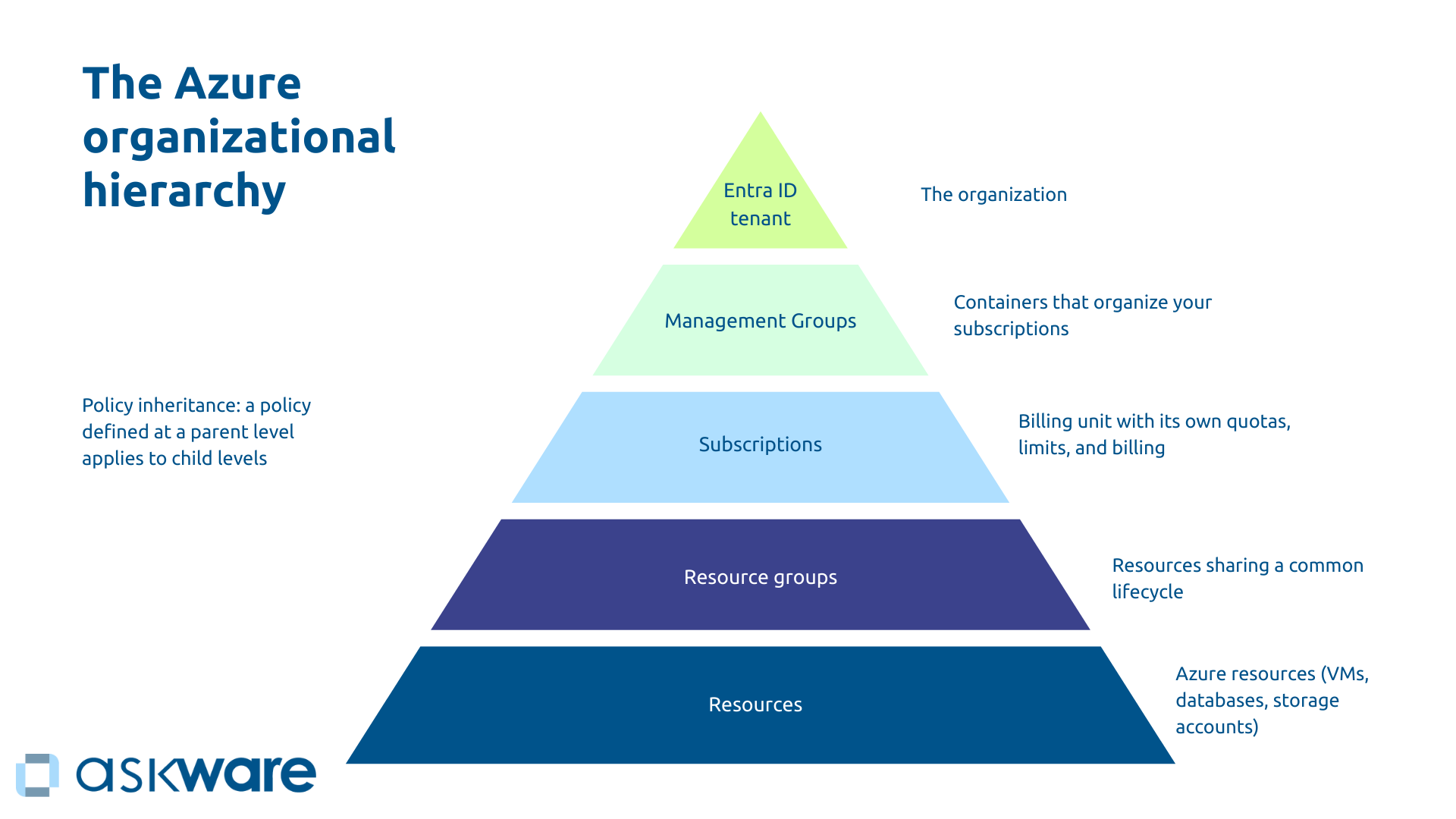
The Azure structure operates in a five-tier pyramid that determines the application of policies and accesses.
At the top, the Tenant Entra AD (Azure ID) represents your organization. Just below, the Azure Management Groups are containers that organize your subscriptions and allow policies to be applied to several subscriptions simultaneously (with a hierarchy of up to 6 levels).
Subscriptions constitute the billing unit. Each subscription thus has its own quotas and limits and its own billing.
Resource groups bring together resources that share a common life cycle. For example, you may have a “Powerbi-reporting” resource group. Finally, the resources form the final level. They group together the Azure resources themselves such as VMs, databases, storage accounts.
The principle of The legacy of policies applies here. A policy set at a parent level will automatically apply to all child levels.
Strategies for structuring subscriptions
To structure your subscriptions, several organization options are possible:
- By environment (one production subscription, one for pre-production and one for development and testing): This is the classic and secure approach because it allows for strong isolation, separate billing and differentiated policies.
- By department (Marketing/Finance/IT): Useful for large organizations with internal billing because departments are autonomous and internal billing is facilitated.
- By project (Dynamics 365 / Power BI /Website): This approach is ideal for project-oriented businesses. With this structure, traceability is perfect.
For complex organizations, it is possible to have an approach hybrid by combining approaches to have more flexibility. For example, you can plan one subscription per department for the “Production” Management Group and subscriptions per environment for the “Non-Production” Management Group.
There is no universal structure, the structure must reflect the organization and facilitate governance by respecting the principles of isolation and traceability. Start with the simplest possible structure (for example by environment) and make it more complex if necessary.
Organizing resource groups: best practices
The principle of organizing resource groups is to group by common life cycle. For example, for a web application, you can make a group with the App Service, SQL database, and storage. If you delete the application, you delete the entire group.
Resource groups should reflect applications or projects, not resource types. It's best to avoid creating groups with resources from different projects, just as it's best to avoid groups by resource type (with all VMs for example).
Adopt a Azure naming convention to easily find groups (for example: RG-Dynamics365-Prod-France), tag systematically and create a group by region for the same application.
Azure Cost Optimization: Best Practices
Beyond tools, optimization requires specific actions:
- Precisely dimensioned : By analyzing actual usage, you can adjust. For example, an 8-core VM using 15% of its capacity can be reduced to 2 cores, allowing savings of up to 70%.
- Bookings : paying as you go for stable production resources can be expensive. You can opt to book for a limited period of time, 1 to 3 years for example, significantly reduces costs.
- Azure Hybrid Benefit : reuse your Windows Server and SQL Server licenses On-premise on Azure (around 40% savings).
- Automated shutdown unused resources: the dev/test environments don't need to run 24/7. With Azure automation and tags, you can automate downtime in the evenings and weekends (and save 70% on these environments).
- Removing zombie resources : The resources created for testing are often forgotten but continue to cost the business. Regular auditing and creating “ExpirationDate” tags help avoid waste by removing these unnecessary resources.
- Choice of third parties : don't take Premium if Standard is enough.
A Gartner study estimates that 30% of cloud spending is wasted without proper governance. Optimizing costs on Azure is part of a routine, continuously and not once to truly avoid waste.
Azure governance tools
Azure Policy: Automating Compliance
Azure Policy allows compliance rules to be automatically created and applied. The policies continuously assess your resources in three ways:
- Audit : reports non-compliant resources without blocking,
- Deny : prevents the creation of non-compliant resources,
- Append/Modify : automatically adds or changes properties.
For example, you can “Allow France only” (for sovereignty reasons), “Require a managed disk for all VMs”, or “Require a 'CostCenter' tag”.
Microsoft provides over 300 predefined policies and you can create your own policies (in JSON). Policies can be grouped into Initiatives (for example with an “ISO 27001" initiative comprising 50 rules). So thanks to Azure Policy, compliance is automatic, it does not require manual verification.
Azure Blueprints: Deploy compliant environments
Azure Blueprints allows you to package and deploy entire environments that already comply with your standards. A blueprint combines policies, RBAC roles, and resource templates into a reusable package.
Thus, you can deploy a new production subscription that is already in compliance with the standards. The Blueprint automatically configures corporate security policies, creates standard resource groups, assigns appropriate RBAC permissions, and deploys the basic infrastructure (virtual network, Monitoring).
The major advantage: standardization and speed. Each new environment starts up compliant, avoiding manual configurations and oversights. Teams save days of configuration while ensuring the application of governance rules.
Azure Blueprints is gradually evolving towards “Template Specs” and “Deployment Stacks”, but the concept of infrastructure as code coupled with governance remains fundamental.
Azure Cost Management: track and analyze expenses
Azure Cost Management is a tool integrated into Azure dedicated to cost management thanks to several functionalities:
- cost analysis : current and historical expenses filtered by subscription, group, service, tag, region),
- forecast based on history,
- budget alerts with notifications at 80%, 90%, 100%,
- recommendations optimization pointing to underused VMs or booking opportunities for example,
- exportation for external analyses.
The tool can thus give visibility to management on cost monitoring, identify the most expensive resources or even allow internal services to be re-invoiced using tags.
RBAC (Role-Based Access Control): finely manage access
The Azure RBAC system assigns roles to users/groups for defined perimeters (on subscriptions, resource groups, or resources).
Each user can be Owner (total control), Contributor (everything except access management), Reader (read-only) or another role to choose from a list of 70 specific roles (for example “Virtual machine contributor”).
Assignments work by inheritance. Thus, the assignments of the Management Groups inherit the child subscriptions which themselves inherit the resource groups etc.
To manage assignments, a good practice is to apply the principle of least privilege and to use groups Entra ID rather than individual users and of course audit regularly.
Tags: the key to traceability and chargeback
Tags on Azure are metadatas attached to resources. They ensure traceability to know what each resource is used for, make it possible to link to a cost center and ensure re-invoicing. They can also be used to trigger automations by identifying the resources subject to automation. Finally, they can be used for reporting to analyze resource costs by project or by environment.
Among the most common tags, we find tags by:
- Environment (Production/Dev/Test),
- CostCenter (Marketing/IT/Finance),
- Owner (email responsible),
- Project,
- ApplicationName,
- DataClassification.
To use tags, you need to define mandatory tags, enforce them via Policy, and automate tagging.
.png)
Setting up governance: where do you start?
Step 1: Audit the existing
For an existing environment, the audit will make it possible to inventory all resources, identify zombie and/or oversized resources, analyze costs, identify compliance problems and shortcomings (tags, naming, policies).
The audit can be carried out using Azure Advisor (automatic recommendations), Azure Cost Management (cost analysis), Microsoft Defender for Cloud (security).
Step 2: Define the governance strategy
To define governance, there are several strategic questions to ask:
- How do you structure subscriptions?
- What tags are mandatory?
- What naming convention?
- What security/compliance policies with Azure?
- How do you manage costs?
- Who accesses what?
Involve all stakeholders (Finance, IT, Security, Compliance, Business) to align the governance strategy with business constraints and needs. Finally, document Microsoft Azure cloud data governance to formalize it.
Step 3: Implement gradually
Governance is being built gradually. Start by identifying Quick Wins such as mandatory tags, naming conventions, budgets/alerts, critical security policies (Audit mode).
Then move on to the structuring with the reorganization of subscriptions/RG if necessary, the establishment of Management Groups, the activation of policies in Deny mode.
Proceed to optimizations with the creation of automations (stopping VMs, deleting expired resources), and the implementation of Blueprints to standardize deployments.
Finally, adopt a posture of continuous improvement with a quarterly review of governance, continuous optimization of Azure costs, and the adaptation of policies.
Doing everything at once brings too much complexity and leads to legitimate team resistance. It is better to proceed step by step.
Get support for effective governance
Azure governance combines technical complexity, organizational challenges and financial impacts.
Askware intervenes throughout the cycle: complete audit of the existing system, definition of the strategy (structure, policies, tags, costs), technical implementation (Management Groups, Policy, RBAC, Cost Management), training of IT teams and continuous support (quarterly reviews, optimization).
Our approach combines Azure technical expertise and an understanding of business challenges to speed up implementation and avoid classic mistakes thanks to feedback.
.png)
Azure governance transforms a potentially chaotic environment into a controlled, secure and optimized platform. Without it, organizations face uncontrolled costs, security risks, and the inability to prove compliance.
Success is based on three pillars: think about the structure from the start, automate rules through Policy, and actively manage costs. It is not a one-off project but a continuous process of improvement.
Microsoft provides the tools, but strategy and implementation require expertise that combines technical vision and business understanding. Askware helps you to audit your current governance, define your cloud strategy, set up structures and policies, train your teams, and ensure continuous management.
Ready to master your Azure environment? Contact our experts for a governance audit and structure your cloud to maximize its value.