AI Agentic: Definition, operation and use cases
Discover agentic AI: definition, operation, concrete use cases and implementation in the Microsoft ecosystem. Complete guide.

Cyber attacks are becoming more sophisticated every day. Traditional antivirus and firewalls are no longer sufficient in the face of advanced threats that bypass these traditional defenses. At the same time, the Zero Trust approach is beginning to take root: trusting nothing by default, systematically checking every access, constantly monitoring suspicious behavior.
You need a security architecture that detects anomalous behavior, correlates events across all of your systems, and automatically orchestrates the response. This is precisely what allows Microsoft Defender and Microsoft Sentinel when they work together.
This article explains their respective roles, their complementarity, and the concrete roadmap to gradually evolve your security posture towards more maturity and proactivity.

Your current security system works according to a simple model: block what is identified as malicious, let the rest pass. This model is inherently reactive and waits until a threat is already known to block it.
Unfortunately, zero-day attacks (exploiting unknown vulnerabilities) and APTs (Advanced Persistent Threats) go under the radar for weeks or even months. This latency between the intrusion and its detection has a name: Dwell Time.
Meanwhile, the attacker explores your system, elevates its privileges, exfiltrates sensitive data, and prepares his final blow. Once the ransomware is deployed or the data is exfiltrated, it is Too late to limit the damage.
Proactive monitoring turns the approach on its head. Instead of waiting for the threat to trigger an alert, you go looking for him.
This approach is based on:
Proactivity drastically reduces your dwell time and therefore the potential impact of the attack. It's the difference between containing an embers and putting out a fire.
Microsoft Defender is not a single tool but a family of integrated solutions that protect your entire modern attack surface. This unified approach is called XDR (Extended Detection and Response).
The suite consists of several complementary bricks, namely:
This layered architecture covers your entire modern attack surface : endpoints, identities, emails, cloud applications, and multi-cloud infrastructures.
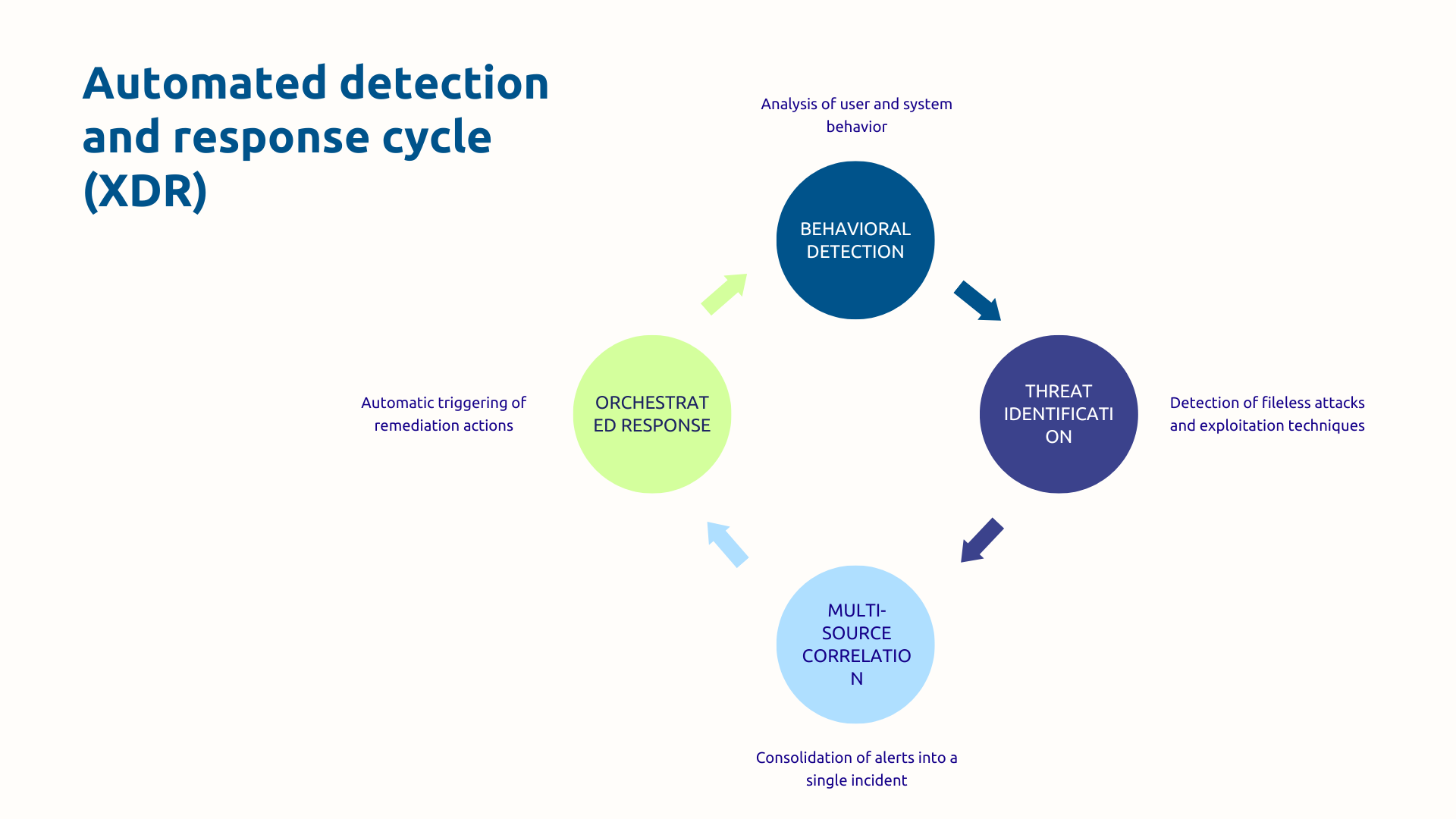
Defender's true value comes from its behavioral detection engine powered by artificial intelligence and machine learning. Instead of being limited to signatures, Defender constantly analyzes the behavior of your users, applications, and systems.
This behavioral analysis makes it possible to detect fileless attacks and native exploitation techniques (living-off-the-land) that pass under the antivirus software radar.
The strength of the XDR approach lies in the automatic multi-source correlation : Instead of three separate alerts on three different consoles (suspicious email + abnormal connection + unusual process), you get a unified incident in Microsoft 365 Defender with the full attack timeline.
Then follows a Orchestrated response which automatically triggers remediation actions: isolation of the compromised machine, blocking of the user account, removal of malicious emails, forced password change.
Despite its impressive capabilities, Defender has significant limitations for a Security Operations Center (SOC) mature:
These limitations explain why a mature SOC needs an additional layer of monitoring and orchestration. That is precisely the role of Sentinel.
Microsoft Sentinel is the Cloud-native SIEM from Microsoft (Security Information and Event Management). Unlike the usual SIEMs, Sentinel is entirely cloud based and follows a pay-as-you-go pricing model.
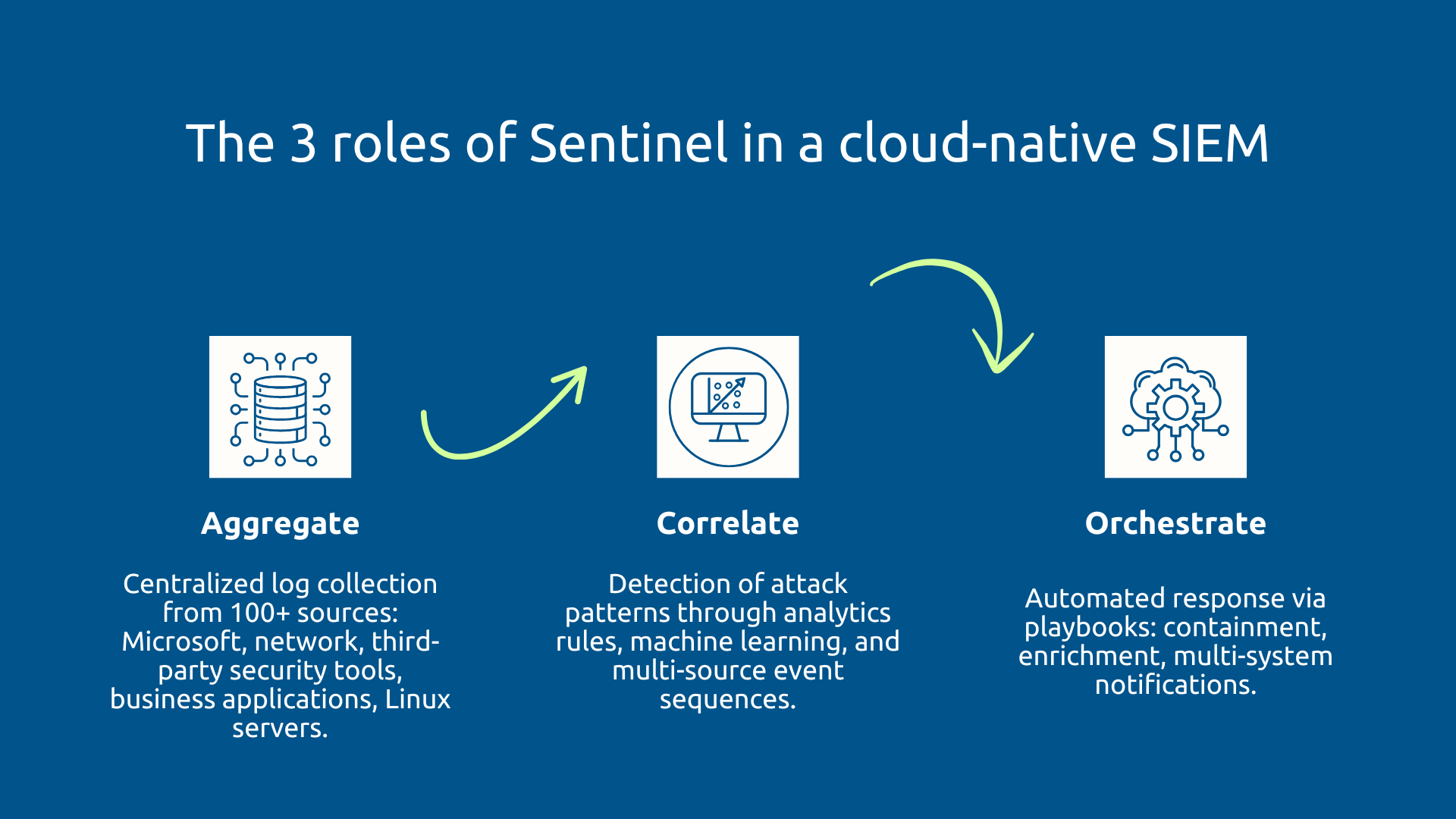
Sentinel's role in your architecture is threefold. First, Sentinel Aggregate logs from hundreds of different sources via more than 100 native connectors. This includes all Microsoft components but also your network equipment, third-party security solutions, business applications, Linux servers.
Once centralized in Azure Log Analytics, Sentinel applies sophisticated detection rules to identify attack patterns through signatures, anomalous behaviors detected by machine learning, or event sequences correlated temporally. In this way, Sentinel reads the noise and detects the signal to report only the incidents that really deserve attention.
Sentinel's way of orchestrate The answer lies in automated playbooks that interact with dozens of different systems to contain the threat, enrich the investigation, and notify the right people.
In any detection system, Analytics rules are configurable, simple or sophisticated detection rules. Microsoft provides hundreds of predefined rules based on the techniques of the MITRE ATT&CK framework, allowing you to map your detections to real adversary techniques.
UEBA (User and Entity Behavior Analytics) analyzes the normal behavior of your users and entities to build reference profiles. When an account connects at 3 am from an unusual IP and downloads files en masse, UEBA triggers an alert even if no static rules have been broken.
This detection of behavioral anomalies is therefore particularly effective against sophisticated attacks where the attacker has compromised legitimate credentials.
The particularity of Sentinel is that it automatically enrich each incident with context data: Azure AD information, Threat Intelligence (IP reputation, known attack campaigns), geolocation, incident history. This enrichment turns a simple technical alert into Investigable contextualized incident.
A mature SOC doesn't just respond to alerts. He is doing Threat Hunting (threat hunting). That is to say, your analysts formulate hypotheses about possible attack vectors and query your logs to find corresponding traces.
Sentinel makes this hunt easier with Hunting Queries predefined based on MITRE ATT&CK, allowing to search for traces of specific attack techniques. By doing so, you build complex queries in KQL (Kusto Query Language) across dozens of sources over several months.
Investigation Graph offers an intuitive visualization of relationships between entities. It consists in selecting a suspicious user so that the graph automatically displays all his connections, machines accessed, files manipulated, accounts with which he interacted.
With Sentinel, you therefore have a SOC that searches for hidden threats that your automatic systems have not yet detected.
As you can see, Defender and Sentinel are not competing but complementary by design. Moreover, native integration is bidirectional via a native connector in real time.
Defender automatically sends all incidents to Sentinel. But integration goes well beyond that: Defender incidents are enriched in Sentinel with data from external sources (Threat Intelligence, firewall logs, Azure AD user history).
This enrichment turns an isolated technical alert into contextualized incident that tells a complete story.
Synergy works the other way around: playbooks created in Sentinel can trigger actions in Defender (isolate machines, block accounts, delete emails, revoke sessions).
This SOAR orchestration (Security Orchestration, Automation and Response) makes it possible to automate complex workflows involving Defender but also dozens of other systems. All this in order to, for example:
In this architecture, Defender defends in depth, Sentinel monitors in breadth and orchestrates the response.
The Defender + Sentinel integration brings concrete and quantifiable gains:
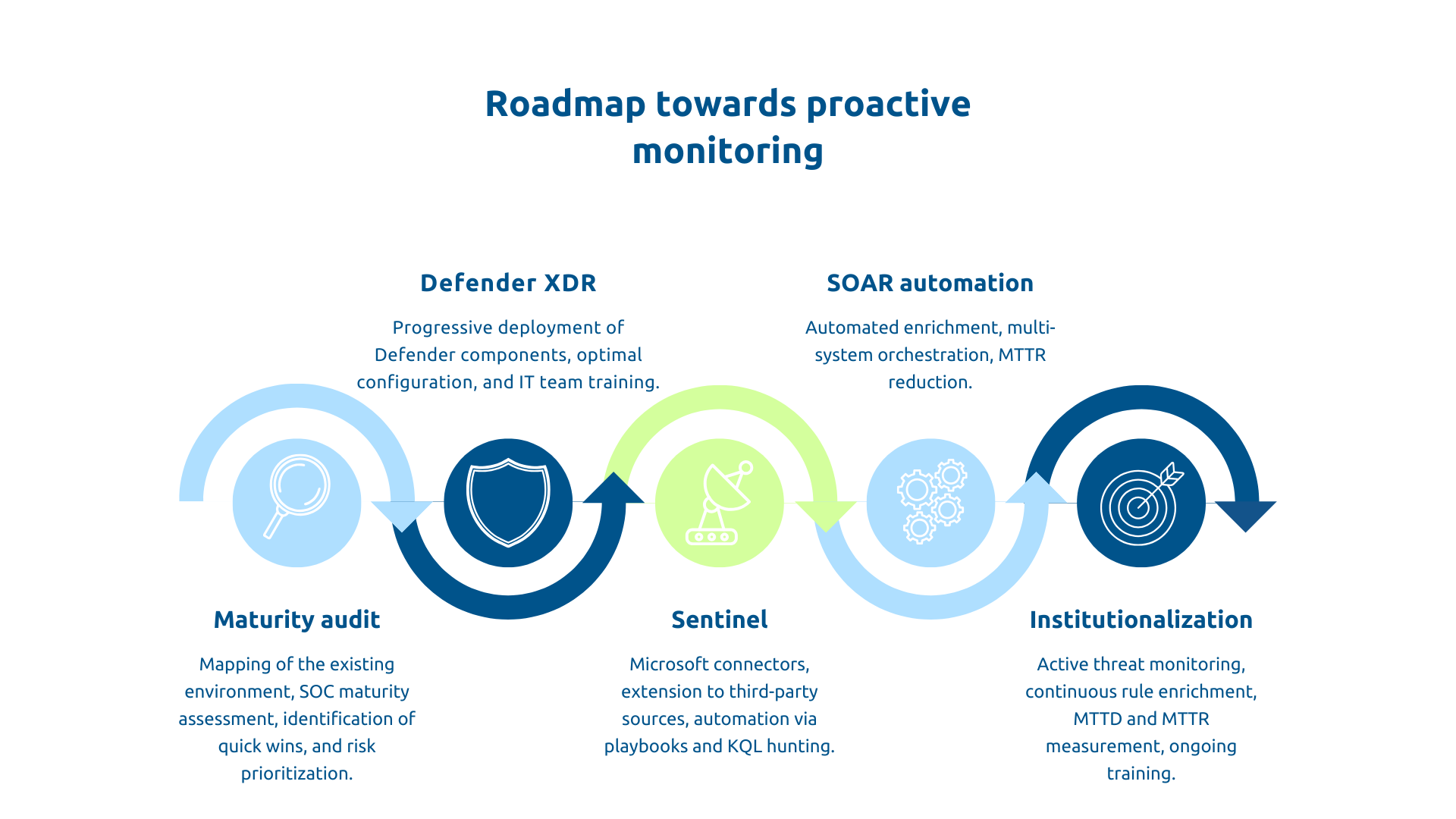
To start, you will need to make a honest mapping of the existing during an audit that will cover your deployed tools, their real coverage, obvious shortcomings, and the control of your teams.
Evaluate the maturity of your SOC according to a recognized framework that generally distinguishes between two main levels:
The audit should also highlight the Quick Wins (simple actions bringing immediate gains: MFA, Defender for Office 365, audit logging) and prioritizing risks according to their business criticality.
This phase results in a hierarchical roadmap: urgent actions (30 days), structural projects (3-6 months), substantive developments (12-24 months).
Before building a SIEM, you need to detect the quality at the source.
Start with Defender for Endpoint (protects your workstations and servers, the most frequent attack vectors), then Defender for Office 365 (phishing remains the number one vector), then Defender for Identity (protects AD in hybrid environments).
After deployment, the crucial phase is that of optimal configuration. Too many organizations deploy Defender with its default configuration without activating advanced capabilities: behavioral detection, attack surface reduction, manipulation protection, and Conditional Access integration.
This configuration requires a advanced expertise and progressive tuning (observation in audit mode, adjustment of thresholds, activation in blocking mode). Training your IT teams is essential for interpreting alerts and responding to incidents.
This phase usually takes 3 to 6 months depending on your size.
Once Defender is up and running, you add the correlation and intelligence layer with Sentinel. The implementation follows an iterative approach over about 6 months.
Phase A - Foundations : You provision Sentinel, activate Microsoft native connectors (Defender, Azure AD, Office 365), activate out-of-the-box analytics rules, create your first visualization dashboards.
Stage B - Expansion : You connect your critical third-party sources (firewalls, proxies, competing EDRs, business applications), customize analytics rules according to your needs, create your first automation playbooks for simple cases (deleting phishing emails, resetting passwords).
Phase C - Automation : You industrialize your playbooks, train your SOC team in threat hunting with KQL, set up regular cycles of proactive threat hunting.
This iterative approach has the advantage of allowing your teams to gradually increase their skills without being overwhelmed.
The peak of proactivity is when automates the response to routine incidents. To do this, identify recurring incidents that can be automated: blocking a malicious IP, resetting the password for a compromised account, isolating a machine communicating with a Command & Control server.
For each scenario, create a Playbook with Azure Logic Apps which automatically orchestrates actions: enrich the incident via VirusTotal, decide on the criticality, isolate the critical machine, create a ticket, notify those responsible.
In a similar way, the automatic enrichment, which we already talked about, boosts productivity because all the contextual information is automatically added to the incident as soon as it is created.
A number of businesses that have deployed SOAR report that they can Automate 70 to 80% of Level 1 tasks of their SOC. This automation allows you to redeploy your analysts to tasks with higher added value.
The transformation towards proactivity is a continuous improvement process so start by setting up regular threat hunting cycles (weekly or monthly) with a structured methodology:
In a second step, maintain a Active standby on new threats, continuously enrich your detection rules after each incident treated. It can also be interesting to participate in the Sentinel community (GitHub hunting queries repository and shared playbooks).
Then, measure and track SOC maturity indicators : MTTD (Mean Time To Detect), MTTR, percentage of incidents automatically processed, MITRE ATT&CK coverage, threats discovered via hunting vs automatic alerts.
Finally, invest in continuing education : Microsoft certifications (SC-200, SC-300), threat hunting training, Capture The Flag exercises keep expertise up to date.
Modern cybersecurity requires a proactive posture. Microsoft Defender and Microsoft Sentinel together form the foundation of a modern SOC: Defender provides multi-layered protection and real-time detection, Sentinel provides global visibility, intelligent correlation, and automated orchestration.
This evolution follows a structured roadmap: consolidating defense with Defender, adding surveillance with Sentinel, industrializing via SOAR, institutionalizing threat hunting. Success is based on a clear strategic vision, in-depth technical expertise, and support to train your teams. Askware masters these three dimensions.
Is your security posture really proactive? Request an audit of your security architecture to identify your blind spots and build your roadmap towards a mature SOC.
Defender alone is enough if you stay within a purely Microsoft perimeter with classical detection ambitions. But as soon as you want to correlate events from third-party systems, do advanced threat hunting over several months of logs, or automate responses involving external systems, Sentinel becomes essential to move to true proactive security intelligence.
Defender detects and blocks threats in real time across all of your endpoints, emails, and identities. Sentinel aggregates these signals plus dozens of other sources, correlates them to identify complex attack patterns that Defender alone wouldn't see, enriches each incident with context, and orchestrates the coordinated response across all of your systems. It's the difference between having sensors everywhere and having a central brain that makes sense of all these signals.
Defender is included in several Microsoft 365 licenses or available individually. Sentinel charges per use according to the volume of logs ingested. The investment is justified by the drastic reduction of investigation time, early detection that limits the impacts of incidents, and the avoidance of hidden costs such as regulatory fines or reputational damage after a successful cyberattack.
Our experts share their vision of best practices and technological trends to ensure the success of your digital transformation.