Microsoft Defender vs Sentinel: how do you move from reactive security to proactive surveillance?
Learn about the differences between Defender and Sentinel, how they complement each other, and how to build a proactive security architecture.

Your firewall is set up, your VPN is working, your antivirus is up to date. However, a phishing email succeeds, a user account is compromised and a few hours later, your entire network is locked by ransomware. It is the failure of the traditional security model.
Then intervenes the Zero Trust, a paradigm that assumes that compromise is inevitable and that systematically verifies each access, regardless of where it comes from. In what follows, we'll look in detail at why this transformation has become essential, how the Microsoft ecosystem makes it possible to implement it in an integrated manner, and the steps to gradually build your Zero Trust architecture.

The Zero Trust Is an architectural strategy, a comprehensive approach that fundamentally changes the way you protect your resources. Its fundamental principle, formalized in 2010 by John Kindervag, an analyst at Forrester Research, can be summed up in four words: “Never trust, always verify” (never trust, always check).
In other words, it is a security model that considers that no user, no device, no network is trustworthy by default. Even if they're inside your infrastructure.
The principle of verification applies to the connection but also to the entire session, based on all available signals: the identity of the user, the security status of his device, his geographical location, the time of the connection and even his usual behavior.
To fully understand the difference with the traditional approach, imagine airport security. The classic model is similar to check-in: once you have passed the entrance check, you can move freely. Zero Trust, on the other hand, works as if each boarding gate required a new check.
These are the 5 pillars that make us move from static security to a dynamic approach:

The traditional model is based on the “Castle and Moat” : you build thick walls and moats around your network and you consider everything inside safe while the outside is hostile. For decades, this approach worked but due to the technological context, this is no longer the case.
Indeed, your data is no longer in your datacenter, it is now in Azure, in Microsoft 365, in SaaS applications. At the same time, your users no longer work from the office. They connect from home, from coffee shops, from abroad, often using personal devices that you don't fully control. Finally, your critical applications no longer run on your on-premise servers but are hosted by third parties in a modern collaborative environment. In short, the traditional network perimeter is no longer enough.
Today, continuing to base your strategy solely on the perimeter means exposing yourself to risks to dramatic consequences because once an attacker has broken through your perimeter defenses, they have access to your entire “trusted” network.
The typical scenario is as follows: a phishing email compromises a user account, the attacker uses that account to access the VPN, and once “inside,” it spreads laterally, identifies sensitive data, and deploys ransomware.
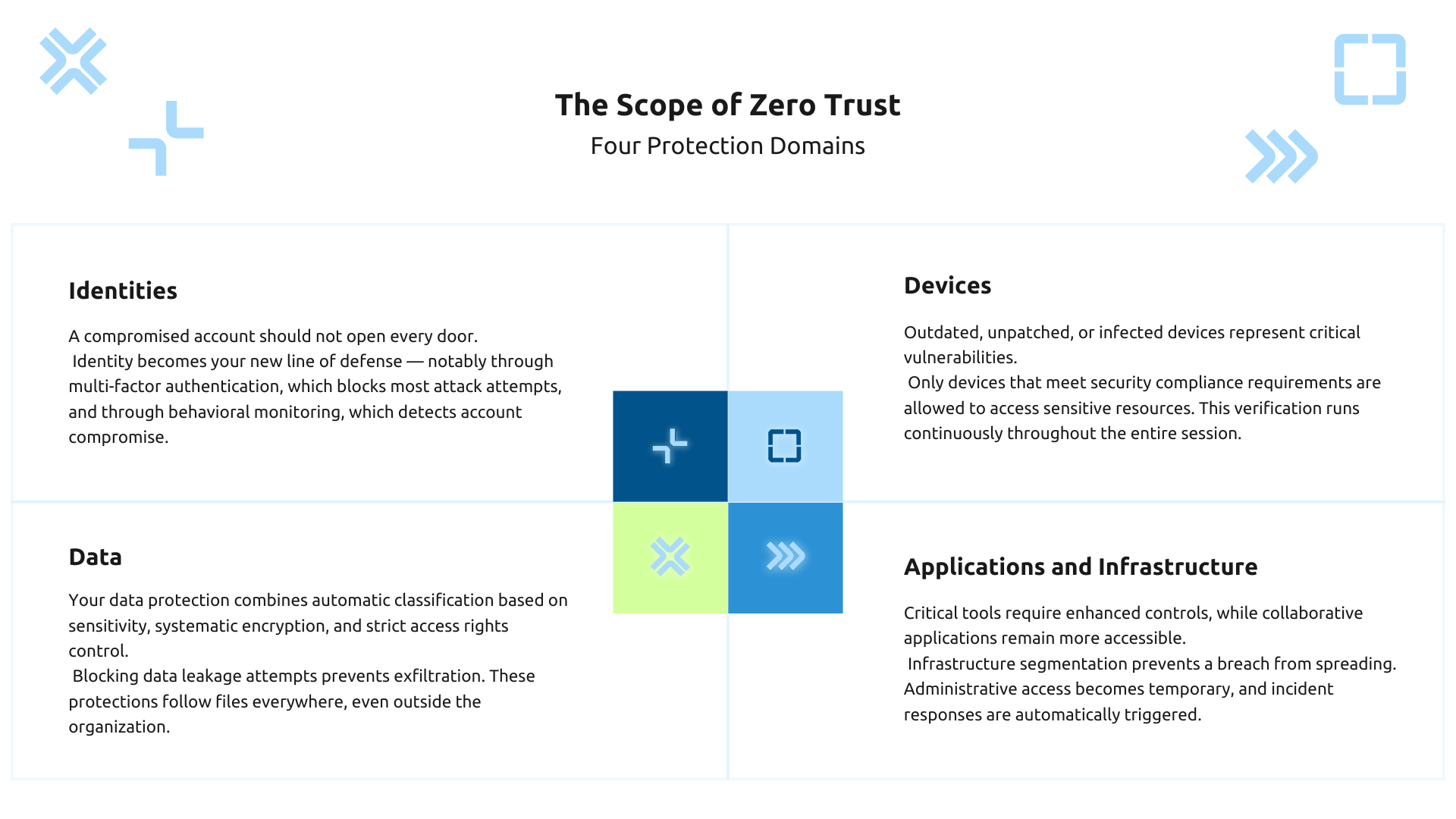
In a world where the traditional network has disappeared, identity is becoming the new perimeter. Indeed, each access starts with a user, a service, a machine. This is why attacks targeting identities via phishing or credential stuffing (automated reuse of stolen credentials) are a major vector of cyberattacks. According to Microsoft, more than 97% of identity attacks detected are password attacks.
Faced with this threat, multi-factor authentication (MFA)) becomes mandatory for all, without exception. A password alone is no longer enough and you must require a second factor: phone code, push notification, FIDO2 key. Also according to Microsoft, activating MFA makes it possible to block more than 99.9% of automated password-based account compromise attacks. Even better than MFA, authentication Passwordless, which completely eliminates the risk of stolen passwords.
Moreover, it is becoming essential to manage rigorously. the life cycle of each identity. That is, when an employee arrives, their account is funded automatically and when they leave the company, their account is deactivated immediately. This allows you to get rid of residual orphan accesses.
In addition, you should monitor the abnormal behaviors : connections from unusual locations, massive downloads, attempts to access resources that have never been accessed. These signals often reveal an ongoing compromise and allow action to be taken before it is too late. The golden rule remains simple: a compromised account should never give you the keys to your entire infrastructure.
Identities are not enough. You should also make sure that the device used is healthy and compliant. Imagine that a user logs in with their credentials and their MFA, but from a personal computer whose OS has not been updated for 6 months, without active antivirus. Is it really a good idea to allow this device to access your sensitive data?
Since the answer is obviously no, you need to maintain a complete inventory of all the devices that connect and assess their security posture. This involves the definition of Policias de compliance accurate:
Depending on their compliance, devices may be granted limited access or completely blocked.
For enterprise-loaned devices, deploy Mobile Device Management (MDM) for complete control.
For personal devices in a BYOD context, the Mobile Application Management (MAM) isolates corporate data in a secure container, separate from personal applications. The important thing is that this check is continuous: if a device becomes non-compliant during the session, access should be revoked immediately, without waiting for the next connection.
The attackers' ultimate goal is your data. Therefore, it is on them that you must focus your strongest protections.
Start with classify your data in a systematic and, if possible, automated way between those that are public, internal, confidential or highly confidential.
Once classified, data must be protected at three levels:
Result: a confidential document shared by mistake remains encrypted and inaccessible. Where perimeter security protected the container, Zero Trust protects the data itself, wherever it goes.
On the application side, you need to control who accesses which applications and how. To do this, start with an inventory of all your applications (SaaS, cloud, on-premise) and then with the establishment of access policies adapted to their criticality. For example, a critical financial application is only accessible from compliant corporate devices, with MFA, where a video conferencing tool may be more open.
At the infrastructure level, apply the principle Assume Breach via micro-segmentation. In concrete terms, a compromised web server cannot communicate with your database. Likewise, implement Just-in-Time Access : your administrators do not have permanent rights but activate them temporarily, with justification. Once the task is complete, access is automatically revoked.
To detect compromises, continuous monitoring identifies anomalies: unusual traffic spikes, suspicious connection attempts, and unauthorized configuration changes. The systems of SOAR (Security Orchestration, Automation and Response) then automate the responses:
Microsoft Entra ID (formerly Azure Active Directory) is the brain behind your Zero Trust architecture. That's where all the smart access decisions are made.
Entra ID first provides centralized authentication via Single Sign-On for your entire ecosystem. Your users authenticate once with MFA, then access all their applications without re-entering their credentials.
The functionality Conditional Access allows you to define policies based on conditions and controls: “If these conditions are met, then apply these controls”.
For example: “If a finance user accesses sensitive data from a non-compliant device, then block access.” This approach Risk-based dynamically adapts the security level to the level of risk detected.
At the same time, Identity Protection continuously analyzes risk signals to detect compromised identities: connections from malicious IPs, impossible travel, leaked credentials. High-risk accounts are then automatically blocked or subject to reinforced checks.
For privileged accounts, Microsoft Entra Privileged Identity Management (PIM) implements Just-in-Time Access. Your administrators activate their privileges only when necessary, for a limited period of time, with documented justification. All of these elevations are audited.
Finally, Entra ID supports authentication Passwordless via Windows Hello for Business, FIDO2 security keys, or Microsoft Authenticator, eliminating the main identity attack vector.
Defender for Endpoint protects workstations and servers with advanced EDR (Endpoint Detection and Response) capabilities.
In the meantime, Defender for Identity monitors your Active Directory to detect attacks: pass-the-hash, lateral movements, privilege escalations.
On the cloud side, Defender for Cloud Apps provides visibility into your SaaS applications and detects shadow IT, in addition to Microsoft Purview's centralized DLP policies.
Defender for Cloud (formerly Azure Security Center and Azure Defender), on the other hand, protects your Azure and hybrid workloads based on cloud security certifications.
Finally, Defender for Office 365 secure your email against phishing and malware.
The real power of this suite lies in its integration. An attack detected by Defender for Endpoint automatically triggers the account to be blocked in Entra ID and sent back to Microsoft Sentinel for global correlation. This approach XDR (Extended Detection and Response) breaks silos and gives you a unified view of the threats that cross your ecosystem.
Microsoft Intune manages and protects your devices in a Zero Trust logic. It provides comprehensive MDM: policy configuration, application deployment, update management. For BYOD, MAM isolates corporate data in a secure container on the personal device. What makes Intune powerful is its integration with Conditional Access. The compliance policies he defines become access conditions in Entra ID.
For its part, Microsoft Purview, which brings together and extends historical services such as Azure Information Protection and Microsoft 365 Compliance, protects your data directly: classification and labeling with Information Protection, Data Loss Prevention, encryption via Rights Management.
Intune ensures that only healthy devices access your resources while Purview ensures that your data stays protected no matter where it goes.
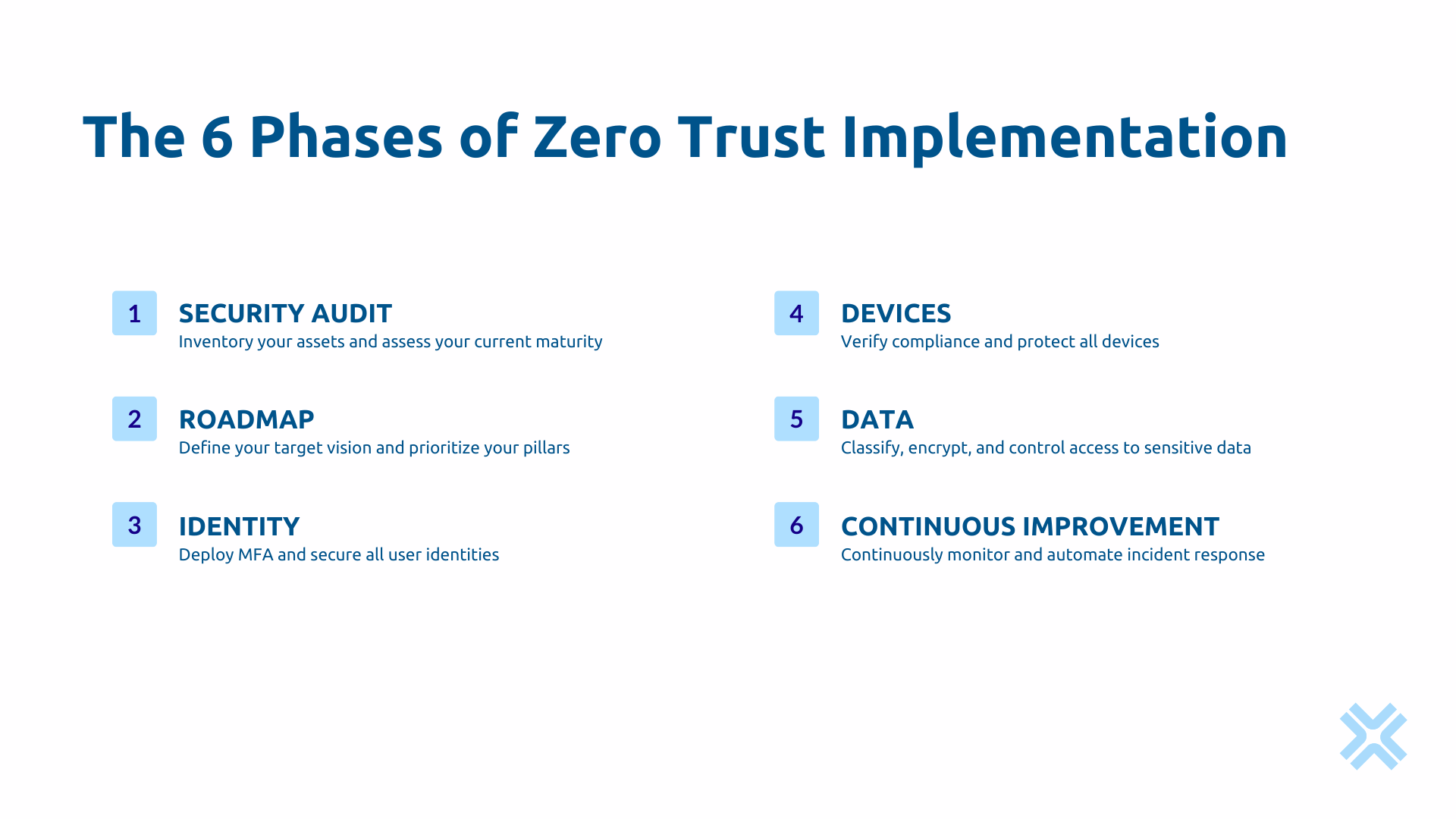
You can't secure what you don't know. Start with map your assets : identities, devices, applications, sensitive data.
This mapping tends to reveal orphan accounts, shadow IT, personal data in unsecured places.
Then assess your security maturity by following Microsoft Zero Trust Deployment Guides Use Microsoft Secure Score as a measurable and quantifiable baseline. Analyze your past incidents to identify your real weaknesses and quick wins.
Based on your audit, define your target vision aligned with your business risks. Prioritize your pillars: generally start with identities (maximum impact), then devices, then data.
Identify your Priority use cases : secure remote work, control third party access, protect financial data. Then build your Multi-year roadmap with clear milestones and measurable KPIs:
Zero Trust is built in stages, never in one shot.
Identities are the foundation so deploy MFA mandatory for everyone (administrators first, then the entire organization).
Set up your first Conditional Access policies : block connections from risky countries, require MFA for sensitive applications, block non-compliant devices.
Activate Identity Protection to automatically detect risky accounts. Implement PIM to remove permanent admin rights and impose justified temporary activations.
With protected identities, secure devices now. Deploy Intune to manage your corporations and define your compliance policies: minimum OS, encryption, active antivirus.
Integrate these policies with Conditional Access to make compliance a condition of access, ensuring native protection. Deploy Defender for Endpoint for advanced protection. For BYOD, implement app protection policies that isolate corporate data. This combination of secure identities and compliant devices is the solid foundation of Zero Trust.
Get on with data protection now. Classify them with Purview Information Protection and set up automatic classification. Deploy Data Loss Prevention on emails, SharePoint, SharePoint, OneDrive, Teams, endpoints. Encrypt highly sensitive data with Rights Management.
On the application side, configure app-based Conditional Access that is proportionate to the level of criticality. Deploy Cloud App Security to get visibility on your SaaS and detect shadow IT. Data protection is the ultimate goal; identities and devices are just the means.
Zero Trust is never “over.” Deploy Microsoft Sentinel as a central cloud-native SIEM that collects and correlates events from across your ecosystem. Configure the continuous monitoring of your indicators: Secure Score, incidents detected, compliant devices, MFA adoption.
Then create automated playbooks to respond to incidents, then practice proactive threat hunting, organize post-mortems after each incident. Finally, review your policies every 3 months.
The Zero Trust model is not a fad but a necessary evolution in security. The Microsoft ecosystem offers a comprehensive platform to implement it, but technology alone is not enough.
Askware supports you to build your custom Zero Trust architecture. We build pragmatic security strategies that reduce your risks while maintaining the agility of your organization. Request your security audit to identify your priority vulnerabilities and establish your Zero Trust roadmap.
According to our field feedback, an SME with around 200 employees with Microsoft 365 can achieve significant gains in 6 to 12 months. Large organizations with complex legacy environments generally reach advanced maturity over 2 to 3 years. The important thing is to start with your priority identities and use cases, then gradually expand.
A misconfigured Zero Trust creates friction: excessive MFA requests, access blocked for no reason. But well implemented, it improves the experience via SSO and passwordless. The controls adapt to the risk: light for normal situations, reinforced for suspicious situations. Communicate with your users and adjust based on their feedback.
Absolutely. Microsoft Entra ID federates with your on-premise AD via Entra Connect, allowing you to apply MFA and Conditional Access even for your internal resources. Defender for Identity monitors your AD. Entra Application Proxy releases your legacy applications with Zero Trust controls. In this way, you are preparing for your gradual migration to the cloud.
Our experts share their vision of best practices and technological trends to ensure the success of your digital transformation.