
How to write technical specifications without hampering innovation?
Find out how to write technical specifications that frame your project without hampering innovation. Expert guide for digital transformation.

Software quality rarely degrades all at once. It erodes gradually, with each modification, every fix introducing a regression risk that manual tests, being too partial and costly, can no longer contain. Eventually, delivery velocity and confidence in deployments become incompatible.
The automated tests resolve this tension. They run with every change, systematically cover critical scenarios, and immediately flag what breaks. This article explains how to integrate them pragmatically into the Microsoft ecosystem.

An automated test is a script that verifies, without human intervention, that an application behaves as expected. It runs in the delivery pipeline, with every commit or before every deployment, and immediately returns a result: success or failure.
Of course, automation doesn't replace all manual tests. Exploratory tests, for instance, which evaluate usability or detect unexpected issues, remain a human responsibility. What automated tests handle is the repetitive aspect of operations where the same scenarios must be replayed with each evolution to ensure nothing has broken.
Let's take a concrete example: a Power Apps leave management application. An automated test verifies that an employee can submit a request, that their manager receives the notification, and that the approval updates the available leave balance. This scenario runs automatically with every application modification, usually in a few seconds or minutes. Without automation, it would have to be replayed manually with each release.
According to the test pyramid heuristic popularized by Mike Cohn in Succeeding with Agile, a balanced strategy generally favors a majority of unit tests, complemented by integration tests and a more limited number of end-to-end tests. However, this distribution is not a universal rule.
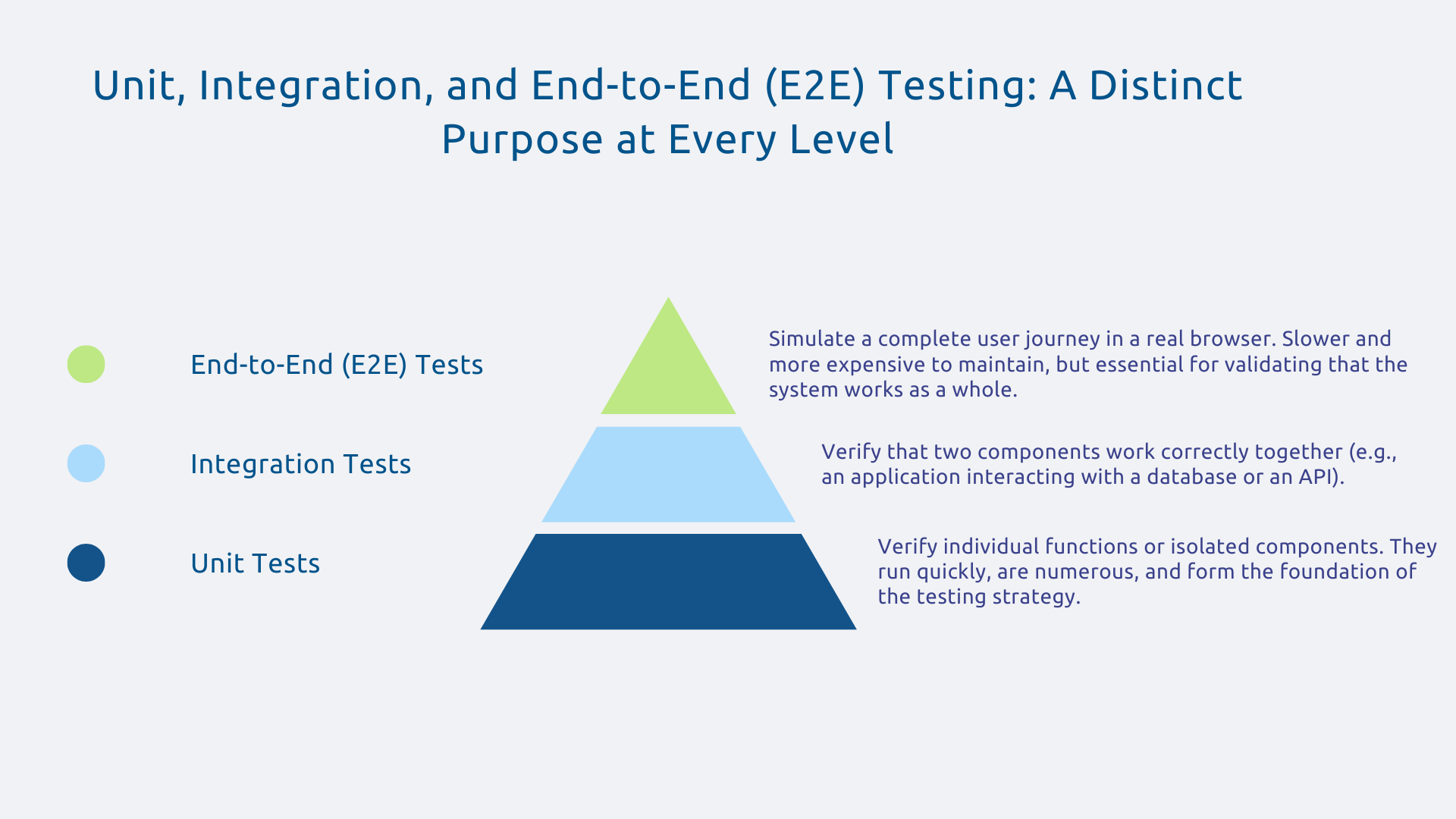
For a customized CRM Dynamics 365 application, this concretely translates into unit tests on C# plugins, integration tests on custom APIs, and a few E2E tests covering the "create an opportunity, qualify it, convert it to an account" journey.
The quality of an application isn't just about answering the question "does it work?". Indeed, while functional tests verify that business logic is respected, other dimensions are just as important:
All these checks can be integrated into an automated pipeline and executed regularly, without manual intervention.
A regression is a feature that worked perfectly but breaks after a modification, sometimes in a seemingly unrelated module. It's the most insidious bug because it often appears in production, where the impact is maximal.
Automated tests replay all known scenarios with every modification. Therefore, if a developer modifies a calculation module and critical scenarios fail, the pipeline flags it immediately, before any deployment.
So, what would have been discovered by users in production, sometimes hours after going live, is, thanks to automated tests, detected earlier in the development environment. The cost of correction is therefore significantly lower.
In many organizations, the manual tests end up constraining the delivery pace as much as development itself. Several days of validation before each release, QA teams fully engaged in repetitive scenarios, a monthly deployment at best: quality becomes a bottleneck where it should be an accelerator.
With automated tests, validating a release takes only a few tens of minutes. Consequently, deployments become more frequent, and features reach business users more quickly.
This is the principle of CI/CD (Continuous Integration and Continuous Deployment): deliver often, deliver with confidence.
Manually re-running the same test scenarios for each release is one of the most demotivating and error-prone tasks. A QA team that spent three days per release testing login, entity creation, modification, deletion, can, once these scenarios are automated, dedicate this time to exploring edge cases, improving user experience, or strengthening coverage for new features.
Just as industrial robots free operators from repetitive tasks to focus on supervision and continuous improvement, automated tests evolve the QA role from repetitive executor to strategic quality expert.
A five-year-old business application without automated tests is an application no one dares to modify. However, this fear of "breaking everything" hinders evolution, causing the accumulation of technical debt and makes modernization particularly risky.
Automated tests act as a living documentation of the expected behavior. They enable refactoring that is progressive and secure, improving the code with the knowledge that any regression will be immediately detected.
They also facilitate the integration of new developers, who can understand how the application should work simply by reading the tests.
Before getting started, an assessment is essential:
This data helps quantify the current cost of poor quality and build a strong ROI case.
To help you, maturity models like the TMMi (Test Maturity Model integration), maintained by the TMMi Foundation, allow the organization to position itself on a structured scale and identify its priority areas for improvement.
Often, there's an attempt to achieve exhaustive coverage from the outset. This is actually a mistake which leads to endless projects and budget overruns, not to mention difficult adoption.
Following the Pareto principle, a relatively limited number of features often account for the majority of usage and therefore deserve significant attention in the testing strategy.
For a CRM application, this means prioritizing the automation of tests for the "create sales opportunity, send quote, convert to order" workflow, which is used dozens of times a day, rather than testing administrative features that are rarely accessed.
In other words, a few well-targeted tests on critical elements are better than many scattered tests on low-impact features.
Automated tests that don't run automatically are useless. Their entire value lies in their integration into the CI/CD pipeline : with every developer commit for immediate feedback, with every pull request for validation before merging, and before any production deployment for a final check.
The "broken build" principle is central: if tests fail, no one can deploy. This concretely means fixing issues immediately rather than postponing them to the production phase.
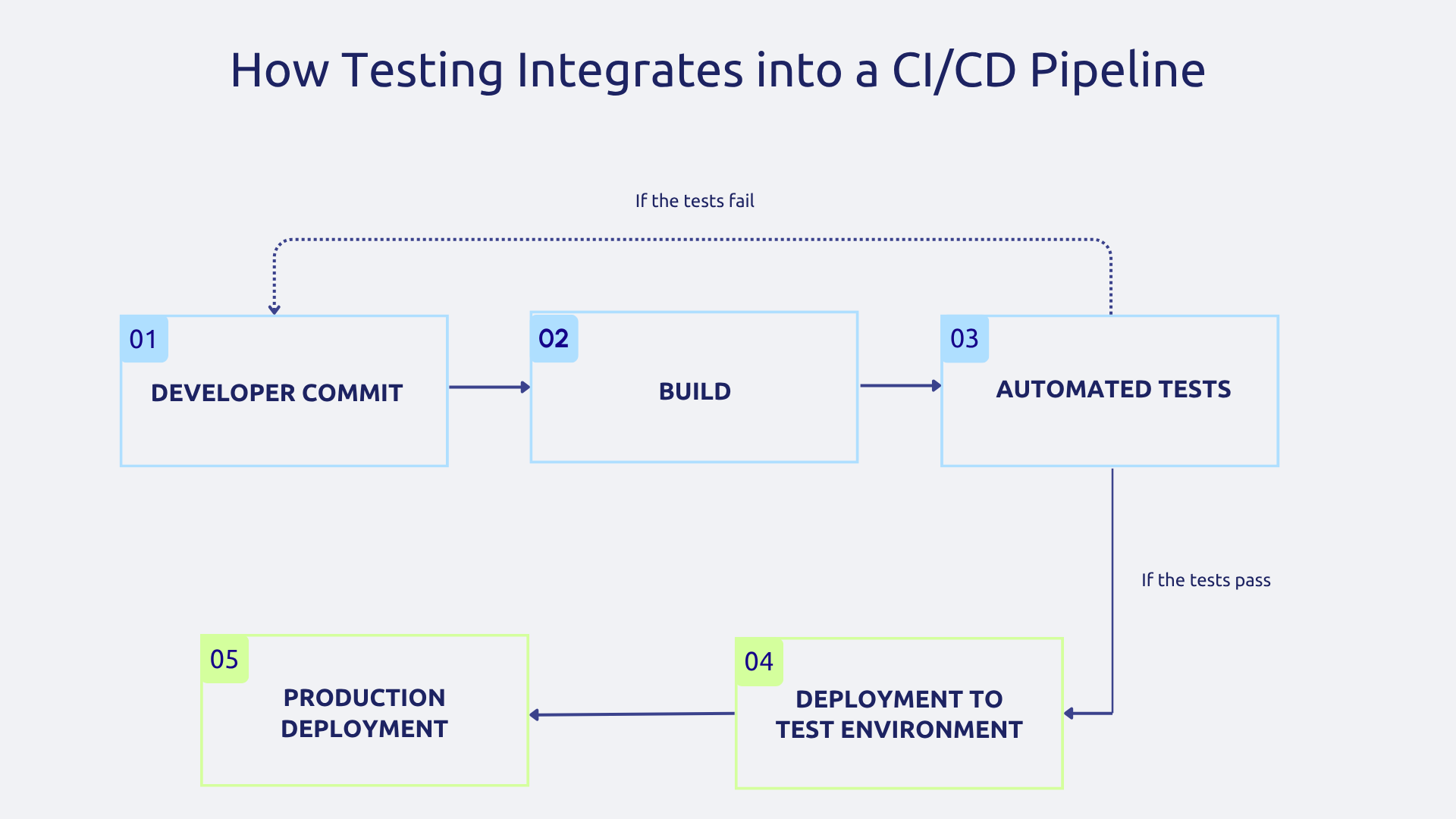
On an Azure DevOps pipeline for Power Apps, the typical flow is as follows:
Tools alone are not enough. In fact, automated test suites rarely fail because of the tools themselves. Instead, they fail because teams are not trained, not convinced, or because tests are not maintained as changes occur.
A skill development program that is progressive, combining initial training, team practice sessions, and pair programming on the first tests, is, as you can imagine, far more effective than deploying tools without support.
Appointing a quality champion within the team promotes the adoption of best practices and helps maintain momentum over time. In practice, the success of an automated testing approach often relies more on team practices than on the choice of tools.
Power Apps Test Studio is one of the tools offered by Microsoft to automate testing for Canvas apps. Without writing much code, it allows you to record user interactions, define assertions on expected results, and automatically execute these scenarios.
However, the tool has its limitations, including:
For the most industrialized scenarios, Microsoft also highlights the Power Fx Test Engine, which offers greater flexibility in delivery pipelines. However, for the majority of business Canvas Apps, Test Studio provides an accessible entry point, even for less technical profiles.
Azure DevOps serves as a central hub in an industrialized testing strategy. Azure Pipelines orchestrates build, test, and deployment sequences, while Azure Test Plans allows for managing manual and automated tests in a single space, without fragmenting quality tracking across multiple tools.
What distinguishes Azure DevOps from a simple orchestrator is the traceability it offers: each test can be linked to a user story or a bug in the backlog, immediately revealing the impact of a change on existing coverage. Combined with the configuration of quality gates, meaning thresholds below which no deployment is allowed, this visibility transforms quality from an intention into an effective operational constraint.
For custom-developed web applications in .NET, React, or Angular, as well as for customized Dynamics 365 portals, Playwright and Selenium are the go-to frameworks. They simulate a real browser, replicating user interactions (click, input, navigation) across all common browsers.
Playwright, developed by Microsoft, is now widely adopted for new projects and is known for its execution speed, stability on modern browsers, and developer-friendliness.
Selenium remains relevant for existing projects where it is already implemented. These frameworks are written in code (C#, JavaScript, Python), which gives them significantly greater flexibility than record & replay tools, at the cost of a steeper learning curve.
Automated testing is no longer just for large development teams at tech giants. Any organization that develops or maintains critical business applications stands to benefit from adopting it, provided they take a phased approach.
The Microsoft ecosystem offers a comprehensive suite, from Power Apps Test Studio and Power Fx Test Engine for low-code, to Azure DevOps for orchestration and Playwright for custom applications. The rest depends on the quality culture you're willing to foster within your teams.
Are you looking to evaluate the quality maturity of your applications and identify your first automation quick wins? Contact Askware for a scoping workshop tailored to your context.
In short, it's a script that simulates a user and verifies that the application responds as expected, without human intervention. The main advantage is that this script can be replayed hundreds of times, at any hour, without ever getting tired or missing a step.
A unit test verifies a very small portion of code in isolation, such as a calculation formula on its own. An integration test goes further: it checks that multiple components work correctly together, for example, that your application communicates properly with the database. Both are useful and complement each other rather than replacing one another.
Trying to cover everything at once would be a mistake. Instead, identify the two or three key user journeys your users take daily and start by automating those. One test running in your pipeline is better than fifty perfect tests that only exist on paper.
Our experts share their vision of best practices and technological trends to ensure the success of your digital transformation.