Modular architecture: the lever of an agile and sustainable IS
Discover modular architecture: principles, benefits and methods for transforming your IS into an agile and sustainable system. Expert guide.

Are your sales teams entering the same customer information into three different systems? Your management expects a 360° vision of the customer but the data is scattered in a dozen tools? Digital transformation has multiplied business applications and paradoxically created new silos where the opposite was promised.
Application integration is part of a response to this fragmentation. It is not a purely technical subject but a strategic lever that transforms a stack of compartmentalized tools into a fluid information system. Here, we discuss the approaches available in the Microsoft ecosystem, the central role of Dataverse, and best practices for building a sustainable integration architecture.

Application integration refers to the ability to make applications communicate with each other:
Its importance has grown considerably with the multiplication of specialized SaaS solutions, the rise of the cloud, and increasing regulatory requirements for traceability and compliance (in particular RGPD). Having a 360° vision of the customer, product or operations is now a real competitive advantage that can only be obtained by connecting systems together.
Silos have a cost but this cost is often underestimated because it is diffuse. The most visible consequence is loss of productivity because silos involve manual re-entries, time lost looking for information in several systems, copy and paste between applications.
That's not all, outdated or inconsistent data also leads to to bad decisions. Indeed, a customer service that does not see the history of purchases or previous tickets wastes time asking questions that are already known and therefore degrades the customer experience with each interaction. Likewise, unconnected systems only confer a truncated vision, which distorts strategic decisions — and leads to errors that cost much more than the integration itself.
Finally, with silos, the IT costs are piling up without us noticing immediately. In fact, custom developments created over time to connect one tool to another generate technical debt that weighs on maintenance and slows down each new project. The more patchwork grows, the more fragile and expensive it becomes to evolve.
First, workflow automation eliminates retyping and frees up time for value-added tasks. Second, data quality improves: a single source of truth, synchronized in real time, reduces errors and inconsistencies. Finally, business agility is also progressing: evolving a process becomes easier when systems communicate.
Take the example of an industrial equipment manufacturer that connects its machines via Azure IoT Hub to its Dynamics 365 CRM: as soon as a client machine shows signs of failure, a preventive maintenance ticket is automatically created in Field Service, the nearest technician is assigned, and the customer is notified. Fewer unexpected breakdowns, increased customer satisfaction, and a new business model for predictive maintenance, made possible only by integration.
Native connectors are pre-built integrations between popular applications, configurable via a graphical interface, without necessarily writing code. Power Platform now offers more than 1,000, a figure that is constantly evolving, covering the most common tools such as Salesforce, SAP, SharePoint or even SQL. Their main advantage is speed because where custom development would take weeks, a connector can generally set up in a few hours.
For example, connecting Dynamics 365 Sales to Outlook and Teams via the native Power Platform connectors, allows sales representatives to create CRM contacts from their emails, launch Teams calls from customer records and automatically synchronize appointments.
Of course, they have their limitations (sometimes restricted functionalities, paid premium connectors), but these do not justify not being able to make it a priority and a reflex. So only invest in custom development if the native connectors really don't cover your needs.
When native connectors aren't enough, REST APIs usually take over. In the Microsoft ecosystem, the Dataverse Web API provides access to business data from Dynamics 365 and Power Platform, while the Microsoft Graph API covers most Microsoft 365 services, including Entra ID, Teams, SharePoint, OneDrive, and more.
API integration certainly offers maximum flexibility, but requires:
Note that Power Automate, Azure Logic Apps, or Azure Functions can consume these APIs without having to write a complete application from scratch.
iPaaS (Integration Platform as a Service) is the modern approach to integration, namely a cloud platform that orchestrates flows via a low-code visual interface, with integrated error management and traceability. Microsoft offers two complementary solutions, which are aimed at different audiences and levels of complexity:
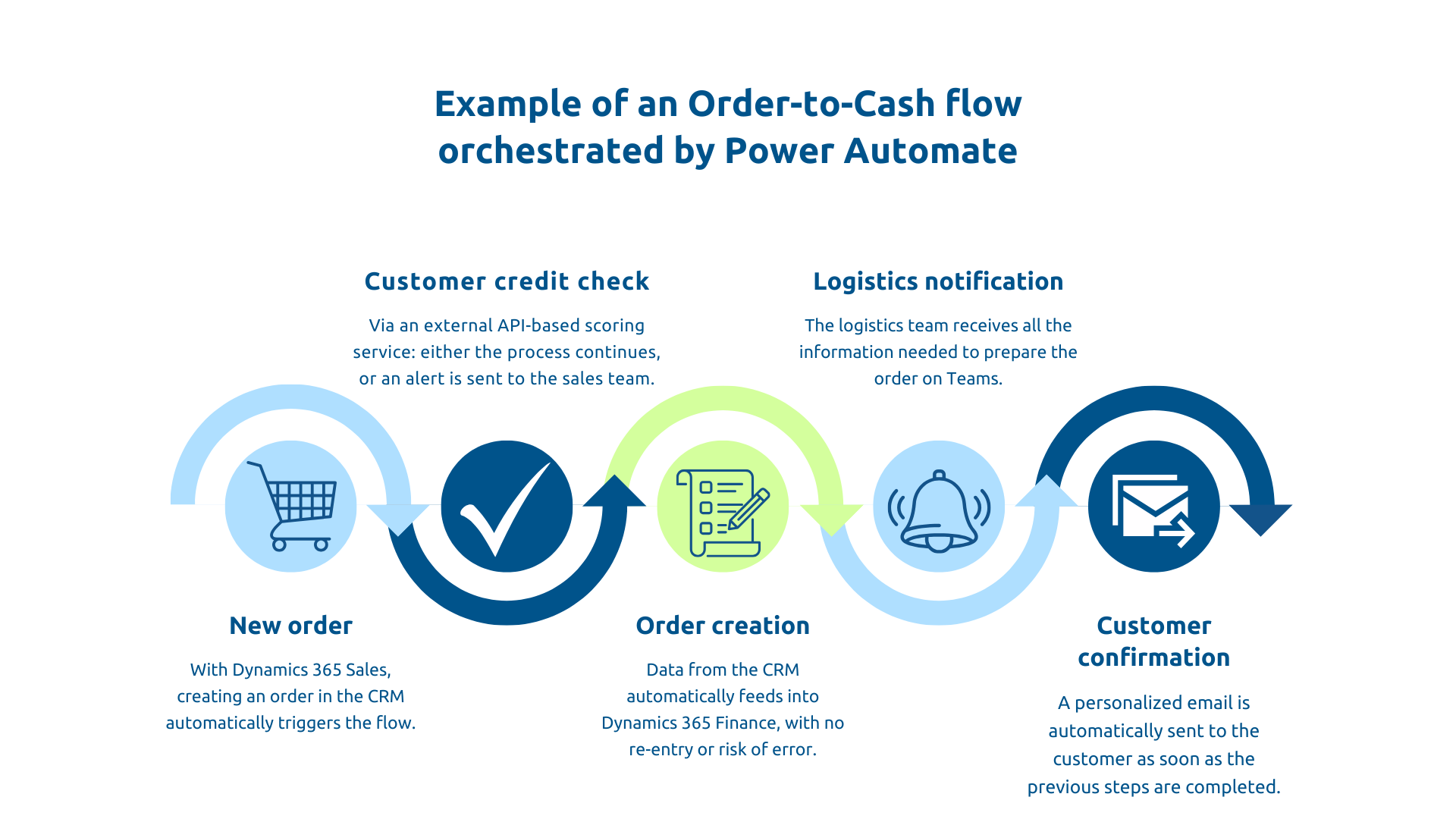
Power Automate offers billing models by user or by flow, while Logic Apps is mainly based on consumption billing according to the plan chosen. Note that a Power Automate workflow can orchestrate the entire Order-to-Cash process: new order in Dynamics 365 Sales → customer credit check via external API → creation in Dynamics 365 Finance → Teams notification to the logistics department → Teams notification to the logistics department → confirmation email to the customer. Code-free, with error management and complete traceability.
Some needs relate to mass processing rather than real time. These include migrations, daily synchronizations or even consolidation for analytics.
Azure Data Factory is the tool dedicated to these scenarios. It extracts data from dozens of sources, applies cleaning, deduplication, and mapping transformations, and then loads the result into Dataverse, Azure Synapse, or a Data Lake.
A migration from an old CRM to Dynamics 365 can thus process large volumes, up to several million contacts, in a few hours depending on the volume, data quality and infrastructure mobilized, while manual processing would take several weeks. In any case, don't try to batch with tools designed for real time.
Dataverse is the cloud database behind Dynamics 365 and Power Platform. It offers a common and extensible data model, native granular security, automatic auditing capabilities, and an integrated API. In an integration strategy, it naturally plays the role of single source of truth : the other systems synchronize with it rather than with each other, which drastically simplifies architectural complexity.
Two-way syncing (the ability to change data across multiple systems at once) is certainly one of the trickiest scenarios. Best practice is to define a Master for each data: which system is authoritative on which information?
In a Dynamics 365 Finance + Dynamics 365 Sales environment, you could formulate the rule as follows: CRM is master for commercial information, ERP is master for financial information. The functionality Double Write allows data to be automatically synchronized, after configuring the maps and adapted business rules.
Event-driven architecture reacts to events as soon as they happen, rather than periodically interviewing systems. This results in immediate reactivity and a more flexible coupling between systems.
In the Microsoft ecosystem, several mechanisms support this approach: Dataverse webhooks trigger external actions as soon as a record is changed, Azure Event Grid distributes events at scale with a highly scalable and low latency model, and Azure Service Bus ensures message persistence and delayed delivery, even if the recipient system is temporarily unavailable.
Example: when an opportunity changes to “Won” status in Dynamics 365 Sales, a webhook triggers an Azure Function that automatically creates the project in Azure DevOps, provisions a Teams team and associated SharePoint spaces, and notifies stakeholders in real time, without manual intervention. This type of flow is naturally based on serverless functions, particularly well suited to lightweight and scalable event processing.
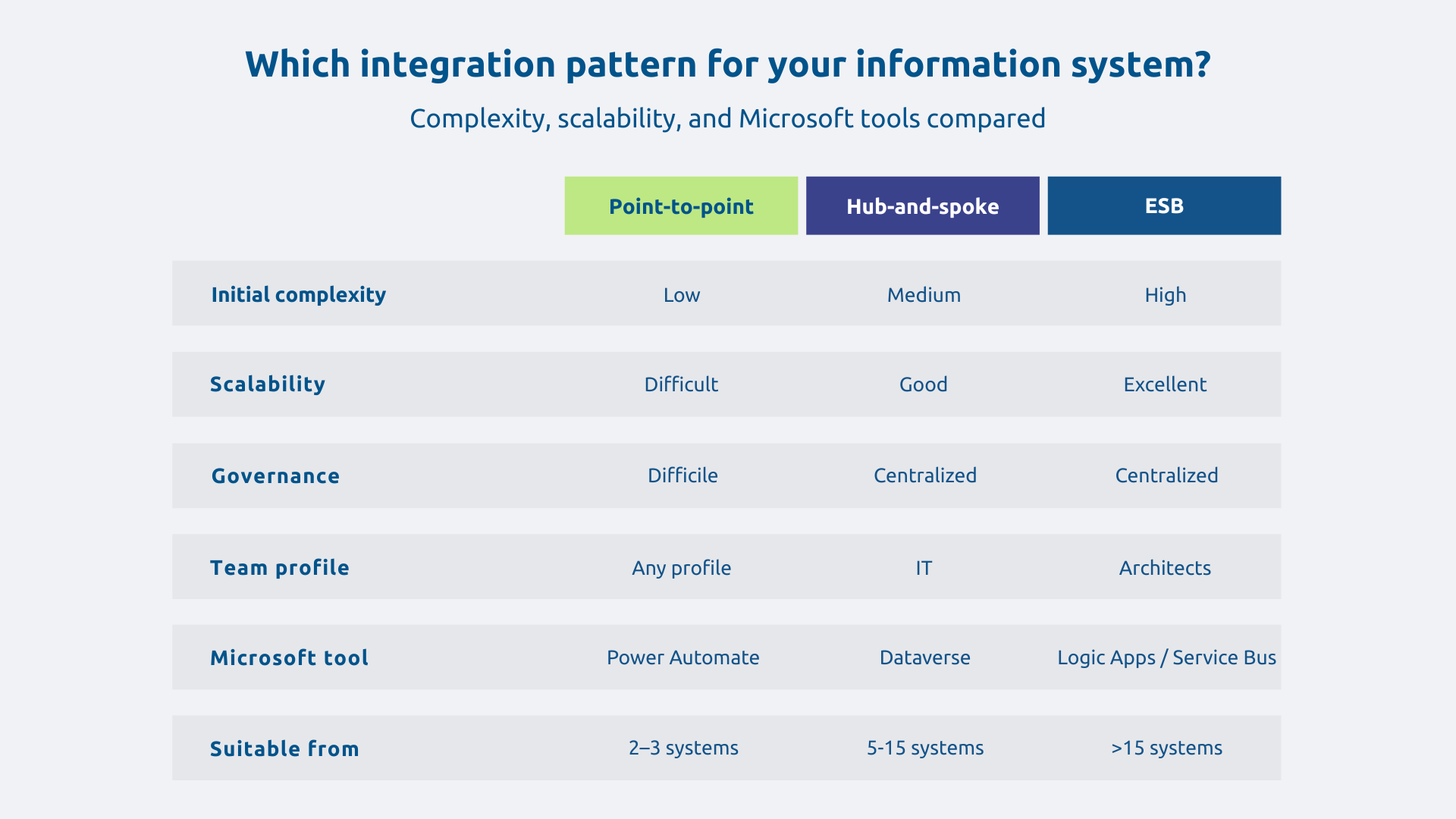
Three types of patterns are found in integration architectures:
To make your choice, pay attention to the context. Thus, an SME equipped with 5 systems can go from point to point with Power Automate while an ETI with 15 systems benefits from adopting hub-and-spoke with Dataverse. Finally, a large group with dozens of systems and complex B2B integrations may need an ESB approach. The main thing is to anticipate the scalability right from the start rather than undergoing a costly redesign a few years later.
Without governance, integrations proliferate because each team creates their own flows, without consistency or documentation, until no one knows what is connected to what. Power Platform DLP policies control authorized connectors, separate dev/test/prod environments protect production, Azure Key Vault manages secrets, and Application Insights provides real-time monitoring.
In addition, governance is also at the heart of the requirements of IT compliance and is based on a Data management sturdy. Invest in governance from the start because making up for non-existent governance after the fact is infinitely more expensive.
Integrations are by definition fragile because you can be confronted with the unavailability of external systems, network timeouts, invalid data, or unexpected peak loads. A robust integration is therefore not one that is infallible but the one that handles errors with ease and recovers automatically.
With this in mind, the retry with exponential backoff automatically retries a failed operation, spacing out the attempts. For their part, the Azure Service Bus queues absorb spikes and ensure the persistence of messages even if the recipient is temporarily unavailable.
In practice: if an external WMS is unavailable during order synchronization, the flow automatically retries according to the configured retry policy, then queues the message and alerts the IT team. Without observability (logging, monitoring, alerting), it is impossible to detect these situations before they cause damage.
Application integration is no longer optional in a multi-cloud and multi-SaaS world. The Microsoft ecosystem offers a remarkably consistent continuum of options to meet all needs without imposing a single technology. Dataverse plays a structuring role in this continuum: a unified data hub, it simplifies the complexity of integration and guarantees consistency and traceability. But a successful integration strategy requires as much architecture and governance as it does technique, because treating integration as a succession of one-off projects means ensuring that the technical debt of tomorrow is created.
Is your IS compartmentalized and hampering your performance? Askware supports you from the audit of your integration architecture to the implementation of modern and sustainable solutions. Contact our experts to build a truly fluid information system.
Start by checking if a native Power Platform connector covers your needs. This is the case for the majority of current tools. If you need more complex business logic, Power Automate or Azure Logic Apps take over. For large volumes, Azure Data Factory is the right tool. You have to start from the simplest and only increase in complexity if necessary.
Power Automate targets business teams for daily automations, with a simple interface and natural integration into Microsoft 365. Azure Logic Apps is aimed at IT teams for more complex scenarios: B2B integrations, event-driven architectures, production environments with strict performance and governance requirements.
It's an organization of integrations around a central point, the hub, rather than connecting each application directly to the others. In the Microsoft ecosystem, Dataverse naturally plays this role. Complexity remains manageable even as the number of systems increases and governance is much easier to ensure.
Our experts share their vision of best practices and technological trends to ensure the success of your digital transformation.