DataOps: orchestrate data to accelerate business value
Discover DataOps: definition, practices, benefits. Complete guide to industrialize your data pipelines with Azure. Askware expertise.

In most businesses, critical data is scattered like isolated islands. Your customer information lives in the CRM, your financial data in the ERP, your marketing data in your Customer Data Platform. This fragmentation creates inconsistencies, slows decision-making, and hampers innovation.
Microsoft Dataverse solves this problem by becoming the common data platform that unifies, secures, and makes your data actionable across the Microsoft ecosystem. In this article, we explore what Dataverse is, how it differentiates itself from alternatives, what features it offers, and how to implement it to transform your business data management.

Microsoft Dataverse is a managed relational data platform, native to the Power Platform, hosted on Azure. It is optimized to manage structured business data with native security and performance.
The cloud-native architecture guarantees a automatic scalability, high availability, and built-in backups. You no longer have to size servers or manage database clusters.
What sets Dataverse apart from a classic SQL database is its predefined data model. The Common Data Model provides you with standard tables (Account/Account, Contact, Opportunity/Opportunity, Product/Product) structured according to best business practices, which you can customize according to your needs.
Think of Dataverse as a pre-assembled piece of furniture that you customize, rather than a toolbox where you have to build everything. REST and OData APIs are generated automatically for all your tables, subject to security and governance rules, row and column level security is native, change auditing is integrated. It all works out-of-the-box.
Dataverse plays a structuring role in the Microsoft ecosystem because it constitutes the shared technological foundation by all Dynamics 365 applications and the Power Platform.
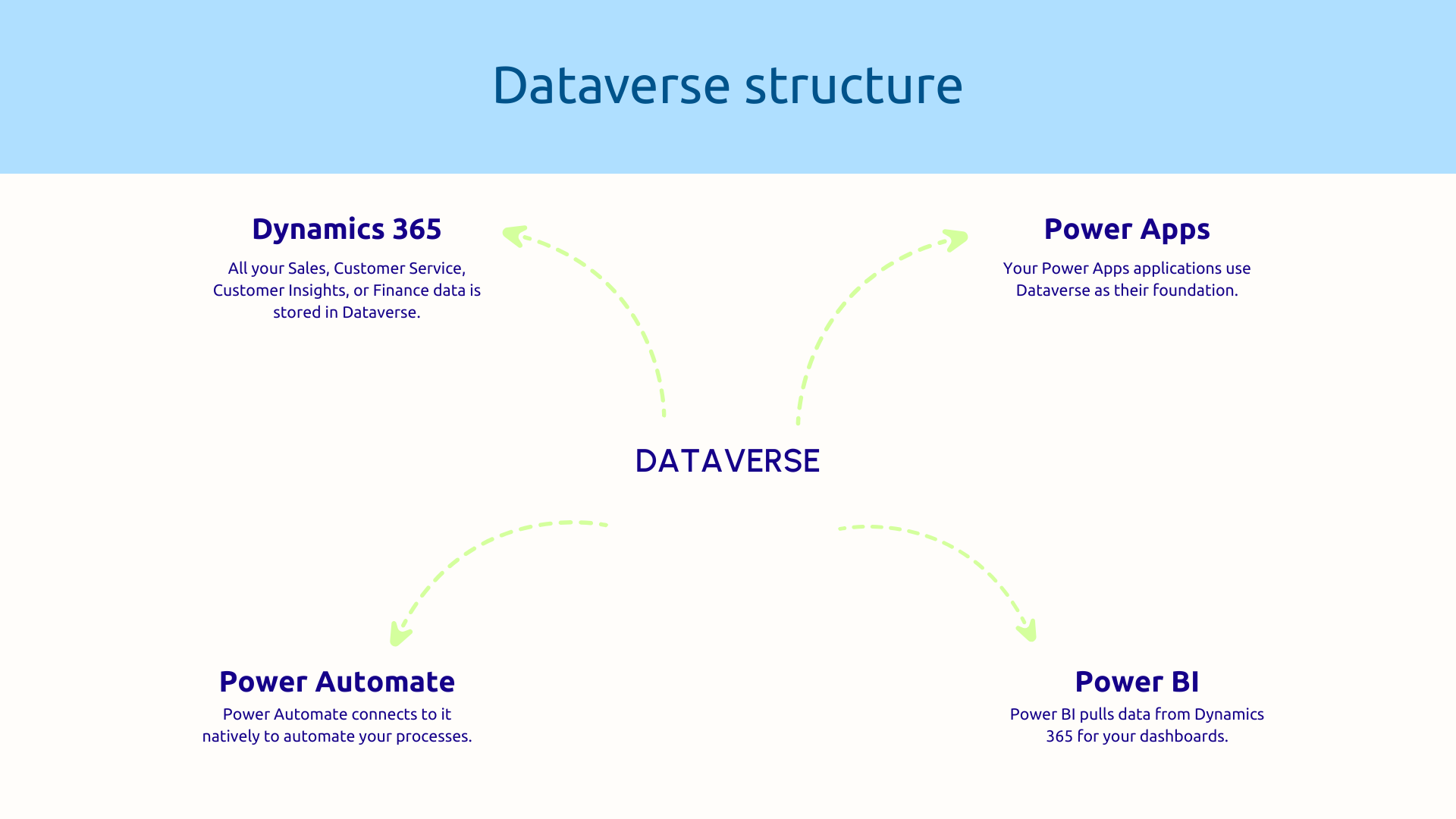
This architecture is fundamentally changing how you relate to data. Instead of five applications with five different bases requiring complex synchronizations, you now have a single shared source of truth.
Thanks to this, when a salesperson changes customer information in Dynamics 365 Sales, customer service instantly sees the update. The marketing team has the same up-to-date data. Power BI dashboards reflect reality in real time. No more Excel exports and desynchronizations.
This unification responds to a structural problem of traditional IT architectures: exponential complexity of integrations. Connecting 5 applications potentially requires 10 point-to-point integrations. As a result, moving to 10 applications makes complexity explode.
Faced with this observation, Dataverse offers an alternative to the star model (where each tool must connect to all the others) thanks to the Hub model (where everyone goes through Dataverse). To achieve this, the platform exposes standardized APIs (REST and OData) that speak the same language. At the same time, native connectors to hundreds of sources drastically simplify integration.
With this approach, the management of your data assets is no longer an integration nightmare since your ecosystem is fluid and controlled.
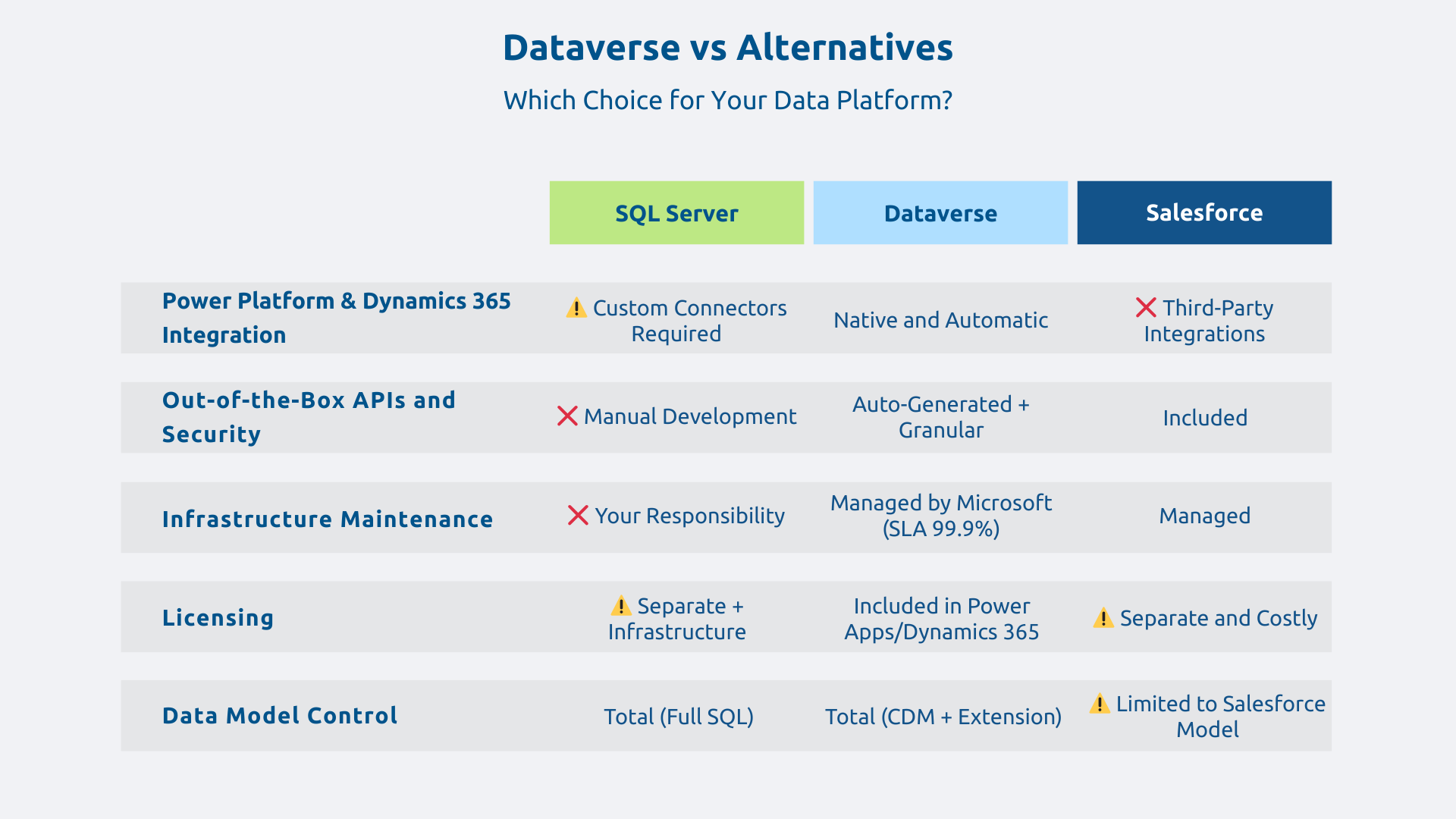
Why choose Dataverse over a classic SQL Server? The answer is that Dataverse provides in addition to storage.
With a traditional relationship base, you should:
Dataverse, on the other hand, provides all of this out-of-the-box.
Native integration with the Microsoft ecosystem is another major benefit. Where connecting SQL Server to Dynamics 365, Power Apps, and Power BI requires full-fledged developments, Dataverse offers native integration that scales automatically.
In addition, maintenance is managed by Microsoft. You don't have to worry about upgrades or security updates.
However, Dataverse offers less flexibility for ultra-complex SQL queries or low-level optimizations. The procedure to follow is therefore simple: opt for SQL when you have ultra-specific needs and choose Dataverse to accelerate your business data projects in the Microsoft universe.
Dataverse is not a CRM in itself. It is rather the data platform that powers these applications in the Microsoft universe.
Thus, Dataverse combined with Dynamics 365 can be compared to Salesforce on certain CRM uses, with one notable difference: you Control your data model and create custom applications without leaving the ecosystem.
In addition, you save money since the Dataverse license is included in Power Apps and Dynamics 365, at no additional cost to the base itself.
However, let's be transparent about the limits. Dataverse is not designed for big data uses or massive streaming loads.. For these use cases, a hybrid architecture is required: Dataverse for operational business data, Azure Data Lake for massive volumes and historical analytics.
Dataverse is based on the Common Data Model (CDM), a library of standard tables that represent common business concepts:
These tables include essential fields and logical relationships. So you start with a solid structure instead of reinventing your schema.
The strength lies in the expansion capacity. You create custom business tables adapted to your activity: Intervention, Project, Contract. Relationships are configured visually: an account has several contacts, a product appears in several orders. Business rules then define business logic without code.
First, authentication is based on Microsoft Entra ID (formerly Azure Active Directory) with support for SSO and multi-factor authentication. Second, rights management works with finesse: you define who can read, create, modify, or delete what data, by user, group, or role.
Even more finely, the line level security automatically filters the visible data according to the connected user. A salesperson only sees his territory, a manager sees his whole team, the management the whole.
At the same time, the Audit Trail allows you to track all the changes: who changed what, when, from what system. This traceability is essential for compliance.
Finally, Dataverse benefits from Microsoft certifications : ISO 27001, SOC 2, RGPD compliance, among others. Your platform thus meets regulatory requirements without additional effort.
In terms of integration, Dataverse automatically generates REST and OData APIs for all your tables. These APIs follow accessible open standards from any language.
In addition, the Webhooks trigger actions in real time when changes are made. A new customer created can automatically send a welcome email and notify the team in Teams.
Integration with Azure Logic Apps, Power Automate, and Azure Functions is also native. You thus connect Dataverse to more than 500 services via preconfigured connectors.
Dataverse relies on Azure infrastructure to ensure performance and availability with an SLA of 99.9%. Horizontal scalability is automatic.
For multi-site businesses, the geographic replication ensures low global latency.
Microsoft guarantees performance and you can focus on your business while the infrastructure evolves automatically.
The most immediate use case is centralize all your customer data to offer a complete vision to all your teams.
By default, your data is scattered across Dynamics 365 Sales, Customer Service, Customer Insights, and your ERP. Dataverse unifies this fragmented data. Contacts, accounts, and opportunities naturally sit side by side with support tickets and marketing campaigns.
This consolidated 360° view then becomes usable in Power BI for predictive analytics. Your Power Apps applications expose this wealth in specific business interfaces.
As a result, each customer interaction automatically enriches the 360° view without manual intervention. Silos disappear in favor of actionable collective intelligence.
Power Apps relies on Dataverse to quickly build applications without managing database complexity.
Concretely, the forms are auto-generated from the data model. Business logic can be configured visually without code. Deployment is immediate on mobile, web and Teams.
In many cases, the Time-to-Market go from several months with traditional development to a few weeks with the low-code approach. For example, a logistics team can create a delivery management application in a few weeks with real-time tracking and integrated Power BI reporting.
In practice, workflows are automatically triggered on Dataverse events : creation, modification, deletion. You then orchestrate multi-step processes across multiple systems.
Let's take a concrete example: when a Dynamics 365 opportunity changes to “Won” status, Power Automate creates the customer case in SharePoint, sends the contract via DocuSign, and notifies the teams in Teams. This workflow can be executed in seconds in a matter of seconds in a completely reliable manner.
Power BI connects natively to Dataverse to create reports consolidating the data of all your businesses.
Technically, the connection is done using DirectQuery (real time) or Import (periodic copy). You can easily cross-reference Dataverse data with other sources. The automatic refresh ensures that your analyses reflect current reality.
In the end, with Dataverse as a single source, your analyses no longer require manual reconciliation between systems. The truth is unique and instantly accessible.
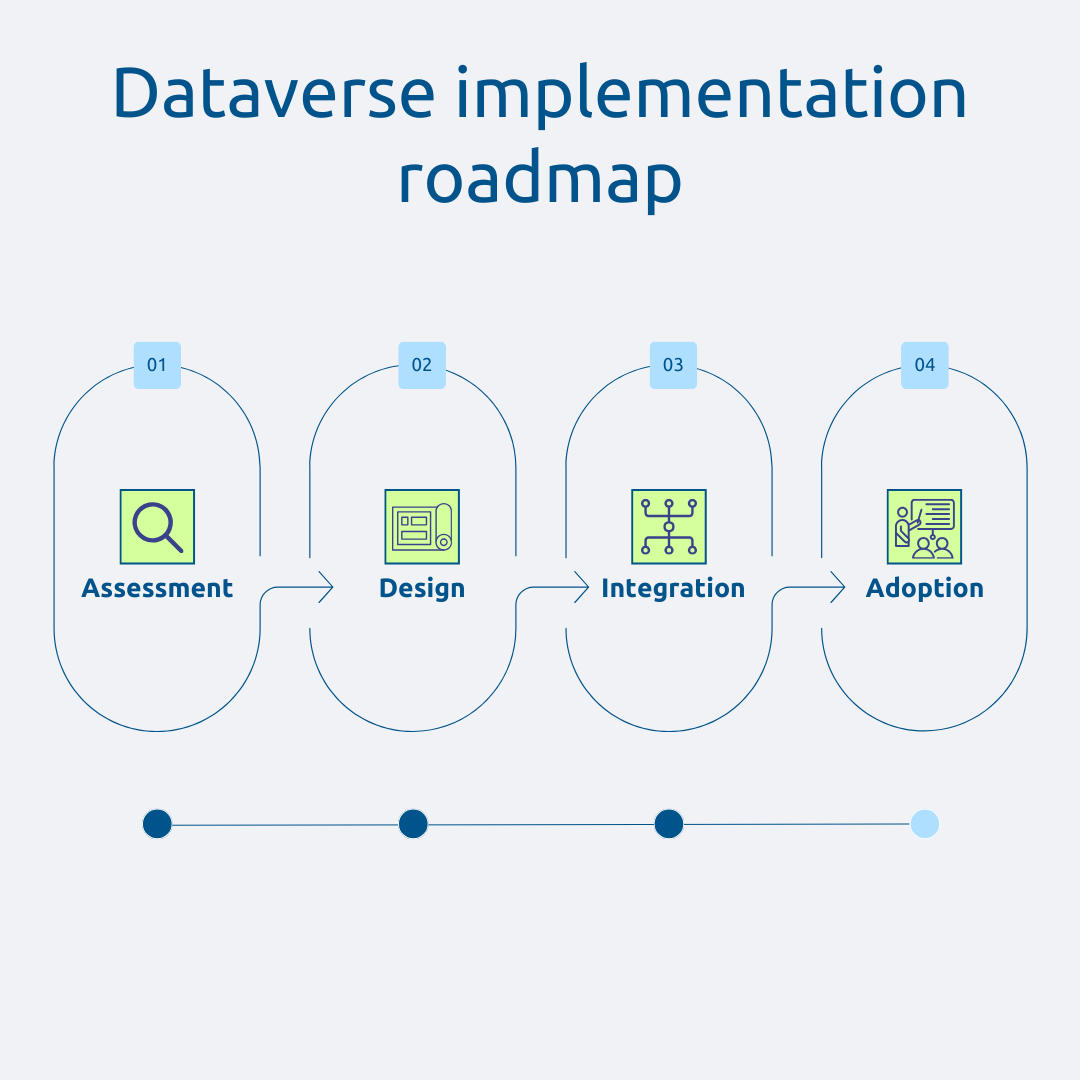
Before deploying Dataverse, you should map your current data heritage and to identify priority opportunities.
In this first step, the inventory lists all your sources: SaaS applications, on-premise databases, files. You then identify the critical data to unify: customers, products, transactions.
Prioritization is then carried out according to a value/effort matrix. Some cases provide immediate value with little complexity (quick wins). Others are more structuring but require more effort.
Finally, the scoping workshops with business departments validate that the use cases meet real business needs. The deliverable: a flow map accompanied by a prioritization matrix.
Once a diagnosis is made, the design of the model determines long-term success. A well-thought-out model avoids expensive refactorings.
You start from the Common Data Model and extend it according to your specific needs. At the same time, governance is clearly defined: who can create or modify tables? How do I validate the changes?
The migration strategy is also decided at this stage: big bang or iterative? In all cases, data cleaning before migration is necessary. You identify duplicates, correct inconsistencies, standardize formats.
The integration then connects Dataverse to your ecosystem in a way reliable and efficient.
As a reminder, Power Platform connectors cover over 500 sources. For systems that are not covered, you develop custom connectors via Azure Functions.
At the same time, security configuration requires particular attention. You define the business roles with their respective permissions and set up security at the line level.
Finally, integration tests validate that flows work properly with robust error management.
Technology only creates value if it is adopted by users. This support phase is therefore crucial.
First, Dataverse administrators receive extensive training. Then, end users are made aware of the new tools with examples taken from their daily processes.
Process and data model documentation serves as a permanent reference. In addition, post-deployment support accompanies the teams during the first weeks. Feedback thus makes it possible to quickly identify the necessary adjustments.
In short, Microsoft Dataverse goes beyond a simple cloud database. It is the business data unification platform that transforms your isolated silos into a coherent, secure and efficient ecosystem.
Askware combines strategic vision and technical expertise to support you from initial audit to operational operation, ensuring that your implementation creates measurable business value from the first weeks.
Do you want to understand how Dataverse could unify your data and accelerate your digital transformation projects? Contact Askware for a discovery workshop.
Common Data Service was the former name of the platform, renamed Dataverse in October 2020 by Microsoft. Technically, it is the same product that has continued to evolve. If you're already using Common Data Service, you're actually using Dataverse with all of its current capabilities.
Yes, Dataverse storage capacity is included in Dynamics 365 licenses and some Power Apps licenses. Each license includes a base stipend. If you exceed this capacity, you can buy additional capacity.
Dataverse exposes REST and OData APIs that can be accessed from any language. Authentication is done via Microsoft Entra ID. Microsoft provides SDKs primarily for.NET and JavaScript through the Web API. For simple cases, Power Automate or Azure Logic Apps offer pre-configured connectors without development.
Our experts share their vision of best practices and technological trends to ensure the success of your digital transformation.