IT observability: managing IT performance in the hybrid cloud era
IT observability: definition, 3 pillars (logs, metrics, traces), Azure Monitor and strategy for hybrid IS. Expert guide.

Most organizations have a CRM. However, many don't truly leverage it, and sales reps continue to manage their leads in Excel, customer data is scattered across the marketing database, ERP, and individual inboxes, and no one has a complete view. Consequently, the CRM is reduced to a reporting tool that is merely tolerated, rather than a chosen performance driver.
This article demystifies what a modern CRM truly is, beyond a simple digital address book, and demonstrates how it drives tangible transformation in sales performance and customer satisfaction, particularly through Microsoft Dynamics 365.

CRM (Customer Relationship Management) is the system that centralizes all customer interactions and data to orchestrate the relationship throughout the lifecycle, from first contact to loyalty.
However, CRM is not just software. It is both:
Its fundamental difference from a spreadsheet lies in one word: dynamism. Indeed, a CRM retains the complete history of exchanges, anticipates future actions, and shares information in real-time across all teams. It is the collective memory of the company regarding its customers: every conversation, every preference, every purchase signal, structured and actionable.
Without a CRM, customers are often asked to repeat themselves.
A comprehensive CRM covers three main functions, all powered by the same customer database.
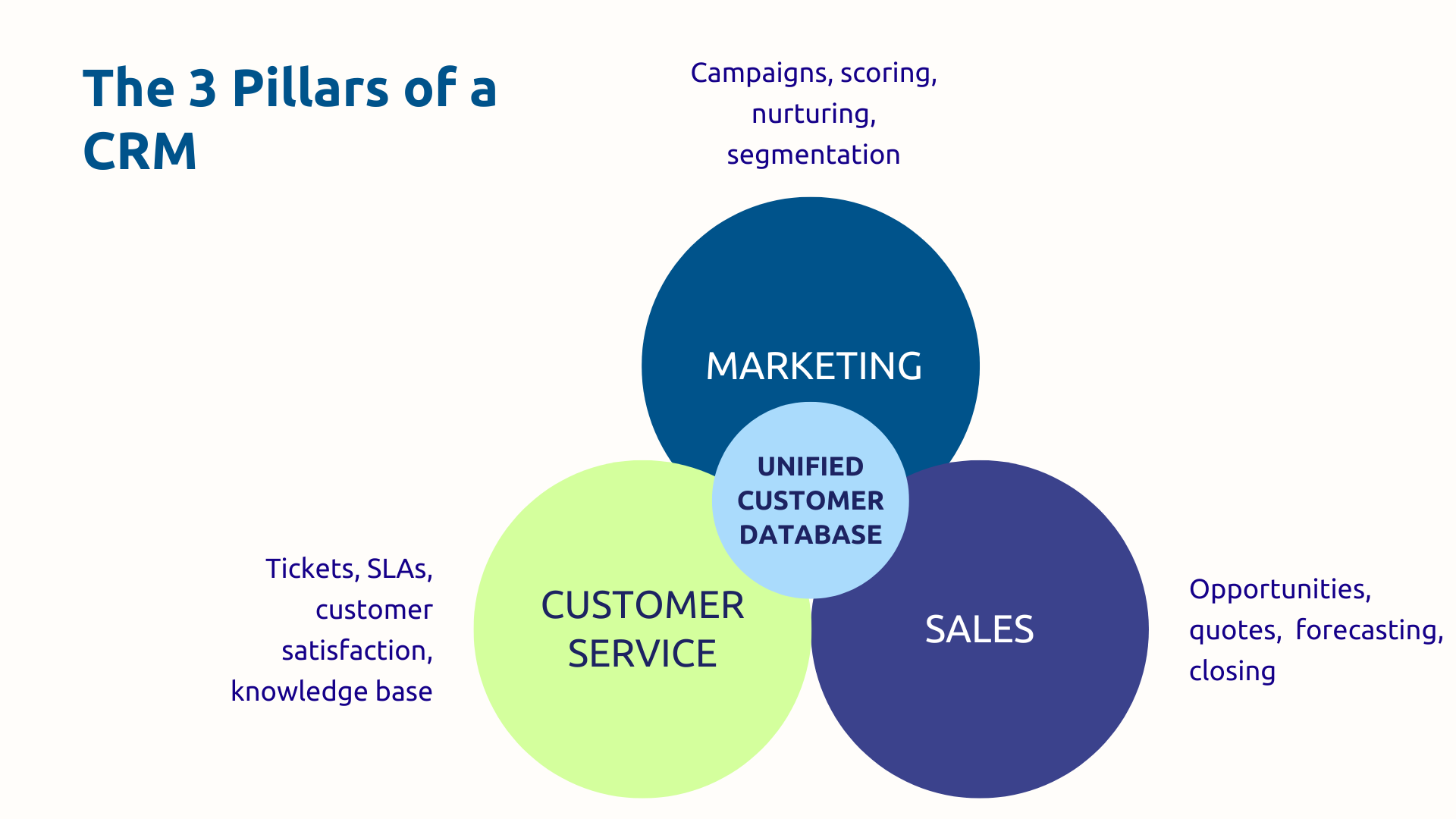
What makes this architecture powerful is the 360° view it provides. For example, a prospect downloads a white paper (captured by marketing), becomes a qualified lead, is assigned to a salesperson, signs a contract, then opens a support ticket. No more information silos; everything is unified into a coherent, end-to-end customer experience.
Excel is a static, single-user calculation tool. It's an acceptable solution when you only have a handful of customers to manage, but not when you have more. A CRM, on the other hand, is a collaborative platform with historical tracking, automated workflows, and real-time shared data.
As for the ERP, it is used to manage financial and logistical transactions (orders, inventory, accounting), while the CRM helps with relationships (prospects, opportunities, satisfaction). However, the two tools can be used together; it's even recommended since they are complementary. Thus, the CRM feeds the ERP (when an opportunity becomes an order), and the ERP consolidates the CRM (purchase history enriches the customer record).
It should also be noted that Dynamics 365 is one of the rare ecosystems to natively unify CRM (Sales, Customer Service, Customer Insights – Journeys) and ERP (Finance, Supply Chain).
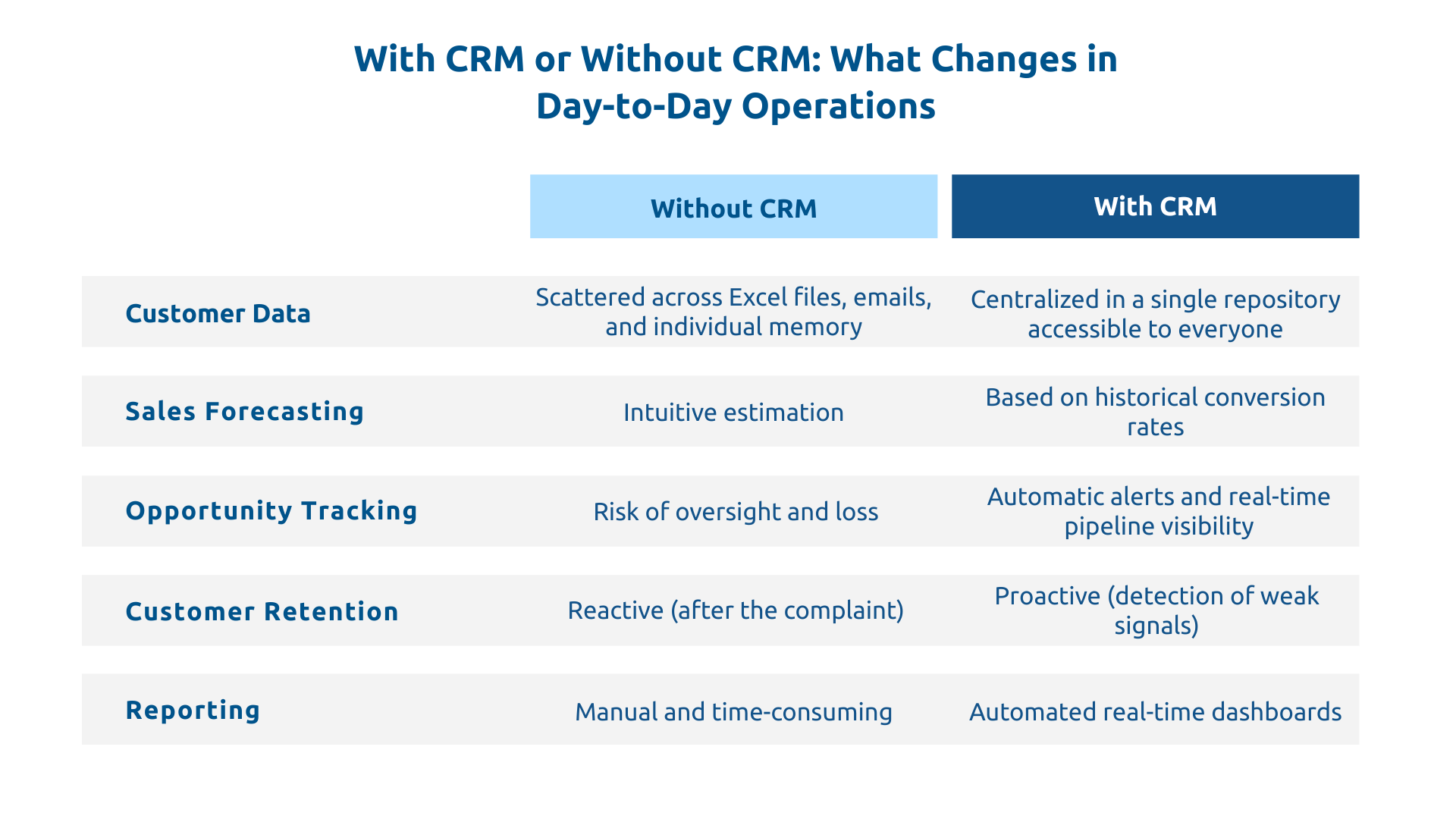
Silos are a recurring problem in the business world, with customer data scattered across sales CRM, marketing databases, support tickets, and ERP. Each department has some pieces, but no one sees the complete picture.
In response, CRM creates a single source of truth for contact details, interaction histories, preferences, purchases, tickets, and behavioral signals. All information is consolidated into an actionable customer profile, meaning that throughout the relationship, the salesperson has everything they need to offer the customer the right solution at the right time.
With a CRM, all opportunities are visible step by step : prospecting, qualification, negotiation, closing. Forecasts are based on historical conversion rates, not estimates. Bottlenecks are identified, and at-risk deals are flagged before it's too late.
Sales management shifts from intuition to data, from "we should make €500K this quarter... I hope" to a precise reading of the current pipeline, closing probabilities, and priority actions. In other words, management becomes predictive and data-driven.
Most salespeople spend valuable time on administrative tasks such as updating records, sending follow-up emails, or searching for scattered information. However, CRM automates all of this and allows teams to focus on what they're there for: selling.
Thus, from appointment creation to email sequences, quote generation, and process templates, repetitive tasks are executed without manual intervention. Furthermore, theonboarding of new sales team members is accelerated because processes are documented and customer knowledge is capitalized.
It is generally accepted that acquiring a new customer costs more than retaining an existing one. Yet, many organizations invest most of their resources in acquisition.
Here again, CRM provides a solution by detecting weak signals such as a customer who no longer buys, whose satisfaction score is decreasing, and who responds less to communications. Following the detection of these signals, an alert is triggered, allowing the salesperson to call quickly, identify the problem, and recover a customer who was about to leave, all before the situation becomes irreversible.
Furthermore, CRM also identifies up-sell and cross-sell opportunities, segments customers according to their potential, and enables differentiated actions based on their profile.
Through modern CRMs, static mass campaigns disappear in favor of personalized and automated journeys.
To illustrate, imagine a prospect who downloads a white paper. Automatically, this prospect is integrated into a two-week nurturing sequence. If they open several emails and view a pricing page, they are considered sales-qualified and assigned to a salesperson who will then have the full context.
The lead scoring feature assigns a score to each contact based on their engagement and profile. Moreover, with dynamic segmentation, lists are updated in real-time. Thanks to all these tools, the marketing ROI is easily measurable since each lead is traced back to its source, and each campaign is evaluated based on the revenue it actually generates.
For practical purposes, it is recommended to start with one or two simple workflows and gradually increase complexity later, as over-automating from the start is the best way to lose control.
Today, the integration of AI into modern CRMs produces tangible results across three main areas:
Regarding Dynamics 365 Sales, its advanced analytics features leverage historical data to identify common characteristics of won opportunities and prioritize accordingly.
A customer often switches from one channel to another without realizing it: email, chat, phone, social media. That said, they expect the company to remember.
This omnichannel approach is only possible if a central system orchestrates all interactions. As you can imagine, this is the role of CRM: every advisor, whether sales, support, or marketing, sees the complete history. No repetition, no contradiction, no break in the experience.
To implement omnichannel capabilities, map all your current customer touchpoints and ensure your CRM can record their data flows.
The real-time dashboards of a CRM are a significant improvement over sales meetings based on gut feelings.
In fact, all information is directly available:
Furthermore, when coupled with Power BI, the CRM enables advanced cross-analysis with ERP data. Ultimately, decision-making becomes reactive and grounded in operational reality.
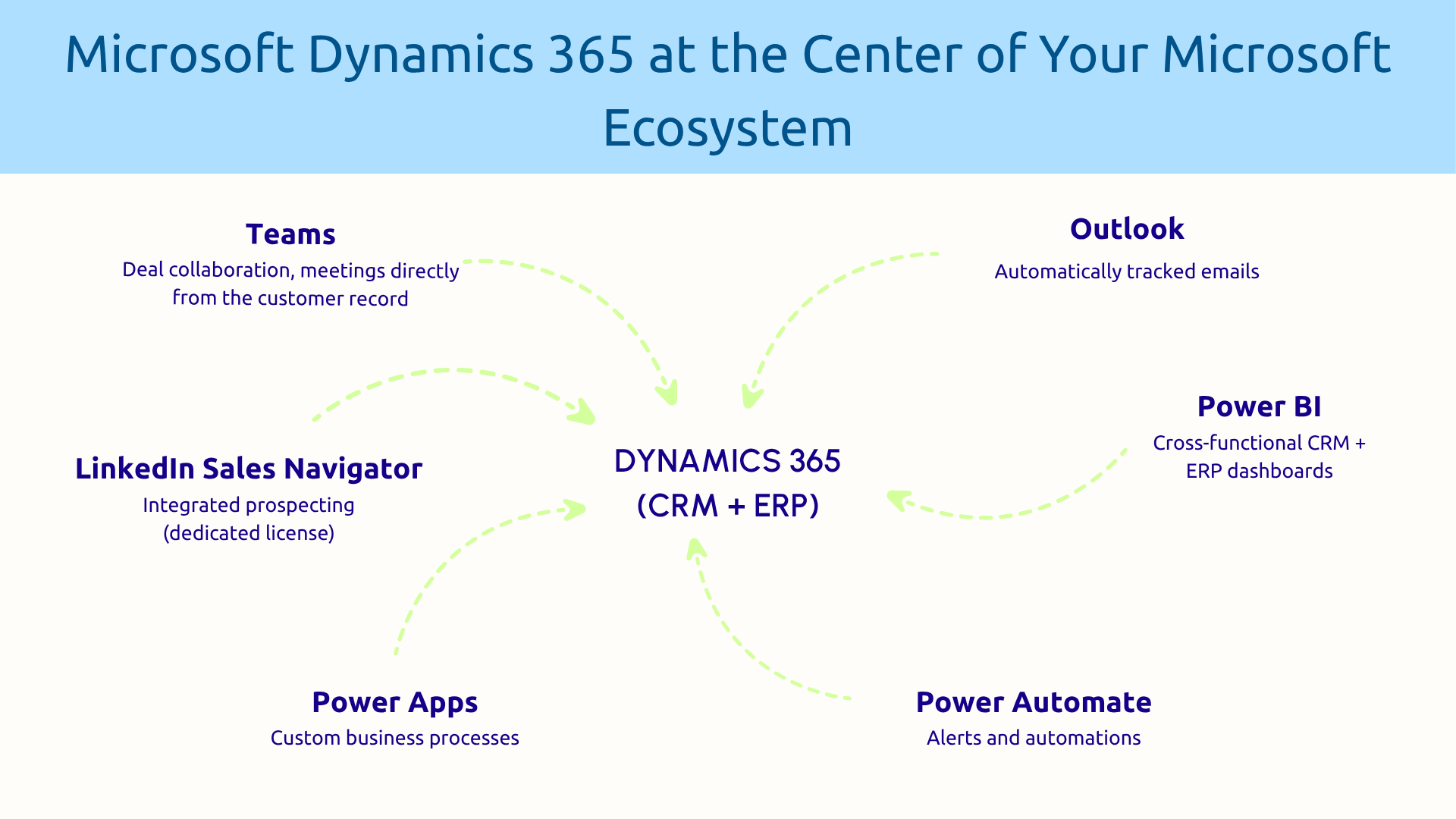
Dynamics 365 Sales is not an isolated CRM. In fact, its integration with LinkedIn Sales Navigator (available with a dedicated license) allows you to prospect directly from the CRM. Meanwhile, Outlook automatically tracks sent and received emails. As for Teams, it facilitates collaboration on complex deals.
What's more, the native AI capabilities provide opportunity scoring, close predictions, and next-best-action recommendations, while configuration and quote generation features also allow for the automation of some CPQ processes, potentially via add-on modules as needed.
In summary, for organizations already heavily invested in the Microsoft ecosystem, Dynamics 365 offers a smoother integration and reduces the need for third-party connectors, with a consistent, unified interface across all tools.
Dynamics 365 Customer Service centralizes ticket management, with intelligent routing based on agent skills and workload. The knowledge base automatically suggests relevant articles based on the ticket context, while the customer portal (Microsoft Power Pages) allows users to create tickets, track their status, and access FAQs independently.
The omnichannel feature also unifies email, chat, phone, and social media into a single interface. Satisfaction is thus measured after each interaction and consolidated into management dashboards.
For support teams already under pressure, the best starting point remains the knowledge base: digitizing the 20% most frequent questions is often enough to significantly reduce the volume of incoming tickets.
The true power of Dynamics 365 comes not only from the CRM but also from the continuity it creates with the rest of the work environment.
Thus, sales reps collaborate on deals in Teams without leaving the CRM context. Simultaneously, financial data from the ERP enriches the customer record in real time. Power Automate, for its part, triggers alerts and actions at the right moment, without manual intervention. Finally, Power BI consolidates everything into dashboards accessible at every level of the organization.
It is this overall coherence that distinguishes Dynamics 365 from a classic CRM. For companies already invested in the Microsoft ecosystem, this translates into less friction, fewer silos, and naturally faster adoption.
Human adoption plays a decisive role in the success of a CRM project, more so than technology alone. Furthermore, methodology, training, and support are as critical as the choice of tool, especially since a poorly adopted CRM yields no results, no matter how powerful it may be.
Do you want to assess the maturity of your customer relationship management and identify your transformation levers? Request a scoping workshop to map your current situation and build a roadmap tailored to your organization.
It's the system designed to help businesses never lose sight of their customer relationships. It centralizes everything you know about your prospects and customers (history, purchases, complaints) and makes it accessible to all teams in real-time. The result: fewer missed opportunities, customers who don't have to repeat themselves, and better-informed business decisions.
They are two complementary tools, not competitors. The ERP manages what happens after the sale: orders, accounting, and inventory. The CRM handles everything related to the customer relationship: leads, opportunities, and satisfaction. In Dynamics 365, the two are natively linked: a won opportunity in the CRM can directly trigger an order in the ERP, without re-entry.
The decision depends less on features and more on context. If your organization already uses Office 365 or Teams, Dynamics 365 will integrate natively, eliminating the need for third-party connectors. For a heterogeneous environment, the ability to integrate with the existing IT system is the central criterion. And regardless of the solution chosen, user adoption remains the number one success factor.
Our experts share their vision of best practices and technological trends to ensure the success of your digital transformation.