How to build an efficient and sustainable IT cloud architecture?
Efficient and sustainable cloud architecture: principles, Azure best practices, and methodology to align IT and business. Expert guide.

Your applications no longer crash but degrade slowly, silently, until a user complains. By then, the incident has already happened and you are discovering it after your customers.
This is the daily life of many CIOs who manage hybrid IS because traditional monitoring was designed for another world, that of stable monoliths and predictable architectures. However, faced with the complexity of current cloud architectures, it is no longer enough.
Computational observability promises to change the situation. This article discusses in detail what it is, presents its three pillars and shows how the Azure ecosystem makes it possible to implement it concretely in a hybrid IS.

Observability is a concept derived from control theory: a system is said to be observable if its internal state can be deduced from its outputs. Transposed to IT, this means the ability to understand what is happening inside your systems by analyzing what they produce (i.e. logs, metrics, and traces).
But what fundamentally distinguishes observability from traditional monitoring is its ability to answer questions you haven't asked yourself yet. Monitoring monitors what you have decided to monitor in advance while observability allows you to explore unexpected behaviors, to investigate unknown causes.
To take an analogy, monitoring is similar to a car dashboard because it displays predefined indicators (temperature, speed, oil level, etc.) For its part, observability works more like the black box of an airplane: it records everything, to understand any scenario afterwards.
Traditional monitoring is therefore based on the following principle: you define what you want to monitor, you set thresholds, you receive alerts. This approach works very well on stable and predictable systems but becomes insufficient as soon as the architecture becomes more complex.
Let's take a typical incident: your application is slow. Your monitoring tells you that a server's CPU is high. However, he doesn't tell you why : neither the request in question, nor the user (s) impacted, nor the saturated downstream dependency. So you spend hours looking for this information.
These shortcomings stem from structural limitations:
In fact, classical monitoring is adapted to the monolithic architectures of the 2000s but was not designed for the distributed cloud architectures that are in use today.
In a modern hybrid IS, a user request will likely cross, for example, an on-premise application, an Azure API gateway, three containerized microservices, a managed database, and a third-party authentication service. All in a few hundred milliseconds.
In this context, complexity is now the norm: resources are ephemeral (containers that appear and disappear according to auto-scaling), deployments are frequent (up to several releases per day in the most mature organizations), and dependencies are multiple. Therefore, without observability, flying this type of IS is the same as driving blindfolded.
Business challenges are significant: every minute of unavailability has a measurable cost, and a deterioration in perceived performance is enough to make a customer journey abandon. Users no longer tolerate slowness and IT teams are under pressure to ensure increasingly stringent SLAs in an increasingly complex environment.
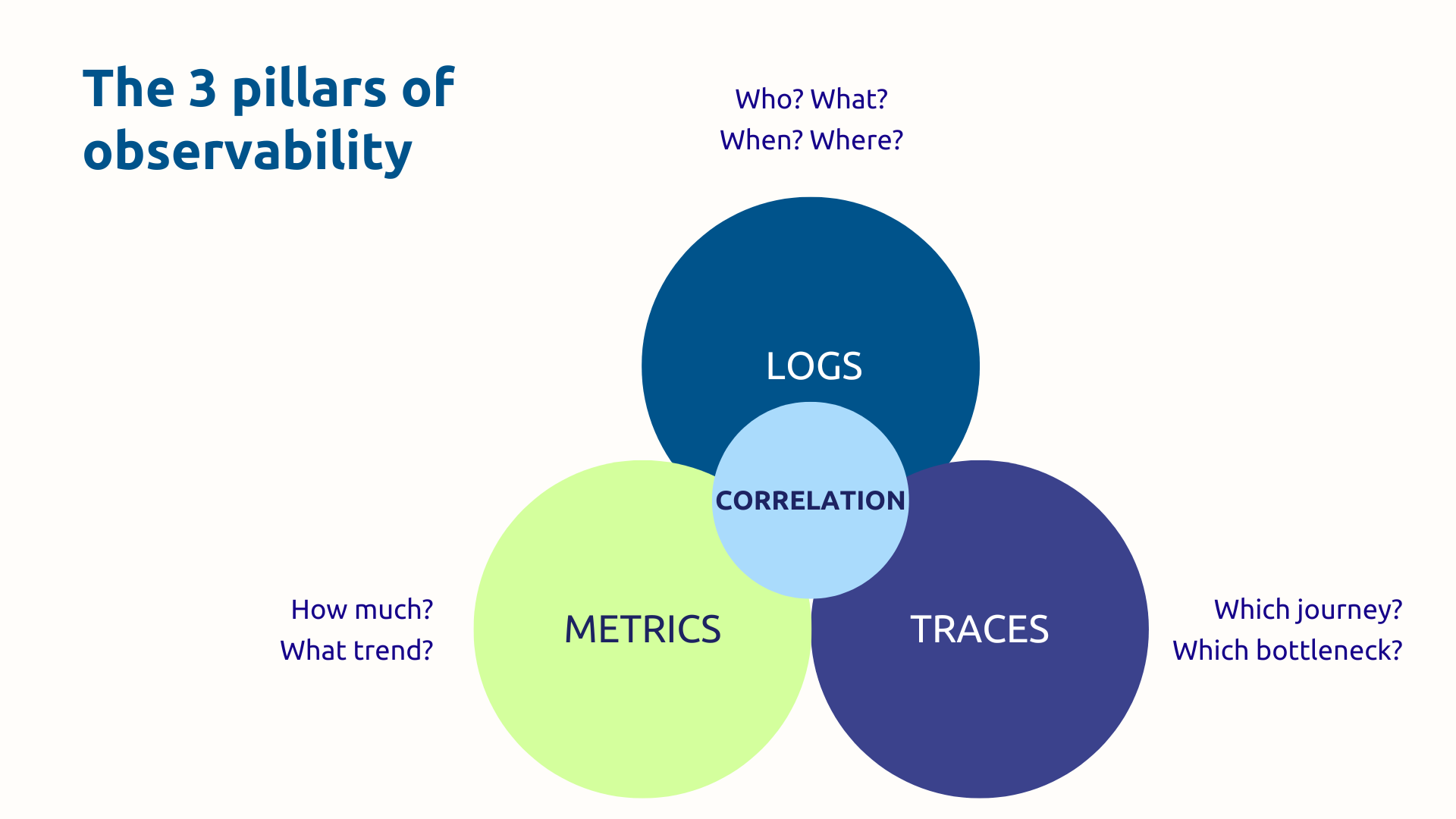
Logs are time-stamped records of everything that happens in your systems: errors, transactions, user actions, status changes. They are the ones who answer the questions.”Who? What? When? Where?”
A structured log (at JSON format) is much more usable than a free text log: it can be indexed, filtered and correlated automatically. Thus, once centralized in a single space, logs from all your sources (applications, infrastructure, security, audit) become a highly effective investigative tool.
Even though volumes can be considerable, storage costs add up, and you need to distinguish signal from noise, as long as your logs are properly configured, you will be able to trace exactly what happened during an incident. For example, every step of an e-commerce transaction, from adding to the cart to confirming payment.
Metrics are numerical measurements performed over a given period of time: CPU usage, latency, error rate, number of requests per second. They answer the question “How much? ” and allow you to visualize the overall health of your systems.
The main advantages of metrics are low storage costs and efficient aggregation capacity. Thanks to all this, a 24-hour latency graph immediately reveals an anomalous peak during peak hours. In addition, alerts based on thresholds (or better, on the detection of anomalies) allow for rapid reaction.
On the boundary side, metrics lose granularity and lack context. Indeed, an isolated metric tells you that something is happening, but rarely why. This is where the third pillar comes in.
Distributed tracing makes it possible to follow the full path of a request through all the services of your architecture. At each stage (called span), the duration and metadata of the call are recorded. All the spans constitute a complete trace, visualized in the form of a waterfall diagram.
Imagine an online purchase that links the query sequence 15 times: catalog → basket → stock check → payment → notification. Thanks to the trace you know that the payment service responds in 1.8 seconds while all the others respond in less than 50 milliseconds. You have thus identified the bottleneck in a few clicks.
In this regard, the OpenTelemetry standard has established itself as the reference for instrumentation applications in a portable and interoperable way. It is supported natively in Azure, including via Azure Monitor and OpenTelemetry compatible SDKs.
Taken separately, logs, metrics, and traces are already useful tools. When correlated, they become powerful.
To illustrate, if we consider the following typical workflow:
Thus, hours of manual diagnosis can be reduced to a few minutes of targeted investigation.
However, this correlation is impossible with siloted tools because it requires a unified platform that circulates and connects the three types of data. That is precisely what the Azure ecosystem offers.
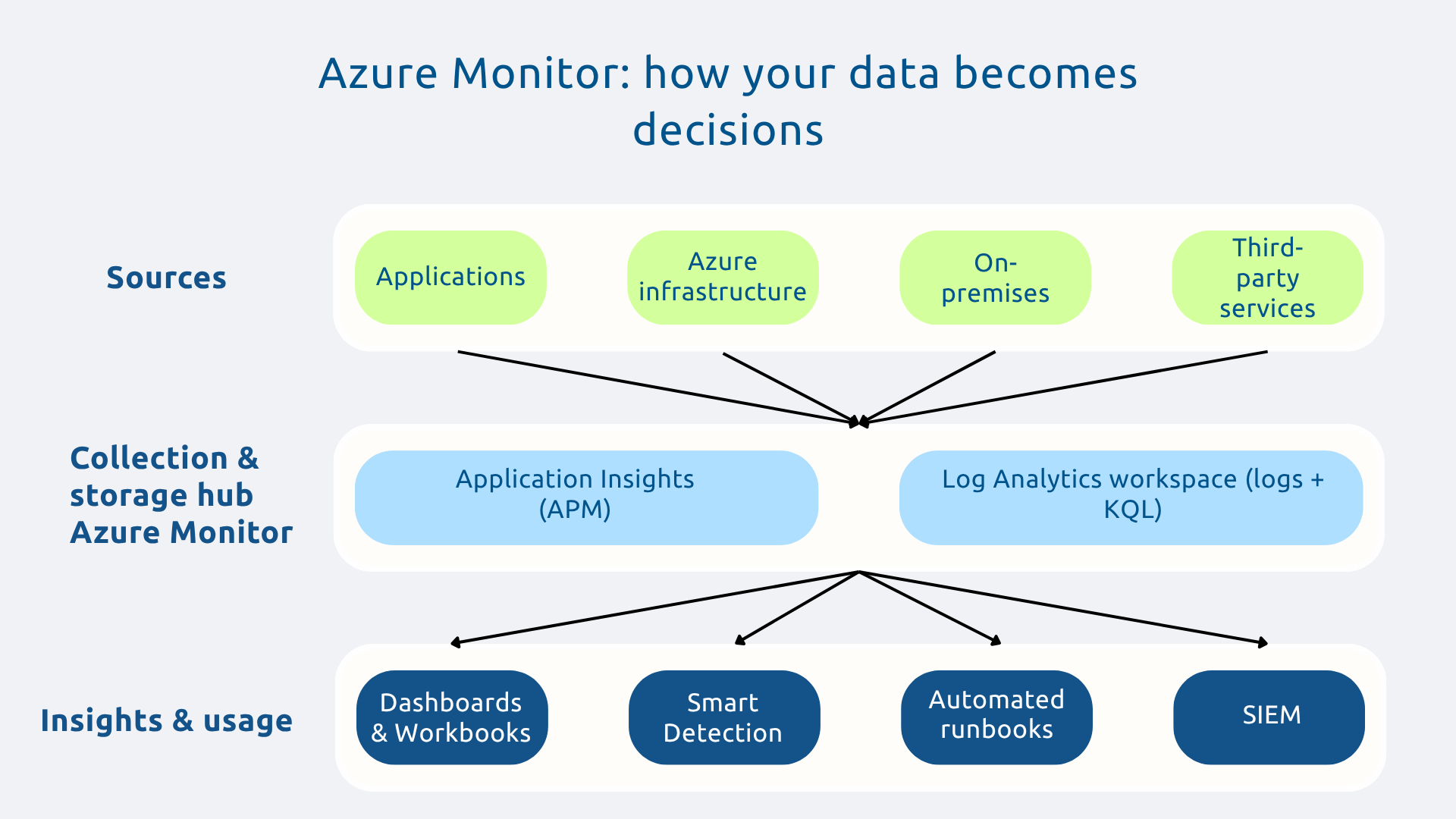
Azure Monitor is the central hub of any observability strategy on Azure. Indeed, it collects, aggregates, and analyzes telemetry data from across your environment: native Azure resources, applications, on-premise infrastructure via Azure Arc, and even other clouds.
All data converges into a centralized storage space (Log Analytics workspace), from where you can trigger alerts, create interactive dashboards (workbooks), configure autoscaling, and generate reports. The integration is native with all Azure services, which significantly reduces the instrumentation load.
Application Insights is the solution for APM (Application Performance Monitoring) from Microsoft. It offers complete visibility on the behavior of your applications: latency, error rates, dependencies, exceptions, slow requests.
Its flagship feature, the Application Map, automatically generates a visual map of your microservices architecture and all dependencies, with associated response times. At a glance you can see where are the bottlenecks and what components are in trouble.
Additionally, Application Insights supports a variety of languages, including.NET, Java, Node.js, Python and integrates natively with Visual Studio and Azure DevOps. It also includes analytics on user behavior (sessions, journeys, page views) to correlate technical performance with real user experience.
Log Analytics is the query engine that turns terabytes of raw data into actionable insights. All your logs, regardless of their source, are centralized in a single workspace, searchable via the KQL language (Kusto Query Language).
Thanks to the latter, in a few lines, you can find all the 500 errors of the last 24 hours, distribute them by service, calculate their correlations with traffic peaks. What's more, queries can be saved, transformed into automatic alerts or integrated into dashboards.
In addition, data retention is configurable according to your regulatory and operational needs. Finally, Log Analytics also integrates with Microsoft Sentinel for security use cases (SIEM).
Azure Monitor and its components don't work alone. The ecosystem is enriched with several complementary tools that cover all observability needs:
The advantage of this suite is that it is integrated by design : no need to assemble disparate third-party solutions and manage integration frictions because Azure offers a cohesive ecosystem that avoids tool silos as well as the Shadow IT.
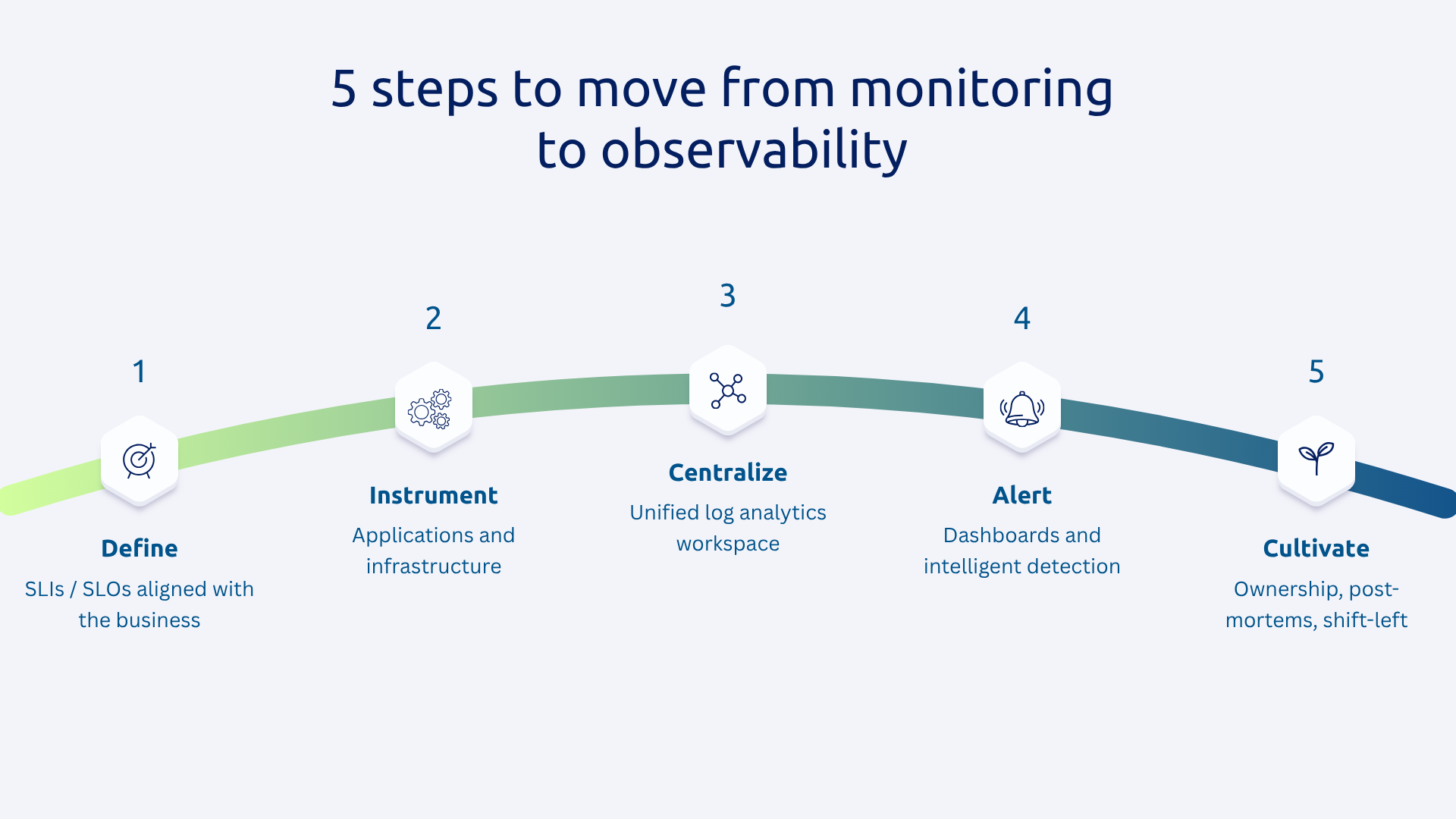
Before you instrument anything, ask yourself the essential question: What is it that really matters for your business?
The answer should be formulated in:
SLI and SLO should be aligned with critical user journeys and business priorities. This framework, inspired by Google SRE practices, ensures that observability generates actionable insights rather than a torrent of meaningless data.
The instrumentation is the indispensable initial investment because the value of observability that you will get depends on its quality.
The Application Insights SDKs and OpenTelemetry libraries make it possible to implement distributed tracing, metric collection, and structured logs with minimal code.
Azure Monitor agents automatically collect data from VMs, containers, and managed services.
We recommend perform this step gradually : start with the most critical services for the business, validate the results, then extend. Standardize instrumentation practices so that all teams produce consistent and correlatable data.
Centralization consists in transforming a collection of disparate monitoring tools into a true observability platform. To do this, set up a Log Analytics single workspace as a point of convergence from all of your data sources.
The correlation is based on the propagation of trace identifiers (trace IDs) across all service calls. When an ID is shared between the logs, metrics, and traces of the same request, navigation between the three pillars becomes fluid and instantaneous.
The Application Map is then automatically generated from Application Insights, giving you a real-time visualization of your architecture and its dependencies.
A good dashboard should guide you to the essentials. Also, design differentiated views according to audiences:
As a reminder, alerts should be based on your SLOs. Note that Azure Monitor offers intelligent detection capabilities to identify anomalous behavior without the need to manually configure thresholds. In addition, by coupling these alerts to automated runbooks, we allow the system to initiate remediation without human intervention on the most common cases.
As a result, fatigue alerts are reduced by notifying teams only for events that really require action.
Observability is as much a cultural as it is a technical transformation.
This means assigning clear ownership: each team is responsible for the observability of its own services. Likewise, incident post-mortems become learning exercises that are documented and shared. Thirdly, instrumentation should be part of the definition of “done” in development sprints, it is the principle of Shift-left observability.
Finally, the value is measured: MTTR (average resolution time), MTTD (average detection time), availability rate. These KPIs make it possible to concretely demonstrate the return on investment of the approach and to maintain adherence over time.
The three pillars intertwined in a unified platform provide the end-to-end visibility that modern architectures require. However, technology is not enough: you need a clear strategy, rigorous instrumentation, and an aligned team culture.
Indeed, as IS becomes more complex, organizations that master observability will have a decisive advantage: the ability to guarantee the user experience, reduce incident costs, and innovate faster, with confidence.
Is your current monitoring strategy sufficient to manage your hybrid IS? Request your audit from Askware to identify your blind spots and build your road map to complete observability.
Monitoring monitors what you have decided to monitor in advance. Observability allows you to investigate behaviors that you did not anticipate. In practice: monitoring tells you “something is wrong”, observability helps you understand why.
Logs (detailed events), metrics (numerical trends over time) and distributed traces (complete journey of a request through your services). It is their correlation in a unified platform that produces true observability.
The MTTR is often high not because the resolution is complex, but because it takes too long to diagnose. An alert on a metric takes you directly to the traces concerned, then to the precise logs. All in minutes rather than hours.
Our experts share their vision of best practices and technological trends to ensure the success of your digital transformation.

