Data architecture: designing a scalable and secure foundation for your data
Discover the principles of a modern and scalable data architecture. Askware guides you on Azure to structure, secure and value your data.

Despite having deployed Microsoft Teams, SharePoint and OneDrive, having acquired the licenses and given access to the teams, nothing helps: the files still circulate by email, the teams use Dropbox in parallel and nobody really knows who has access to what.
This type of situation happens more often than you think. According to McKinsey, employees would waste on average nearly a quarter of their working time looking for information. However, since the tools supposed to solve this problem are already there, the problem comes from a lack of orchestration.
That is why, in order to accelerate the transformation, it is not necessary to add new software but to build a coherent ecosystem where collaboration, security and business processes fit together fluidly. This is precisely what is referred to today as Digital workplace ; and that's what this article invites you to explore, especially in the Microsoft ecosystem.

A digital workplace is a consistent digital work environment which integrates four inseparable dimensions.
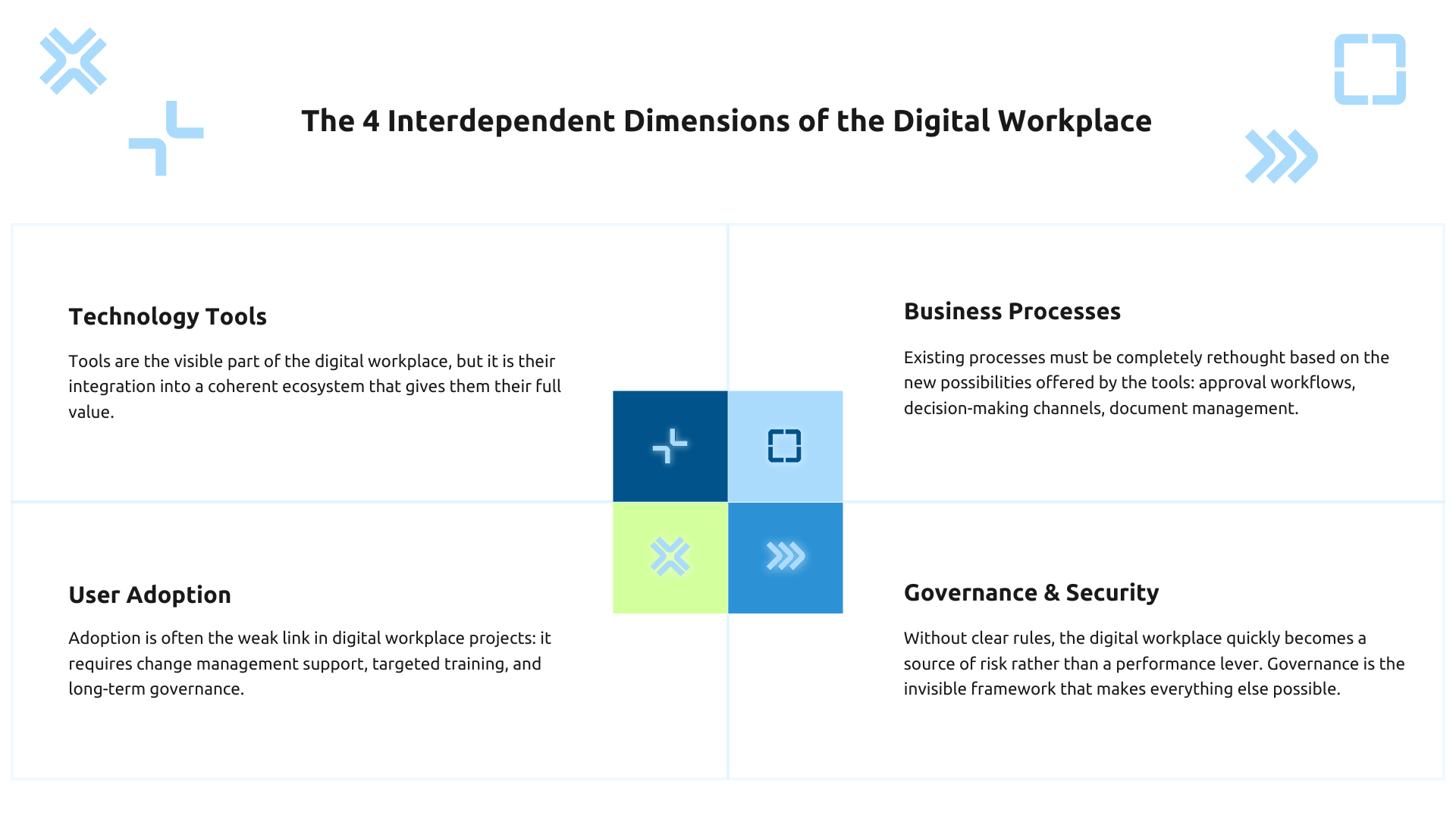
The digital workplace is not just about tools.
In fact, a company can have 10 powerful digital tools and suffer from low productivity if they do not communicate with each other. Conversely, a well-orchestrated Microsoft 365 ecosystem—where Teams, SharePoint, SharePoint, OneDrive, and Planner revolve around the same data and identities—creates a seamless employee experience, where information flows naturally and securely.
Behind any mature digital work environment are several technological building blocks, namely:
These pillars should work together, not in silos. It is this native integration that is the strength of the Microsoft ecosystem:
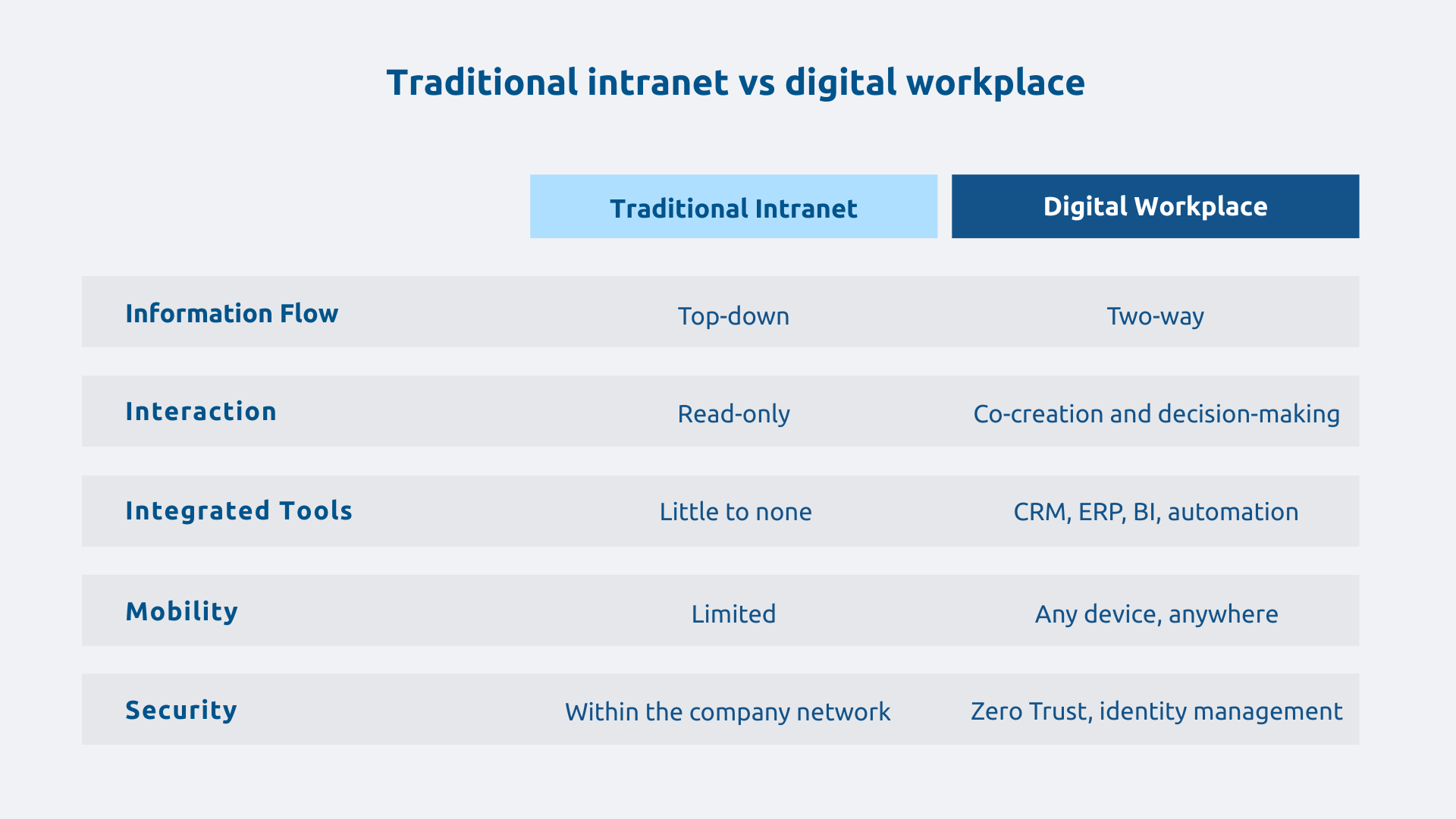
The classic intranet is a space for passive consultation: top-down information, internal news, and forms to download are published there. The digital workplace, on the other hand, is a active work environment where we collaborate, automate, decide and produce.
To put it more simply: where the intranet is similar to a corporate billboard, the digital workplace is comparable to a fully equipped office in which one works.
This explains why many organizations that have modernized their intranet remain dissatisfied: they have improved the panel but without building or equipping the office.
According to Forrester Research, businesses with a mature digital workplace significantly reduce the time spent looking for information. We are talking about several hours recovered per employee per week ; as much time available for higher-value tasks.
In addition to the gain at the individual level, all the fluidity of the group is changing. Indeed, when teams share the same document spaces, the same validation workflows and the same communication channels, then decision-making processes accelerate, document validation times shorten and back and forth by email is a thing of the past.
Hybrid work is the new standard and the digital workplace is the structural manifestation of this because it erases the boundaries between office and remote work ensuring the same user experience regardless of location or device.
Let's imagine a salesperson on the go. From his smartphone, he accesses his customer file in Dynamics 365, updates an opportunity in Teams, and shares a presentation stored on SharePoint; all without leaving his usual work environment, with the same levels of security as in the office.
It is also a A lever for attracting talent. New generations of employees expect a coherent and mobile digital experience. In this respect, unlike a fragmented work environment, a well-designed digital workplace sends a strong signal of modernity.
According to Gartner, the Shadow IT (applications not approved by IT) represents 30-40% of IT spending in big companies. In concrete terms, this means redundant licenses, scattered support costs, and uncontrolled security risks.
Why do employees bypass IT? Not out of malice, but out of necessity: approval processes are slow, the tools available do not meet needs, and operational pressure is strong.
Structuring a digital workplace around a Microsoft 365 base makes it possible not only to alleviate these problems but also to:
Investing in a structured digital workplace is less expensive than experiencing the dispersion of tools, not even counting the cost of a security incident related to an unapproved application.
A digital workplace that processes personal data should incorporate security and regulatory compliance requirements by design, not as an addition after the fact. The principle of Security by Design is no longer a recommendation: it is becoming a regulatory requirement with the RGPD, NIS2 and the Cyber Resilience Act.
In the Microsoft ecosystem, Microsoft Purview allows you to automatically classify sensitive documents, apply DLP (Data Loss Prevention) rules and generate the audit trails necessary to demonstrate compliance. Concretely: a document containing personal data in SharePoint can be automatically marked as confidential and have sharing restrictions applied, without human intervention.
In a distributed work environment, the traditional security perimeter, namely the corporate network, no longer exists: employees access data from home, from an airport, from a personal device. To adapt to this new order of things, it is necessary to adopt an approach of Zero Trust. That is, never trust by default, always check the identity and the context of access.
In the Microsoft ecosystem, this results in conditional access policies in Microsoft Entra ID (formerly Azure Active Directory): A collaborator who attempts to access SharePoint from an unmanaged device will be subject to multi-factor authentication (MFA) and will not be able to download files. Access is possible, but supervised according to the level of risk assessed in real time.
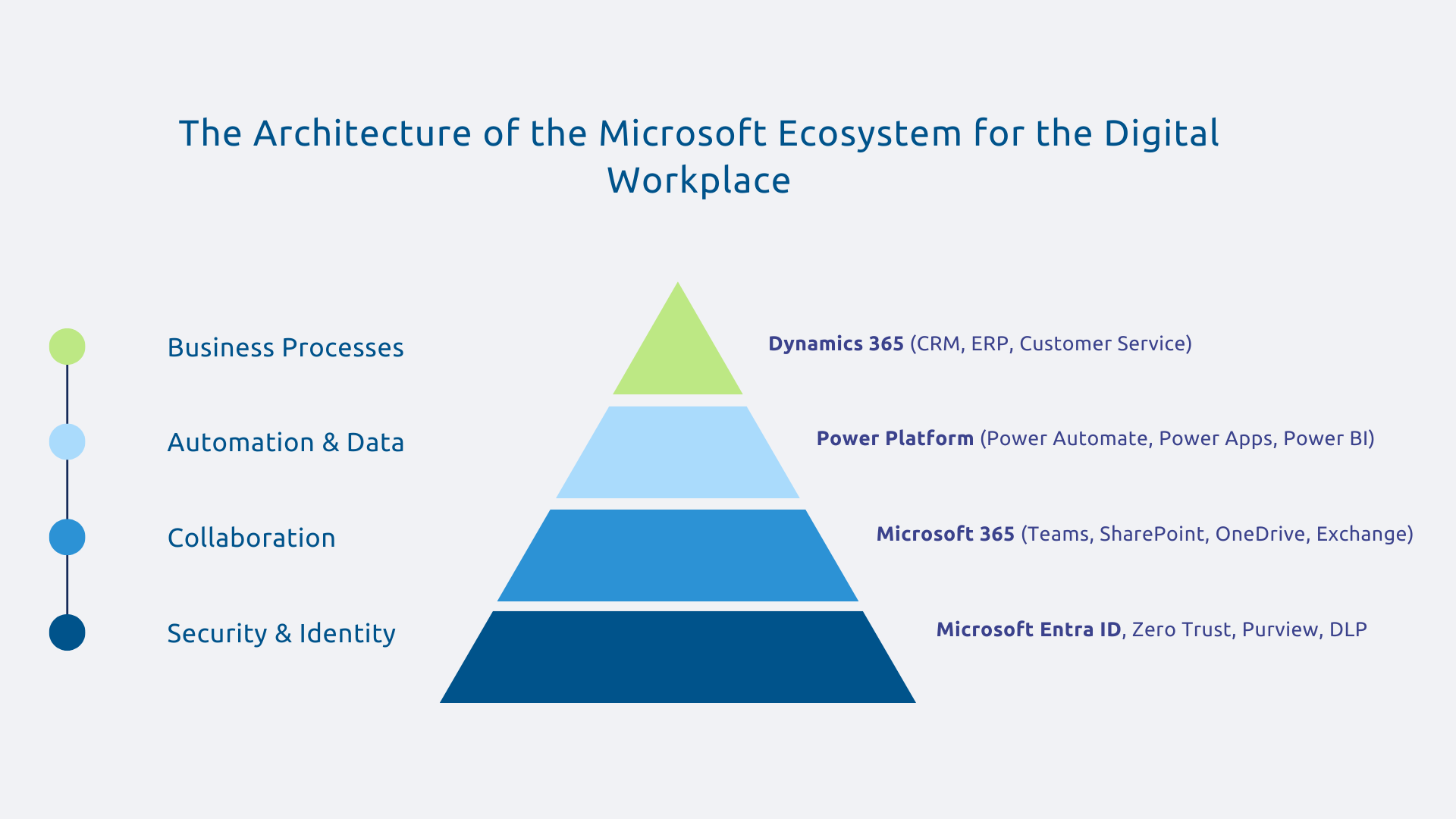
The strength of the integrated platform that is Microsoft 365 lies precisely in the coherence that exists between its components. Teams, SharePoint, OneDrive, Exchange, Exchange, Viva Engage: all share the same identity infrastructure, the same search engine, the same security policies.
This native integration produces concrete effects. Thus, a file created in Teams is automatically stored in SharePoint, accessible from OneDrive on mobile, co-editable in real time with a colleague, and protected by the security rules defined in Entra ID. No extraction, no copy, no manual synchronization.
Microsoft 365 is available in several adapted plans (Business, E3, E5) according to the size and needs of the organization, especially in terms of advanced security features for the most demanding environments.
Teams is the interface for conversations, meetings, calls, and integrated applications. For its part, SharePoint is the documentary and organizational base of business knowledge. The two are complementary and their architecture is linked: each Teams team automatically creates an underlying SharePoint site for document storage.
The best practice is simple: Teams to work on a daily basis, SharePoint to structure and maintain. Teams welcomes exchanges, decisions, and ongoing files while SharePoint archives, organizes and makes consolidated knowledge accessible.
This distinction avoids one of the most common pitfalls in Teams deployments: the proliferation of teams without governance, which quickly leads to another type of silos, digital this time.
Power Platform includes three complementary components:
A concrete example: a fully digitized leave request process — Power Apps form in Teams, Power Automate workflow for hierarchical validation, automatic update of the SharePoint schedule, notification in Teams. Zero emails, zero manual reminders.
Thus, Power Platform transforms the digital workplace into a business innovation platform, by allowing the teams themselves to create their own automations without always depending on IT.
The digital workplace must also include business tools. That's where the native integration between Microsoft 365 and Dynamics 365 comes in, made possible by Dataverse, the data platform common to the entire Microsoft ecosystem.
In concrete terms, a salesperson can directly access their Dynamics 365 customer files from Teams, create an opportunity, share a quote — without leaving their daily work environment. CRM is no longer an isolated tool that can be consulted separately: it is becoming a dimension of the digital workplace.
It is this overall vision (collaboration, automation and business processes in a coherent ecosystem) that Askware implements in its digital workplace projects. Expertise is not limited to technical deployment: it integrates governance, security, and user adoption to make transformation sustainable.
In summary, a successful Digital Workplace is the culmination of a strategic transformation that combines tools, processes, security, and adoption. Companies that have understood this are no longer asking “what tools to deploy”, but “how to orchestrate our ecosystem to create value”. This is an issue that will take on a new dimension as AI, with Microsoft Copilot in mind, integrates into the Digital Workplace.
Is your digital workplace ready for what's to come? Askware offers you a maturity audit to identify areas for improvement and build a roadmap adapted to your context. Contact our Microsoft experts for an initial conversation.
The tools depend on the context and needs of each organization. In the Microsoft ecosystem, we generally find Teams for collaboration and communication, SharePoint for document management, OneDrive for individual storage, Power Automate for automated workflows, and Power BI for data-driven management. The important thing is not the list of tools itself, but their integration into a coherent ecosystem where information flows without friction.
Setting up a digital workplace is rarely done all at once. The effective approach starts with an audit of the existing system (tools in place, real uses, identified frictions) and then defines a target architecture adapted to business needs. Then comes technical deployment, followed by work to support change, which is often underestimated. It is this last component that makes the difference between a deployed tool and an adopted digital workplace.
The Intranet is a space for distributing information from the company to employees. You can read news, you can find forms, you can consult reference documents. The digital workplace is a work environment in its own right: we collaborate, we make decisions, we execute processes. It's a change in nature, not just in degree. Many organizations have modernized their intranet thinking about building a digital workplace and end up with a nicer, but still static, billboard.
Our experts share their vision of best practices and technological trends to ensure the success of your digital transformation.

