How to write technical specifications without hampering innovation?
Find out how to write technical specifications that frame your project without hampering innovation. Expert guide for digital transformation.

How many times did you deploy an Azure environment quickly, only to discover 6 months later that the configuration did not meet your regulatory requirements? Most CIOs are familiar with this scenario: the pressure of time-to-market forces you to go quickly so that security ends up being treated as a patch rather than a prerequisite.
However, the more your cloud infrastructure expands, the more manual configurations diverge, the more compliance gaps accumulate, and the more expensive remediation is. Therefore, reconfiguring after the fact multiplies the risks of error and mobilizing IT resources that are already under stress.
Microsoft Azure blueprints were precisely designed to break with this logic. In this article, you will discover what they actually are, why they changed the game for cloud governance, how their successors are part of the same philosophy, and what indicators to follow to measure their value.

One Azure blueprint is a set of predefined templates that automatically orchestrate the deployment of Azure resources that comply with security and governance standards. Concretely, it brings together in a single package everything a cloud environment needs to be operational and compliant from the moment it is created:
The solution becomes particularly interesting when compared to a manual approach. Imagine that you need to deploy 5 new Azure subscriptions for as many different projects. Without industrialization, a configuration can take several days or even several weeks depending on its complexity. With a Blueprint or Infrastructure as Code approach, this same deployment can be automated and completed in a few hours, with a guarantee of consistency across all environments.
So Blueprints are not just a Time saver, but a guarantee of non-regression because each environment deployed respects exactly the same rules as the previous one.
This is where their true strategic value lies. Blueprints embody the principle of “compliance by design” : regulatory requirements are integrated directly into deployment models, rather than audited after the fact.
Concretely, a Blueprint can integrate a mapping between:
In addition, the versioning of blueprints ensures that no changes can be introduced without being documented and checked.
With Blueprints, compliance stops being a one-time exercise done before an audit to become a automated technical prerequisites, embedded in the DNA of each environment you deploy.
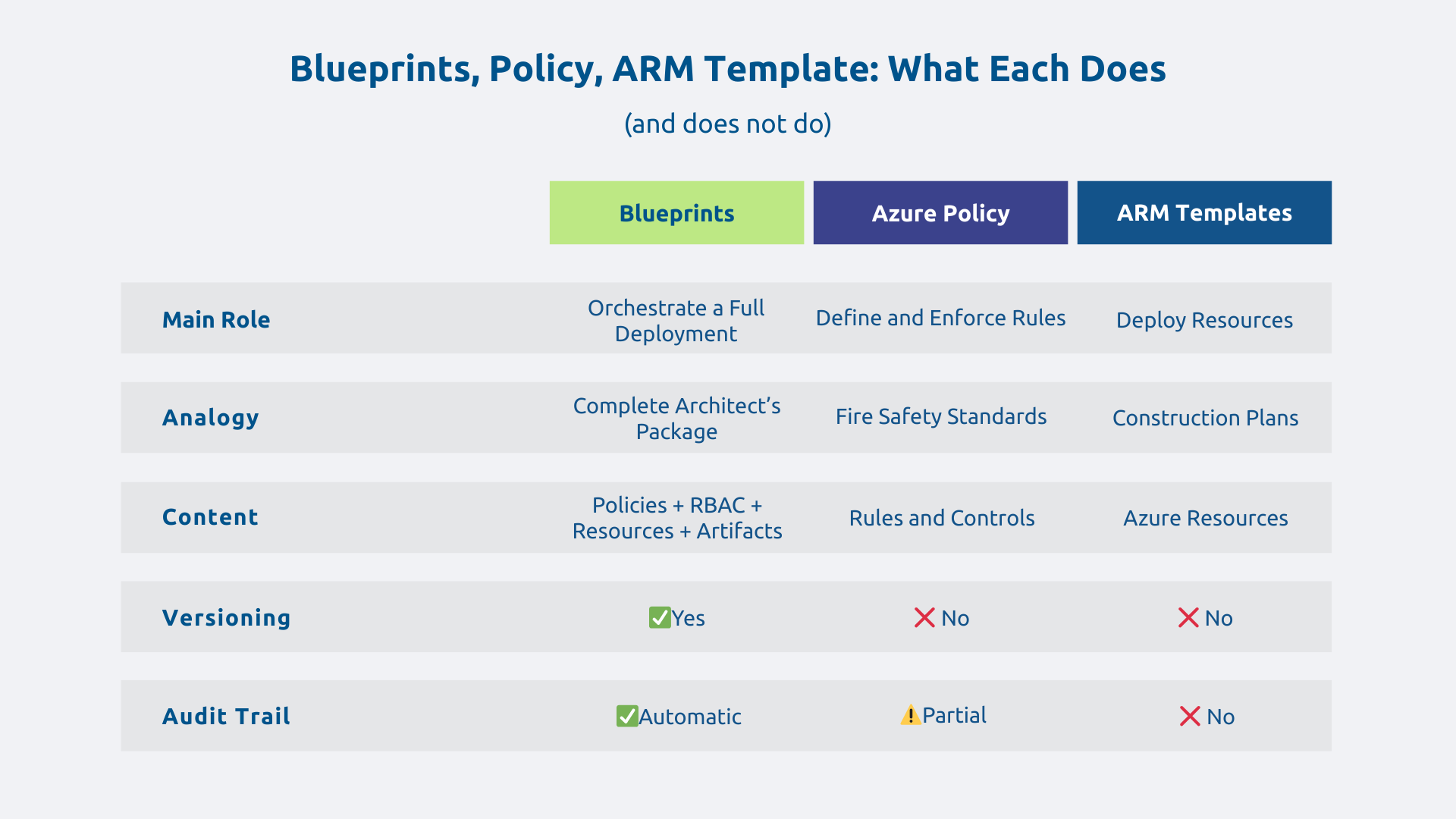
The Azure governance ecosystem may seem complex at first glance. These three tools are complementary, but their roles are distinct. To simplify, let's use the metaphor of a building:
The aim of Blueprints is therefore not to replace the other tools but to gather and coordinate them to ensure that each deployment meets all of your organization's technical, regulatory, and organizational requirements.
The apparent contradiction between speed and security is one of the most common IT dilemmas. Blueprints solve it by making security a native component deployment rather than an additional step.
Let's take a concrete example: a company needs to deploy 20 Azure environments (development, staging, production) for different teams. Without standardization, each environment is configured manually with the risk of differences between them. With Blueprints, the time savings can be significant and makes it possible to standardize environments, with a drastic reduction of configuration differences between each deployment.
Scalability is also a major benefit, so much so that replicating a compliant environment can now be done in just a few clicks.
Microsoft has historically offered predefined models covering standards such as ISO 27001, NIST SP 800-53, or PCI-DSS. These models are now gradually being migrated to Azure Policy Initiatives and Landing Zones, which are the reference approach in recent architectures.
From the outset, these models and initiatives incorporate technical controls that are aligned with the corresponding regulatory requirements. For the GDPR specifically, Microsoft offers compliance maps and dedicated Azure Policy initiatives, without any template alone guaranteeing regulatory compliance because regulatory compliance always involves an organizational dimension.
These models remain entirely customizable according to your specific constraints and the documentation generated automatically for each deployment considerably simplifies your audits. Regulatory compliance is thus transformed from a cost to be provisioned into a profitable technical investment.
Blueprints create a Common language between the IT department and business departments. By encompassing technical complexity into reusable templates, they allow non-IT teams to operate with greater autonomy, without exposing the organization to security risks.
Thus, a marketing department can deploy its own analytics environment on Azure very quickly, in a secure framework predefined by the IT department. She does not need to master the subtleties of Azure policies since the blueprint ensures that the environment respects the set rules, no matter what happens.
Supervised self-service reduces dependence on IT teams for routine deployments, frees up resources for higher value-added projects, and accelerates the company's ability to innovate.
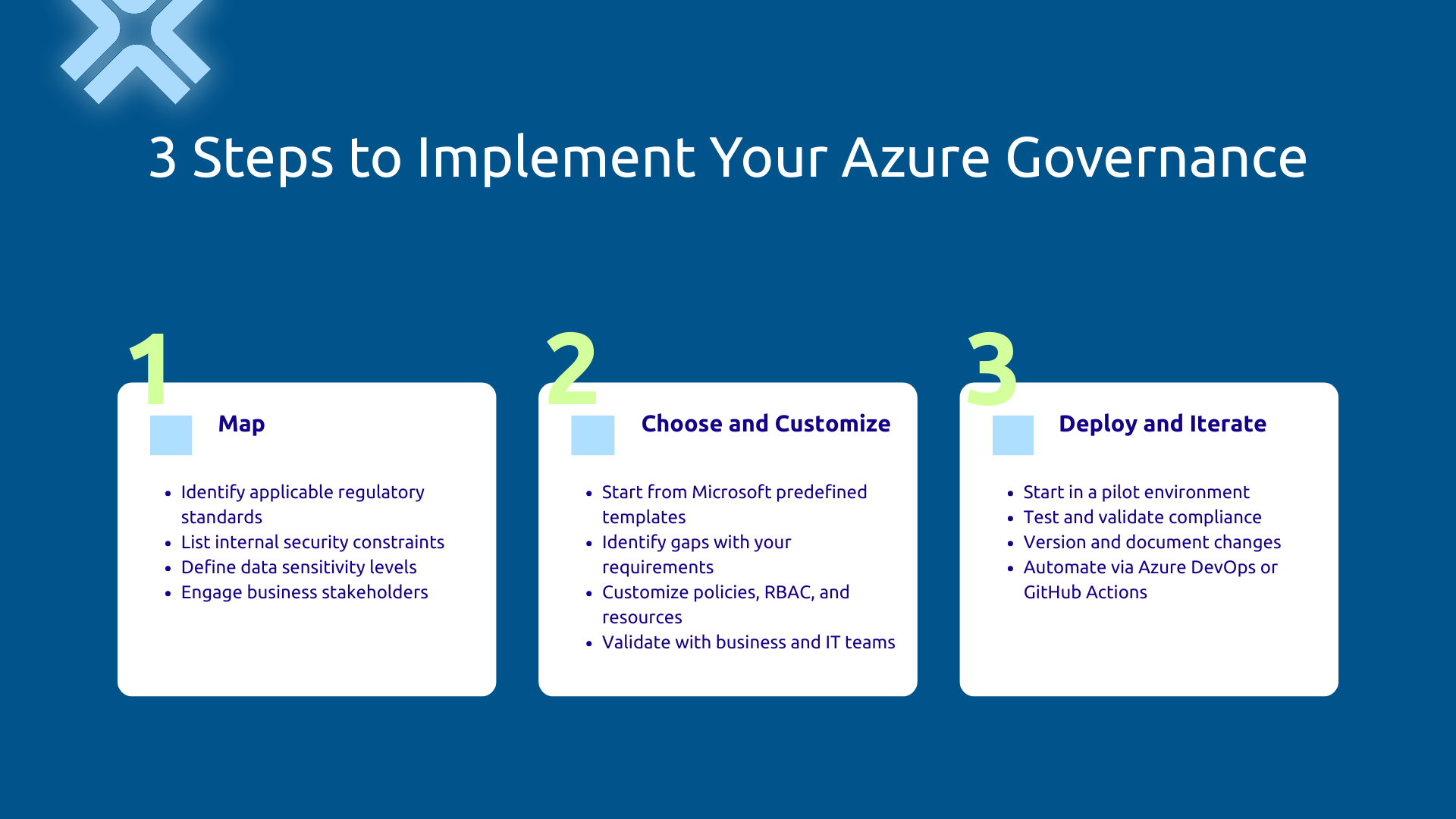
Before touching on the technique, start with a rigorous inventory. Identify the regulatory standards that apply to your sector, list your internal security policy constraints, and define the sensitivity levels of your data and applications.
Take good care involve business managers at this stage, not just IT. A blueprint designed without integrating real operational constraints will either be too restrictive or insufficiently protective. That is why the Business/IT alignment must be established before the first line of configuration.
No need to start from scratch. Microsoft provides compliance initiatives and models that cover key regulatory standards. So, start from these bases, identify the differences between the standard model and your specific requirements, then customize the artifacts (policies, RBAC, resources) while maintaining overall consistency.
An organization in the health sector, for example, can rely on compliance initiatives aligned with ISO 27001 and adapt them to meet the requirements of HDS (Health Data Host) certification, in collaboration with experts who are familiar with this specific framework.
Capitalize on existing Microsoft and adapt it intelligently is always more efficient than building a model from scratch.
Avoid the “big bang.” Start with a pilot environment (development or pre-production), test deployments, validate control compliance, and observe the impact on existing workloads before moving into production.
Manage your Blueprints like code (Infrastructure as Code): version them, document each evolution, plan a rollback plan. Note that integrating into an Azure DevOps or GitHub Actions pipeline makes it possible to automate deployments and maintain complete traceability of changes.
A blueprint evolves with your business needs, infrastructure, and regulations.
A few classic pitfalls frequently compromise the effectiveness of Blueprints:
The balance between security and agility is the key to success. You don't need too many blocking controls, or too few, so as not to open the door to risks.
Blueprints are an essential part of a governance strategy. They naturally align with Azure Management Groups to reflect organizational hierarchy, with Azure Policy for fine rule management and with Azure Cost Management for financial management of the cloud.
As part of the Cloud Adoption Framework from Microsoft, cloud governance now relies mainly on Landing Zones and Azure Policy Initiatives to structure large-scale deployments. The principles of automation and compliance by design embodied in the Blueprints remain at the heart of this approach: they are a bit like the “technical constitution” of your cloud, in other words, the fundamental rules that any deployment must respect.
Effective cloud governance combines technical tools and human organization: roles, processes and management tools form a coherent system.
Today, most IS are based on a hybrid environment combining on-premise infrastructure and Azure resources. Governance can be extended to on-premise resources via Azure Arc, relying primarily on Azure Policy to enforce consistent policies across cloud and on-premise environments.
In concrete terms, a company that is gradually migrating its historical IS to Azure can thus guarantee unified governance, with the same security policies applied consistently in both environments.
You cannot improve without first measuring. Also, to manage the value of your governance approach, follow these key indicators:
These indicators not only allow you to justify the investment internally, but also to demonstrate the maturity of your cloud governance to your partners, customers and regulators.
The principles supported by Microsoft Blueprints move from managed security and compliance after the fact to integrated cloud governance by design. Whether they are embodied today in Blueprints, Azure Policy Initiatives, or Deployment Stacks, the benefits remain the same, provided they adopt a structured and iterative implementation.
As regulations become stronger and cloud infrastructures become more complex, the question is no longer whether governance by design is necessary, but At what rate can you implement it.
Together, let's assess how to structure the governance of your Azure infrastructure. Contact our Askware experts for a compliance audit or a framing workshop adapted to your environment.
Azure Policy defines what is allowed or forbidden in your Azure environment and continuously monitors the compliance of your resources. Blueprints orchestrate a complete deployment by combining policies, ARM templates, and access roles into a versioned package. In recent architectures, Microsoft recommends combining Azure Policy for controls, Deployment Stacks for resource orchestration, and Template Specs for reusable templates.
The most effective starting point is to start with predefined Microsoft compliance initiatives and adapt them to your needs. Through the Azure portal or the API, you can modify existing artifacts, add your own policies or resources, and define configurable parameters at the time of deployment. The main thing is to validate the model in a test environment before going into production.
Microsoft offers Azure Policy initiatives and compliance maps aligned with key GDPR requirements, accessible through Microsoft Purview Compliance Manager. These tools automate the implementation of the most critical technical safeguards, but do not cover all of the GDPR obligations, which are also part of organizational processes. Cloud governance is an essential tool but not a complete solution in itself.
Our experts share their vision of best practices and technological trends to ensure the success of your digital transformation.