Enterprise ERP: understanding everything in 2026
Discover ERP: definition, operation, business benefits and a complete guide to choose and deploy your solution. Dynamics 365 expertise.

Sooner or later, every CIO faces the same dilemma: the finance department demands an ERP to regain control over costs and financial closings, while the sales department argues that a CRM is the absolute priority to avoid losing opportunities. With a constrained budget, tight deadlines, and resistance to change, where do you even start?
The question "ERP or CRM" is actually the wrong question. These two systems are not at odds: they address distinct scopes and different user populations. Understanding their respective roles is precisely what allows you to determine where to start the transformation and anticipate how to orchestrate them together.
This article provides the keys to resolve this dilemma: clear definitions, concrete selection criteria, a progressive deployment strategy, and how the Microsoft Dynamics 365 ecosystem changes the equation.

An ERP (Enterprise Resource Planning) is the system that centralizes and automates the company's internal processes. Finance, accounting, purchasing, inventory management, supply chain, production, human resources: the ERP brings together under one roof all the back-office functions that keep the organization running.
Its goal is to provide a consolidated and real-time view of resources, costs, and operations. Its primary users are CFOs, management controllers, purchasing managers, logistics teams, and production managers. Within the Microsoft ecosystem, ERP corresponds to Dynamics 365 Finance and Dynamics 365 Supply Chain Management.
A CRM (Customer Relationship Management) is the system that centralizes all interactions with your customers and prospects, from the first contact to loyalty building. Thus, it covers the entire customer lifecycle, from contact management and sales pipeline tracking, to marketing automation, customer service, and sales performance analysis.
While the ERP looks inward, the CRM looks outward. Its users are the sales, marketing, and customer service teams. If the ERP is the central nervous system, the CRM is the company's relational memory: it records every interaction so that each salesperson and customer advisor has the necessary context to offer a personalized experience.
In Microsoft, CRM includes Dynamics 365 Sales, Customer Service, Customer Insights – Journeys (marketing automation), and Customer Insights – Data (customer data unification).
The confusion stems from the fact that some ERPs integrate basic CRM functions (contact management, quotes, invoicing), while some CRMs deal with data that typically falls under ERP, such as orders or pricing. These apparent areas of overlap give the impression that one must choose one or the other.
The reality is more nuanced. Indeed, a company with an excellent ERP but no CRM sees its sales team working in Excel, loses opportunities due to a lack of structured follow-up, and has no consolidated view of its customer relationships. Conversely, a CRM without an ERP leaves the finance department blind to real margins, delivery times, and projected cash flow.
Separately, each system is powerful but only within its own domain. Together, ERP and CRM drive true transformation.
ERP focuses on operational efficiency: cost reduction, financial compliance, inventory control, and back-office process automation. CRM, on the other hand, drives commercial growth: increased revenue, improved customer satisfaction, retention, and experience personalization.

ERP looks inward to control costs; CRM looks outward to grow revenue. Clearly, both aspects are therefore essential for a high-performing company.
The ERP modules cover:
The CRM modules , for their part, cover:
As you can see, there are many areas of overlap (invoicing on the ERP side, quotes and orders on the CRM side, the shared customer database) but it is precisely at these interfaces where integration creates value.
For example, consider the following scenario: an opportunity is qualified in the CRM, a quote is accepted, an order is generated in the ERP, which triggers delivery, invoicing, and accounting. Without integration, each step would involve manual re-entry, leading to errors and delays.
Each system transforms the organization in a different way.
The ERP structures internal processes, enforces management rigor, and produces consolidated, reliable, and auditable financial reporting.
The CRM aligns sales and marketing teams on a unified customer vision, improves pipeline visibility, and professionalizes the customer experience.
For truly strategic management, general management needs to combine the operational and financial insights provided by the ERP on one hand, and the market and customer relationship insights offered by the CRM on the other.
Start where it hurts the most because that's where the ROI will be most immediate and team adoption strongest.
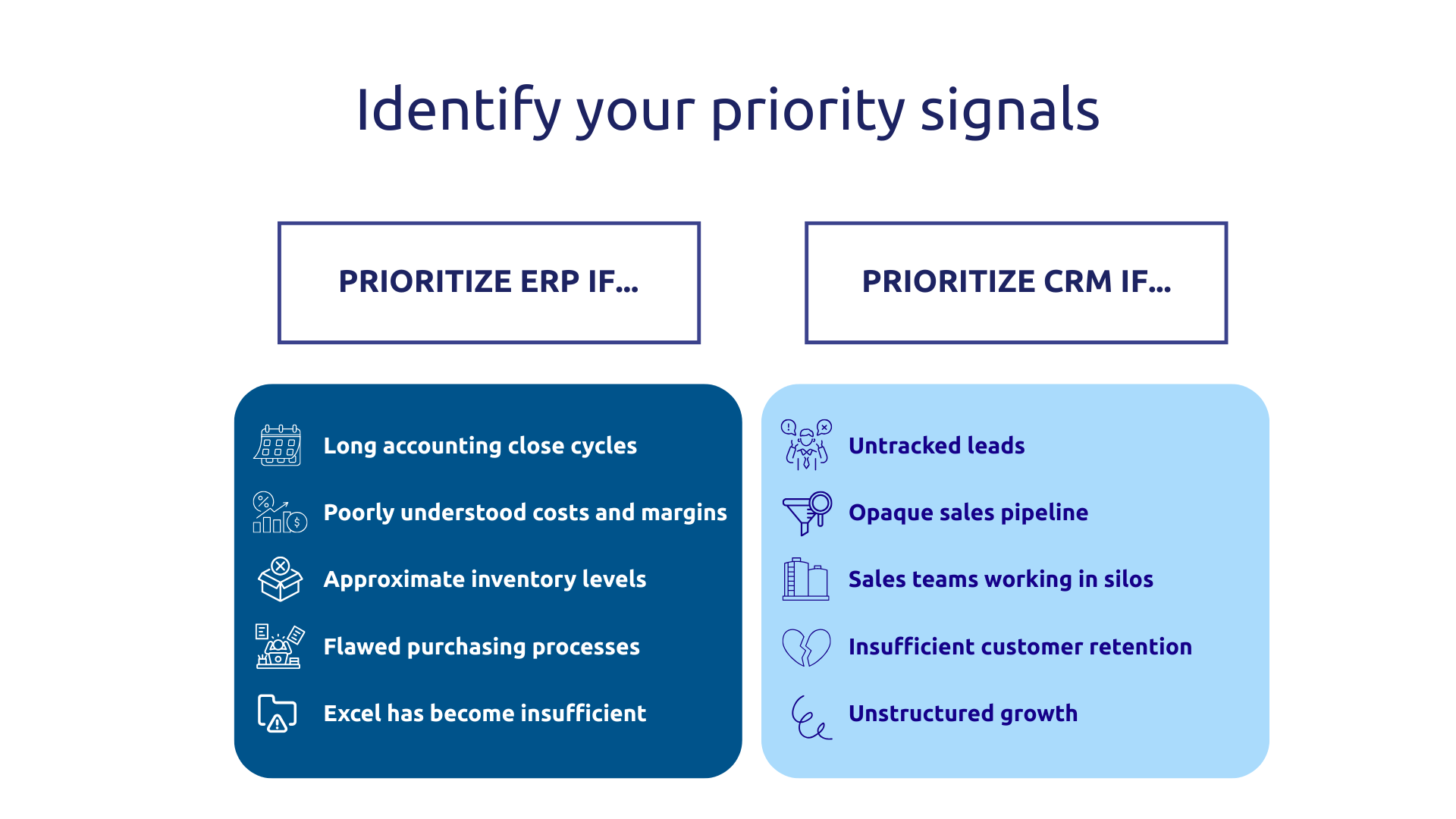
Certain signs clearly point towards ERP. The most notable of these pain points and areas for improvement include: long and chaotic accounting closings, a lack of visibility into real costs and margins, approximate inventory management leading to stockouts or overstocks, unstructured purchasing processes, or growth that makes Excel unmanageable.
Other signs point towards CRM : untracked sales leads, an opaque sales pipeline, sales teams working in silos without information sharing, difficulty retaining customers, rapid growth that requires structuring commercial activity before it becomes diluted.
Industrial companies, distribution players, and construction firms generally benefit from prioritizing ERP: their competitiveness relies on controlling production costs, managing multi-site inventories, and optimizing procurement. For organizations managing a significant equipment fleet, the question of integrating asset management into the ERP naturally arises.
In many industrial contexts, ERP challenges thus become a priority before CRM issues. For example, an SME of about a hundred people that doesn't know exactly what each produced unit costs them first needs visibility into its internal operations.
Conversely, B2B service companies, software publishers, and consulting firms operate with long sales cycles where customer relationships are the primary asset. For them, structuring sales and customer retention through a CRM is often the priority. Some sectors (particularly e-commerce or the medical field) quickly need both, as their model involves complex operational management and intensive customer relations.
The capacity for change absorption is often underestimated in transformation projects, sometimes due to a lack of collaboration between IT and business departments. Furthermore, simultaneously deploying an ERP and a CRM in a digitally immature organization means undertaking two major projects in parallel, with the risks of team dispersion and burnout that this entails.
In many SME/mid-market projects, a sequential approach proves easier to secure than a simultaneous ERP + CRM deployment: deploy an MVP on the most critical system, stabilize usage, then extend to the second scope. This approach allows capitalizing on initial successes, training internal champions, and demonstrating value before committing to the next investment.
The best system isn't the one that's most comprehensive on paper, but the one your teams will actually adopt.
Regardless of which system is deployed first, it is imperative toanticipate from the outset how it will integrate with the other. Why is this? Simply because neglecting integration exposes you to concrete and costly repercussions such as:
A 360° view (commercial data cross-referenced with operational and financial data) is only achievable if both systems communicate. This is what an application integration designed from the conception phase entails.
This is precisely where the Microsoft Dynamics 365 ecosystem changes the game.
Indeed, Dynamics 365 Finance, Supply Chain Management, Sales, and Customer Service are built on a common architecture centered around Dataverse, which significantly reduces the need for complex synchronizations in many scenarios, compared to an integration between two distinct vendors.
With Dynamics 365, the user interface is consistent across modules, workflows can span ERP and CRM with significantly less configuration than in a heterogeneous architecture, and licenses generally allow for progressive deployment, even if certain module combinations involve specific licensing rules.
Furthermore, when the appropriate integration mechanisms are in place (Dual-write or virtual entities), a salesperson in Dynamics 365 Sales can access stock information from Finance & Supply Chain, generate a quote with up-to-date pricing, and trigger a sales order in the ERP once the quote is accepted.
When comparing this approach of ERP from vendor A + CRM from vendor B, one realizes the difference between an ecosystem designed as a whole and an architecture requiring more integration and maintenance, where every evolution on one side can weaken the synchronization on the other.
ERP and CRM address complementary dimensions of performance: one focused on internal efficiency, the other on external growth. The real question isn't about choosing between the two, but identifying where to focus your efforts first, based on your priority pain points, industry, and capacity for change.
As AI integrates into both, the lines between ERP and CRM are blurring: sales forecasting, financial anomaly detection, and sales rep assistance during opportunity processing. These capabilities, several of which are already available in Dynamics 365 Copilot, require a unified platform to be fully leveraged.
Askware helps you define the right path for your organization : maturity assessment, architecture selection, phased deployment, and change management. Contact our experts to jointly build the roadmap that aligns with your priorities.
ERP manages a company's internal resources and operations (finance, inventory, production, purchasing), while CRM handles customer and prospect relationships (sales, marketing, customer service). In summary, ERP optimizes internal organizational processes, while CRM optimizes market-facing activities.
Yes, technically, but with significant blind spots. An ERP without a CRM means an organization that effectively manages its costs and operations but lacks any structured insight into its sales pipeline, customers, or opportunities. For a business whose growth relies on sales and customer retention, this is a significant drag on performance.
While feasible, it's often costly and fragile: you need to develop or purchase connectors, manage real-time data synchronization, and maintain the integration with every update to either system. This is one of the reasons why a platform like Dynamics 365, where ERP and CRM natively share the same database, significantly simplifies the equation, both technically and in terms of data governance.
Our experts share their vision of best practices and technological trends to ensure the success of your digital transformation.