Microsoft blueprints: how do you structure compliance and security by design?
Learn how Microsoft blueprints automate Azure compliance and security by design. Expert guide for DSI.

As a CIO, you need to ensure that critical documents are backed up, versioned, and retrievable at all times. However, this is not so obvious in a world where, according to McKinsey, employees would spend nearly 2 hours a day looking for and gathering information in their work tools. All this while your auditors ask you to prove that your sensitive files are protected and that legal retention periods are respected.
These challenges are not trivial. Indeed, a poorly structured file server or an aging EDM is at the same time a risk of data leak, legal exposure, and a measurable loss of productivity.
The Microsoft ecosystem offers a complete suite to build a modern, secure and compliant EDM. But to transform these tools into a real system of document governance requires an intentional architecture and a configuration expertise. In this article, we decipher the components of a robust Microsoft EDM: definition, risks of poor management, regulatory requirements, technical building blocks and the five pillars of a successful implementation.

EDM (Electronic Document Management) refers to the set of processes, rules and tools for creating, storing, organizing, securing, tracking and archiving an organization's documents in a structured and compliant manner.
The difference with a traditional file server is precisely this concept of governance. Where a file server is like a cluttered warehouse where everyone stores what they want where they want, an EDM works like a rigorously organized library: a structured metadata catalog, clear access rules, a history of changes, and systematic archiving.
A modern EDM includes three inseparable dimensions :
Poor document management presents risks that organizations often underestimate on several levels.
First of all, concerning the security, the lack of granularity in access rights means that any employee can access confidential contracts or sensitive personal data so that data leaks and unauthorized access go unnoticed due to lack of traceability.
On the map regulatory, an organization that is unable to find and delete all of a person's personal data in its documentary archives is exposed to CNIL sanctions of up to 4% of its total annual worldwide turnover. Note that the absence of evidence of compliance during an audit is in itself a fault.
On the map operational, the hidden costs are considerable: time lost looking for documents, multiple and contradictory versions that circulate in parallel, untraced validation processes that delay decisions. It's not just an organizational problem.
EDM must meet a strict and evolving regulatory framework. The RGPD imposes several concrete obligations in terms of documentation. Namely:
Legal archiving adds a layer of complexity to the exercise because tax and accounting documents, contracts, and HR documents each obey their own preservation rules. Here it is probative value What is at stake: you must always be able to prove the integrity of an electronic document, which sometimes involves timestamp and electronic signature.
Depending on your sector, additional obligations apply: HDS standards for health, MiFID II for finance, ISO for industry. In any case, compliance is not optional, and a modern EDM must integrate these requirements at the design stage.

SharePoint Online is the central platform for a structured Microsoft EDM. Its architecture is based on sites, document libraries and lists, which you organize according to the logic of your organization: by direction, by project, or even by business process.
What differentiates SharePoint is its ability to structure information through custom metadata and reusable content types. For example, take a library of customer contracts: each document automatically includes metadata (contract type, customer, amount, signature date, manager), a multi-step approval workflow, and automatic versioning that maintains the complete history of changes. Automatic alerts notify teams before a contract expires.
To complete its toolbox, SharePoint also offers:
OneDrive fulfills a complementary role to SharePoint: the management of personal documents and individual work. With this solution, each employee has a secure personal space, synchronized with their workstation, with automatic versioning and secure sharing via sharing links whose expiration time can be configured (depending on the security settings and the Microsoft 365 license).
In addition, the Known Folder Move (KFM) feature, which automatically redirects local Windows folders — Desktop, Documents, Images — to OneDrive, makes it possible to centralize desktop files without effort on the part of users.
OneDrive and SharePoint form a continuum : personal → collaborative → archived, with unified governance administered from the Microsoft 365 admin center. A work document starts in OneDrive, migrates to SharePoint as soon as it enters the collaborative phase, and then is archived according to retention policies.
The power of a Microsoft EDM comes from the native integration of several complementary services. Microsoft Teams integrates an underlying SharePoint library into each channel, making it easy to manage documents at the heart of collaboration — but beware of the ungoverned proliferation of Teams that can quickly create new silos.
To go further in the protection of content, Azure Information Protection (AIP) makes it possible to classify and protect documents according to their sensitivity via configurable labels (Public, Internal, Confidential, Secret). Each label automatically triggers associated protections:
As a result, AIP protects the document even outside the organization.
Once documents have been classified and protected, it is still necessary to manage their legal life cycle. It is the role of Microsoft Purview Records Management : declaration of documents in “records” (unalterable archives), automatic retention policies according to the type of content, and documented disposition after expiration. Power Automate completes the set by automating document workflows: validation, notification, automatic movement to the archives.
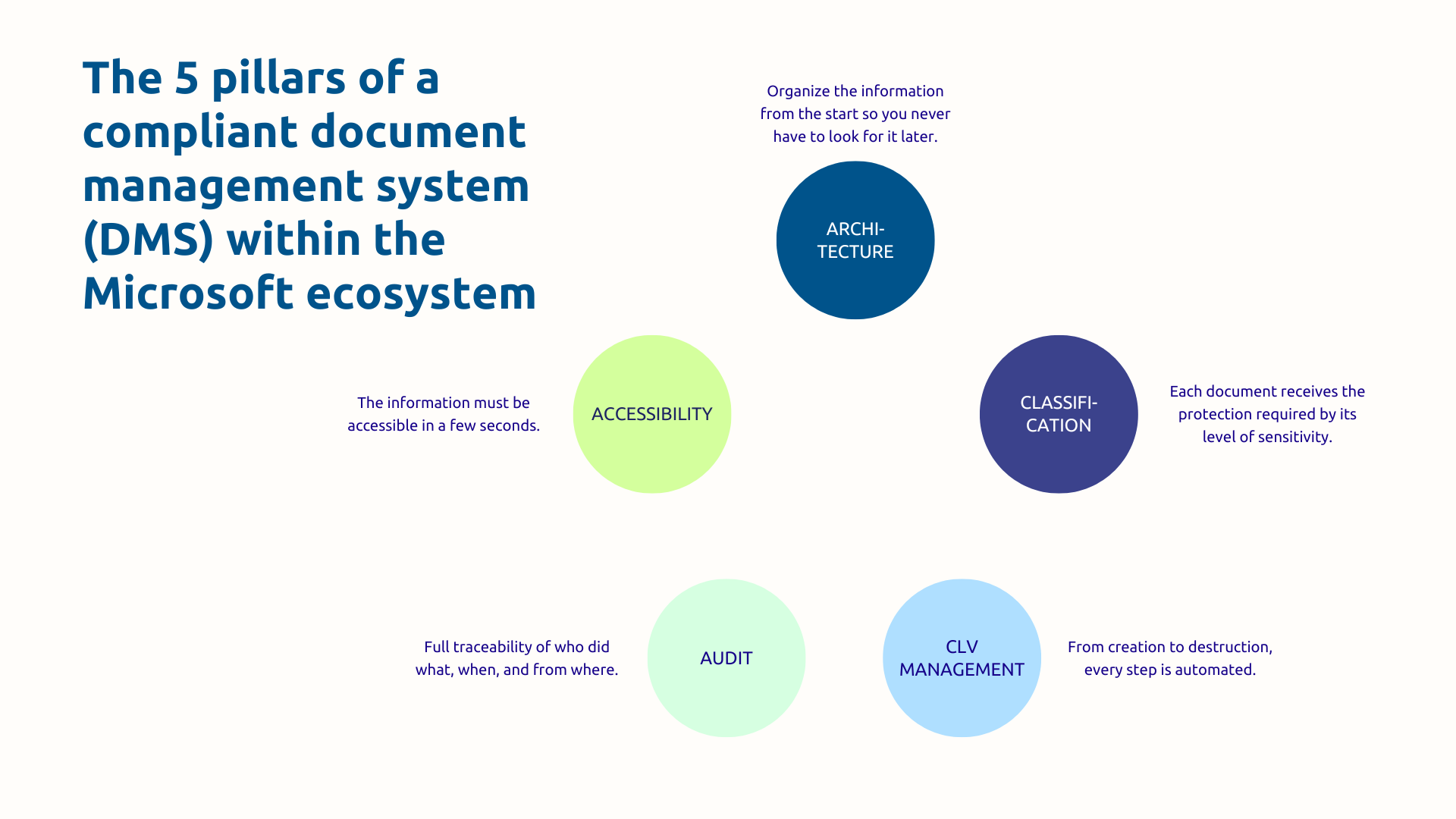
Effective EDM starts with a clear document architecture and a consistent taxonomy. Without this foundation, all the tools in the world will not prevent chaos from gradually developing.
SharePoint architecture should first of all reflect your organization: thematic hubs (HR, Finance, Sales, Projects), sites by entity or by process, structured libraries with reusable types of content. Metadata must be defined in a coherent and scalable manner, avoiding the uncontrolled multiplication of custom fields that quickly turns EDM into a labyrinth.
This rigor in structuring also applies to the migration from existing systems (file servers, proprietary EDM, ungoverned Teams spaces), which must be planned in successive waves, starting with the most critical documents.
Not all documents are the same and do not deserve the same protections. The classification policy defines the levels (Public, Internal, Confidential, Confidential, Personal Data, Secret) and the protections associated with each.
In concrete terms, a document created in the “Customer Contracts” library can be automatically labeled “Confidential” via intelligent classification rules, encrypted, and configured so that it can only be shared internally with complete traceability of accesses. In a logic Zero Trust, integration with policies DLP (Data Loss Prevention) automatically blocks inappropriate sharing: sending a confidential document by email to an external address, suspicious massive download, etc.
Classification is the foundation for protection and compliance, and its success depends as much on user awareness as on technical configuration.

Each document goes through several stages: creation or import, validation and approval, use and modification, archiving, then destruction or legal preservation. Orchestrate this lifecycle in an automated way is one of the most decisive contributions of a well-configured Microsoft EDM.
Purview retention policies allow you to define specific rules by content type. For example, an invoice is actively stored in SharePoint for 10 years in accordance with French accounting obligations, then archived in unchangeable mode according to the company's documentary policy, then automatically destroyed with the generation of a traceable audit log.
For its part, Power Automate supports validation workflows: submission, multi-level approval, stakeholder notification, automatic movement to the appropriate library according to status.
In other words, the rigorous management of the document lifecycle is not linear but must be governed by clear, automated and auditable rules.
Without traceability, there is no provable compliance. The Microsoft 365 Unified Audit Log records all the actions performed on the documents: consultation, modification, download, sharing, deletion. These logs can be viewed, exported and can be kept for up to 10 years.
Automatic alerts are triggered on suspicious activities: massive downloads outside the usual hours, unusual external shares, mass deletions. These signals make it possible to detect a potential leak before it causes irreversible damage.
During a GDPR check, you must be able to prove that you have deleted an individual's personal data within the legal deadlines. The audit log shows exactly who performed the deletion, when, from what station, and in which systems. The audit trail is as much your legal protection than an operational tool.
An EDM only really brings value if users quickly find what they are looking for. Microsoft 365 search is unified: from a single entry point, your employees search simultaneously in SharePoint, OneDrive, Teams, and Exchange. The search focuses on both metadata and document content, with advanced filters and customized results based on the user's context.
Since your teams expect a search experience as natural as Google on their internal documents, the objective is to significantly reduce the time lost looking for files, which is now one of the main sources of friction in organizations. Accessibility of information is a key factor in adoption : a GED where you cannot find what you are looking for will be bypassed (with the risk of Shadow IT), regardless of its level of technical sophistication.
Document management has become a strategic issue that affects regulatory compliance, data security and the organization's ability to prove its governance during audits. The Microsoft ecosystem offers all the tools to meet them, provided you orchestrate them with technical expertise and a detailed knowledge of your sectoral regulatory constraints.
Do you want to assess the maturity of your current document management? Askware experts carry out a complete audit of your system, identify your compliance issues and offer you a tailor-made Microsoft architecture. Contact us for a framing workshop.
The difference is in structure and governance. A shared folder is a place where files accumulate without rules. An EDM is a system where each document is qualified by metadata, subject to precise access rules, automatically versioned, traced in every modification, and managed throughout its life cycle until it is destroyed. It's not just tidying up, it's governance.
In practice, OneDrive is made for individual work: your drafts, your work files, anything that's not yet ready to be shared. SharePoint, on the other hand, is designed for collaboration and collective governance: structured libraries, approval workflows, retention policies, shared access rights. The two are complementary and form a natural chain: a document starts in OneDrive and then migrates to SharePoint when it enters the collaborative phase.
It depends on the type of document. In France, accounting documents and invoices must be kept for 10 years, while some tax documents may be required for 6 years by the administration. Contracts are kept for their period of validity plus a period that varies according to their nature. For personal data within the meaning of the GDPR, the storage period must be justified and proportionate to the purpose of the processing.
Our experts share their vision of best practices and technological trends to ensure the success of your digital transformation.