Enterprise ERP: understanding everything in 2026
Discover ERP: definition, operation, business benefits and a complete guide to choose and deploy your solution. Dynamics 365 expertise.

Most ERPs excel at managing the financial aspects of assets: fixed assets, depreciation, and net book value. That said, they don't see a machine's actual condition, its breakdown history, or its planned maintenance needs. On the other hand, maintenance management systems track field interventions but ignore budgets, cost centers, and purchasing flows. This disconnect creates two partial views that don't communicate with each other.
The integration of Enterprise Asset Management-ERP precisely addresses this paradox by unifying the operational life of assets and their financial treatment within a coherent ecosystem. This article explains why this integration has become essential, how to implement it practically, and which Microsoft Dynamics 365 solutions enable its realization without unnecessary complexity.

Enterprise Asset Management (EAM) refers to the holistic approach to managing the complete lifecycle of physical assets : from acquisition to disposal, including commissioning, operation, maintenance, and replacement.
It's important to distinguish between three related concepts. The CMMS (Computerized Maintenance Management System), or CMMS (Computerized Maintenance Management System) in English-speaking terminology, focuses on organizing and monitoring maintenance operations. EAM, on the other hand, is broader, as it integrates CMMS but also adds asset portfolio management, financial traceability, regulatory compliance, and a strategic lifecycle vision. CMMS answers the question "how to maintain?"; EAM answers "how to manage the entire asset portfolio to maximize its value?"
Thus, EAM brings to asset management optimized and predictive processes. For example, a factory that shifts from reactive maintenance to planned maintenance based on actual usage can see a significant improvement in equipment availability, with a direct impact on production capacity.
EAM is relevant wherever physical assets are numerous, costly, or critical to operations.
The manufacturing industry is the most obvious use case, as an unplanned shutdown on a production line immediately translates into lost revenue and delivery delays. In the energy sector and for network operators, it's even more critical, particularly due to strict contractual and regulatory obligations.
Furthermore, it's also worth mentioning the healthcare sector due to its particularly stringent traceability requirements, as illustrated by the obligation to document and audit every intervention on an MRI or scanner.
Finally, the transportation, building operations and maintenance, as well as the public sector, share the same challenges of maintaining dispersed assets over the long term.
The benefits of EAM are measured on multiple levels, but the most immediate is financial: several industry studies report substantial reductions in maintenance costs when transitioning to a preventive approach, by avoiding emergency interventions and express parts orders.
This saving on direct costs is accompanied by an effect on production capacity: improved equipment availability, measured via OEE (Overall Equipment Effectiveness, an indicator combining availability, performance, and quality), directly translates into additional production volume without new investment.
The spare parts inventory management follows the same logic, since consumption history helps avoid both stockouts that halt critical interventions and overstocking that ties up capital. Finally, regulatory traceability ceases to be a documentation emergency at each audit and becomes a continuous, structured process.
An isolated EAM is a partial source of truth that creates more complexity than it solves.
The double entry is the most direct friction because the same assets and intervention costs must be entered into both systems. Twice the work, twice the risk of errors.
This leads to an inconsistency in master data : when EAM and ERP each maintain their own database without synchronization, it becomes impossible to reconcile information.
Similarly, reporting remains fragmented with operational KPIs on one side and financial indicators on the other, without ever being able to calculate the true cost of an asset over its lifecycle.
The opposite mistake is to think that the ERP's fixed asset management module is sufficient. However, this is not the case; ERP views assets as accounting entries: acquisition value, depreciation schedule, net book value. It does not see equipment with a breakdown history, planned maintenance schedules, technicians to assign, or parts to reserve.
In fact, ERP modules are not designed for sophisticated preventive maintenance planning, nor for mobile interfaces for field technicians, nor for integration with IoT sensors.
In summary, both are necessary since ERP manages the financial aspect of assets while EAM manages their daily operational existence.
Firstly, a unified master data eliminates discrepancies by ensuring that a single asset corresponds to a single source of truth, synchronized between the two systems. On this common basis, processes become fluid; from identifying a maintenance need to the financial allocation of the intervention, each step flows seamlessly without manual re-entry.
However, it is the 360° view This represents the most strategic gain: combining operational performance, uptime, MTBF (Mean Time Between Failures), and MTTR (Mean Time To Repair) with actual maintenance costs illuminates decisions that would otherwise be impossible.
Should this equipment be repaired or replaced? Without consolidated financial and technical data, the answer relies on intuition. With integration, it is based on facts.
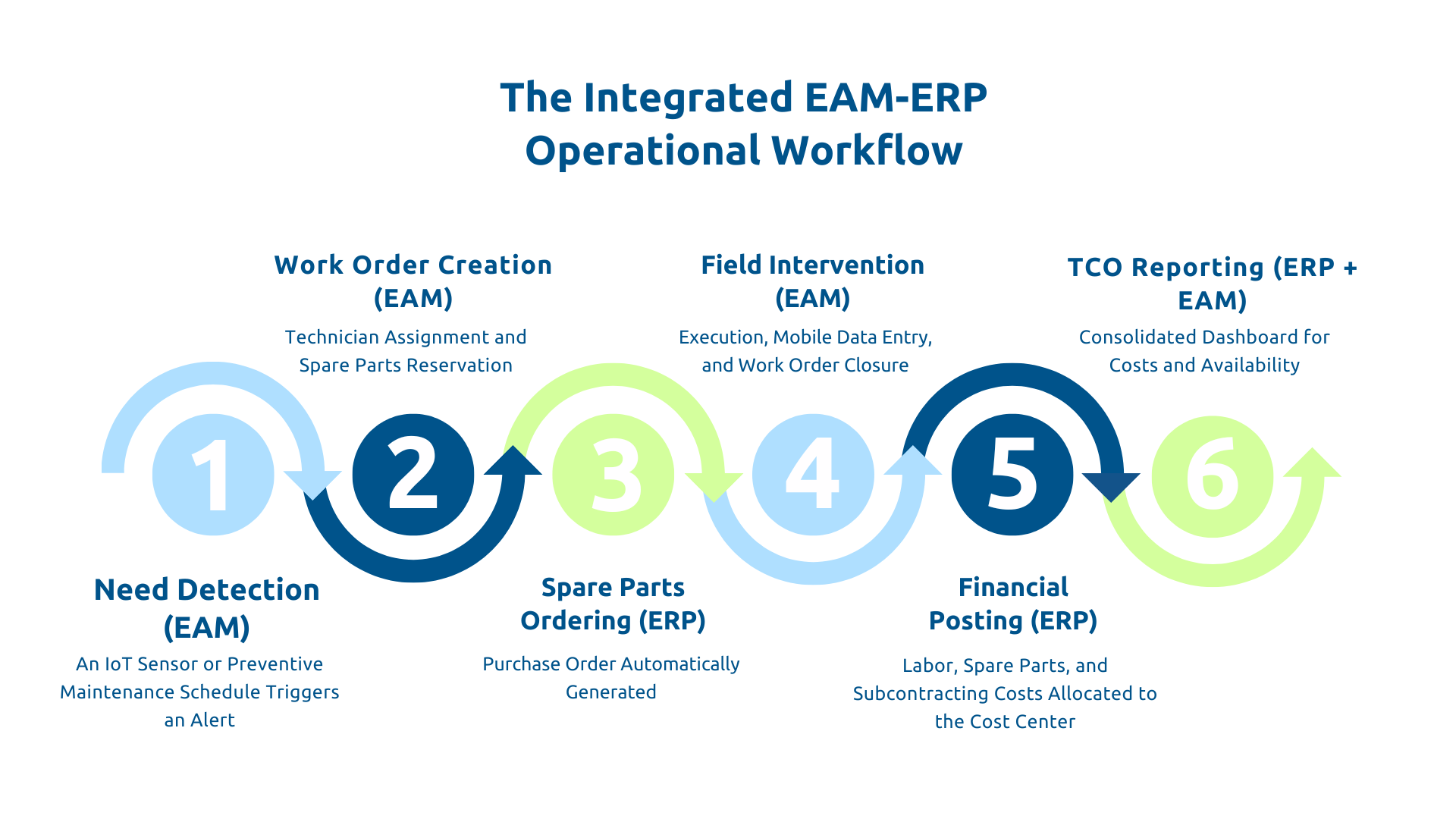
For organizations managing internal production assets, Microsoft Dynamics 365 Supply Chain Management natively integrates a comprehensive Asset Management module. This eliminates the need for an integration project because the module shares the same data repository as the Finance, Purchasing, and Inventory modules.
Similarly, an asset created in Asset Management is immediately visible in accounting and a parts purchase order triggered from a work order directly feeds into the Purchasing module.
In terms of functionality, the module covers the asset register with equipment hierarchies, preventive maintenance, work orders, fault tracking, and a mobile interface for technicians. This module is particularly suited for manufacturing industries that manage a fleet of fixed production equipment.
Dynamics 365 Field Service addresses another use case, namely organizations that manage assets distributed across multiple sites or at customer locations, with field service teams to schedule. Optimized for mobile technicians, it integrates geolocation, digital service reports, and automatic scheduling based on technician skills and availability.
Field Service is also the gateway to predictive maintenance within the Microsoft ecosystem because if connected to Azure IoT Hub or Azure IoT Operations services, it can receive telemetry alerts from connected equipment and automatically trigger work orders before a failure occurs. For example, an elevator maintenance company managing 5,000 pieces of equipment for its clients can automatically schedule its technicians and bill without re-entering data.

Some organizations already have a specialized industry-specific EAM, such as IBM Maximo Application Suite (Maximo) for heavy industry or SAP S/4HANA Asset Management (SAP PM) for international groups, and wish to retain it while still leveraging the capabilities of Dynamics 365.
Of course, this configuration is technically feasible via Azure Logic Apps, Azure Data Factory (or Data Factory in Microsoft Fabric), or REST APIs, but it involves an initial development cost, ongoing maintenance, and strict governance of master data management.
In contrast, a native solution eliminates this complexity from the design stage. The choice depends on the functional value of the existing EAM and the total cost of integration over time.
Every EAM project begins by understanding the current state. The first step is to comprehensively inventory the equipment (their nature, location, condition, and criticality) because the actual asset base is often more dispersed or heterogeneous than anticipated.
Once this initial overview is complete, the process mapping helps understand how maintenance actually functions today: what proportion is reactive versus preventive, what tools are used, and who decides what.
However, the data audit will prove even more insightful than the other two aspects:
Based on this, target KPIs such as uptime, MTBF, MTTR, and maintenance cost per asset can be defined to serve as a reference throughout the project.
During the design phase, we will focus on defining the target architecture. The first key decision is the choice of solution whether it's the native Dynamics 365 module or the integration of a third-party EAM.
The next step is designing the unified asset repository : one asset, one truth. This requires defining data governance, the ERP as the master for financial data, and the EAM as the master for technical data, as well as the methods for bidirectional synchronization.
Next, you'll need to design the flows :
It's recommended to implement a phased rollout, for example, a pilot on one site or production line, with measurement of the benefits achieved, before extending to the entire scope.
IT departments must also consider adapting the user training to each profile, from maintenance technicians to planners, including fleet managers.
Often, it's a cultural challenge. In other words, transitioning from a reactive to a preventive mode requires changing deeply ingrained habits.
Accelerating trends such as Industrial IoT, predictive maintenance through sensor data analysis, AI for planning optimization, and digital twins further underscore the importance of these foundations. Without a reliable asset repository and robust EAM-ERP integration, these advanced capabilities remain inaccessible.
Askware supports organizations in the design and deployment of these integrations within the Microsoft Dynamics 365 ecosystem. Contact us for an EAM maturity audit and to jointly define your roadmap.
CMMS covers the planning and monitoring of maintenance operations; EAM is broader and additionally integrates comprehensive asset management, financial traceability, regulatory compliance, and a complete lifecycle view from acquisition to disposal.
The starting point is to define data ownership—the ERP for financial aspects and the EAM for technical data—and then to synchronize the key flows: work orders, service costs, consumed parts, and the purchase cycle. The simplest option is to choose a solution that natively integrates both dimensions, such as the Asset Management module of Dynamics 365 SCM.
Yes, through two complementary modules: Asset Management in Dynamics 365 Supply Chain Management for internal production assets, and Field Service for distributed assets with field teams, both natively integrated with the Finance and Procurement modules.
Our experts share their vision of best practices and technological trends to ensure the success of your digital transformation.