Dynamics 365 Field Service: a complete platform to industrialize your field service
What is Dynamics 365 Field Service?
Dynamics 365 Field Service is the module for management of interventions on site of the Microsoft Dynamics 365 ecosystem, which covers the entire response cycle: from customer request to billing.
The platform orchestrates the smart planning by calculating the best tours according to:
- The distances,
- The skills,
- The availability of parts,
- Contractual commitments.
The mobile application gives technicians access to all the information they need on interventions such as customer history, technical drawings, stock management and electronic signature.
Predictive maintenance Leverages IoT sensors to detect anomalies before failures occur finally, native integration with Customer Service and Business Central guarantees perfect continuity between customer support, field interventions and billing whose data comes from the same database managed by Dataverse.
It's not just a planner, but a platform that combines algorithmic optimization, field mobility, and predictive intelligence to transform your service operations.
The profiles that get the most value from Dynamics 365 Field Service
Each player finds in Field Service the tools to improve their efficiency:
- Service managers drive overall performance and cost optimization with reliable data.
- Dispatchers benefit from tools that automatically suggest the best assignments to optimize technician routes.
- Techs access information instantly via mobile: history, procedures, vehicle stock, electronic signature.
- Inventory managers get real-time visibility on the parts.
- End customers follow the arrival of the technician and benefit from interventions resolved on the first pass.
- DSI can ensure the governance of field data
So if a customer reports a failure on an equipment. Field Service will automatically identify the nearest competent technician, verify that he has the necessary part in his vehicle, plan the intervention and transmit all the information to the technician's mobile. The outage can be resolved in two hours, without a single phone call.
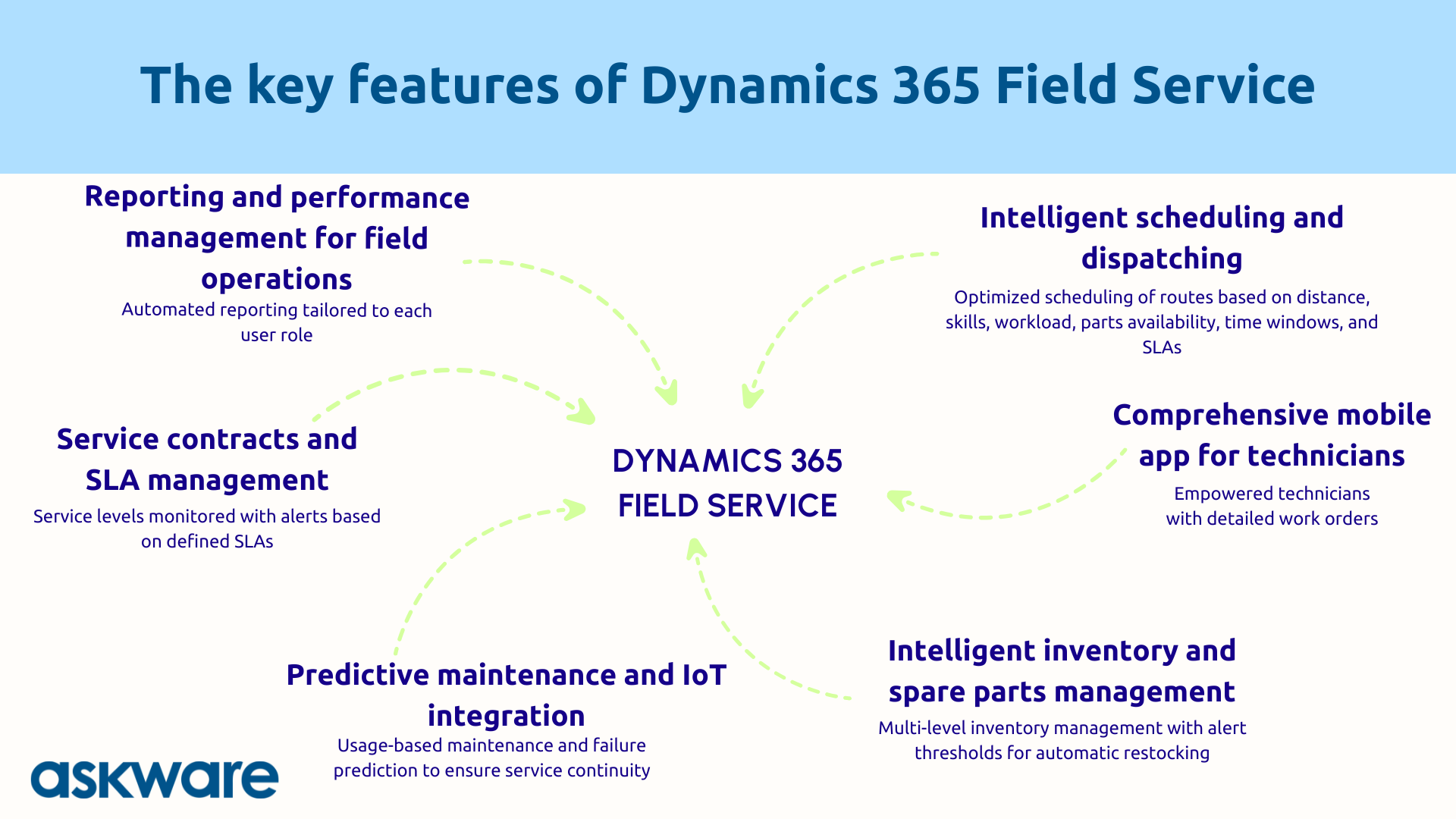
Key features of Dynamics 365 Field Service
Smart scheduling and dispatch
The planning engine is transforming resource management throughAlgorithmic optimization of resources in the field. The algorithm calculates the best tours by simultaneously analyzing distances, skills, workload, workload, parts availability, customer intervention windows and SLAs.
Scheduling can be done manually thanks to a visual dashboard where you just need to drag and drop interventions to assign them.
Intelligent assignment automatically suggests the best technician for each intervention. Faced with unexpected events such as a customer emergency, a sick technician, or traffic jams on the way, the system dynamically recalculates the schedules.
Imagine: 15 interventions to plan. The system will analyze all the variables for you and propose a schedule that minimizes kilometers while maximizing interventions by technician. Algorithmic optimization makes it possible to improve the productivity of technicians by 14% (according to a Forrester study).
Full mobile app for technicians
The mobile application turns every technician into independent professional.
The detailed work order contains:
- All the information about the customer,
- Equipment history,
- Intervention instructions,
- Necessary parts.
Integrated navigation guides the technician to the intervention site.
On site, he accesses the repair guides, technical diagrams and videos that are in the knowledge base of the Customer Service module. He consults his vehicle stock, records the use of parts (automatic decrementation) and orders a replenishment if necessary.
The electronic signature and photos are captured directly and the offline mode allows the application to work without a network (synchronization is then done as soon as the network returns).
Intelligent inventory and spare parts management
Having the right part at the right time is the Challenge number one for the first-pass resolution rate. According to industry data, 68% of service delays are caused by unavailability of parts. A technician without the necessary part is a mandatory return to the company. The intervention cost is doubled and the customer is unhappy.
Field Service manages the multi-level stocks : central warehouses, satellite depots, vehicles. Real-time visibility shows where each room is located with an automatic update when a technician uses a room.
Of alert thresholds Inventory level indicators generate notifications and allow replenishment to be automated. Field Service is synchronized with Dynamics 365 Business Central for more comprehensive inventory management.
To go even further, the system analyzes planned interventions and suggests which parts to load into the vehicle. If three interventions tomorrow require a specific sensor, Field Service checks the vehicle stock and generates a resupply alert if necessary.
Thanks to these functionalities, businesses notice an increase in the first-pass resolution rate of up to 35% after optimizing field inventory management with an integrated system.
Predictive maintenance and IoT
Predictive maintenance represents the Paradigm shift : we go from reactive, which consists in repairing when it is broken, to predictive, with interventions before it breaks.
Field Service connects to IoT sensors that transmit real-time data on temperature, vibration, consumption... The AI analyzes these signals and detects anomalies. When an anomaly is identified, the system automatically creates a preventive maintenance order. Integration with Azure IoT Hub makes it possible to manage the maintenance of entire fleets of connected equipment.
For example, if an elevator transmits abnormal vibrations, Field Service will detect the anomaly, create a maintenance order, schedule the intervention at night and the technician will replace the part before the failure occurs. The customer does not experience any interruption.
Thanks to predictive maintenance, maintenance operations are planned according to the actual use of the equipment and not according to an arbitrary schedule. This makes it possible to avoid some of the unexpected breakdowns, which are sources of costly emergencies and customer dissatisfaction.
Service contracts and SLA management
Field Service takes care of the management of your maintenance contracts with the possibility of setting up service levels differentiated customer (SLA) with for example an intervention within 4 hours for a premium customer and interventions within 24 or 48 hours for standard customers. When a request comes in, the system checks the contract and applies the right priority.
Of automatic alerts warn if the contractual deadline is likely to be exceeded. Billing adapts to your contracts: fixed price, per service, hours. For quota contracts, the system tracks the time consumed.
Result: zero contractual penalties and respect of customer commitments with minimal manual management of field interventions.
Reporting and management of field performance
Field Service makes visible the performance with native KPIs. You can thus find the indicators relating to the first pass resolution rate, average intervention time, compliance with SLAs, technician occupancy rate, costs per intervention, analysis of routes.
The dashboards adapt to each role:
- Dispatchers can see the schedule in real time to facilitate management,
- Managers it contains data on the performance of teams,
- Techs consult their personal intervention schedule.
Power BI integration allows for advanced analytics and the identification of bottlenecks. You can analyze the ratio of travel time to productive time and the level of customer satisfaction thanks to satisfaction surveys sent automatically after the intervention.
Example: a field service manager sees a resolution rate of 70% when the objective was set at 85%. Power BI analysis identifies the problem: vehicle stocks are poorly sized. He will then be able to work on optimizing stocks to increase the resolution rate and reach the objective.
The concrete business benefits of Dynamics 365 Field Service
Reducing logistics costs and improving productivity
Optimization of tours technicians generate:
- Fewer kilometers and therefore less fuel and less vehicle wear.
- A better occupancy rate with more interventions per technician without increasing the workforce.
- A reduction in the administrative time of technicians.
Improving the first-pass resolution rate eliminates unnecessary feedback.
A Forrester study from 2024 shows an ROI of 346% over three years and a 14% improvement in technician productivity.
For example, if a maintenance company deploys Field Service, it may notice a reduction in the number of kilometers traveled and a reduction in its logistics costs of €100,000 thanks to the optimization of tours and the management of parts stocks.
Improving the first-pass resolution rate
The First Time Fix Rate is The ROI indicator of the field service. Field Service is improving this rate in three ways:
- The technician arrives with the good information : complete history and instructions for the intervention,
- Good parts thanks to stock management,
- Good skills with intelligent dispatch of interventions.
If necessary, the Teams connection with an expert allows remote support to be provided.
Thus, a company whose first-pass resolution rate is 70% will be able to increase it to 90%. With 10,000 interventions per year, this represents 2,000 returns avoided, i.e. €300,000 in savings at €150 per trip.
Improving customer satisfaction and field experience
Field Service is transforming field service into positive experience differentiating for the customer :
- Optimization ensures compliance with planned time slots.
- Real-time monitoring allows customers to visualize the arrival of the technician.
- Technicians arrive well-informed and well-equipped.
Predictive maintenance occurs before the outage and helps avoid service interruptions for customers.
Thanks to the punctuality, efficiency and proactivity allowed with Field Service, studies show that businesses that have a 70% first-time resolution rate achieve a customer retention rate of 86%.
.png)
How do you successfully deploy Dynamics 365 Field Service?
Audit your field processes and define your target workflows
Success depends on the quality of the initial framing. This audit phase maps your operations :
- Volume of interventions,
- Geographic areas,
- Resources (technicians, vehicles, stocks),
- Skills of each technician.
It defines your target workflows from customer triggering to billing.
Priority KPIs are identified as the first-pass resolution rate, compliance with SLAs, cost per intervention, customer satisfaction. The analysis of stresses (schedules, zones, regulations) completes the diagnosis.
Askware is conducting this audit by cross-referencing business vision and technical feasibility, based on a business-oriented IS audit approach to increase the efficiency of your processes.
Setting up optimization and business rules
Field Service is highly customizable to adapt to your job.
The configuration defines the constraints: intervention areas, work schedules, customer intervention windows. It configures the skills and certifications required for each type of intervention.
Optimization can also be configured. You can choose your priority criteria: minimize the distance? Maximize interventions? Prioritize SLAs? Balancing the load? The answer depends on your strategy.
Field work order management distinguishes between urgent and scheduled interventions and between corrective and preventive interventions. Replenishment rules define thresholds and quantities.
Askware sets up Field Service to reflects your business constraints and optimizes according to your priorities, in a coherent IT governance.
Train teams and drive adoption
Adoption by dispatchers AND technicians is decisive.
Change management explains the concrete benefits: “Fewer unnecessary kilometers”, “All the information on a tablet”, “Fewer last-minute emergencies”. The ideal is to involve the team in the configuration.
The training covers all users. Mobile training favors practical field sessions, aligned with the daily life of technicians. Progressive deployment (over a geographical area or a type of intervention) favors the adoption of the tool before its generalization. Identifying field champions accelerates adoption.
Askware even supports the training of teams in the field to show concrete gains. A successful field tool is a tool adopted by technicians. This adoption can be measured thanks to the rate of mobile use, the quality of the data entered and more generally on the evolution of KPIs.
.png)
Dynamics 365 Field Service industrializes your field service: intelligent planning for technicians, mobile tools, predictive inventory management, IoT breakdowns, compliance with contractual commitments and performance management. Whether you are looking to reduce your logistics costs, improve your first-pass resolution rate, switch to predictive maintenance or transform your after-sales service into a strategic asset, Field Service provides measurable answers.
Success depends on strategic framework, precise configuration according to your constraints, integration with your existing ecosystem (CRM, ERP, IoT), and support for adoption.
Askware supports you at each stage: auditing your operations, defining workflows, setting up optimization, integration with the Dynamics 365 ecosystem, team training and continuous optimization.