Development of tailor-made business applications: why and how to do it?
Complete guide to custom business application development: when, how, Power Platform vs custom. Expert method and advice.

The business applications are both essential and problematic. Essential, because they carry years of data and well-established processes. Problematic, because they slow down teams, are expensive to maintain, expose the organization to increasing security risks, and block any functional evolution.
In this article, we will see how a well-orchestrated overhaul leverages this paradox for performance, by relying on a rigorous methodology, a clear vision of the target solution, and proactive management of operational risks.

A business application is a software that directly supports a critical business process : sales management, customer relationship management, financial steering, production management, asset tracking, etc. It differs from 'support' tools (email, office suites) due to its direct impact on operational performance.
In other words, it is a strategic asset, and its modernization is therefore a governance decision.
Every business application is used daily by dozens, sometimes hundreds, of employees; it centralizes critical data accumulated over several years; and any unavailability immediately translates into a measurable business cost.
The signs indicating that a redesign is no longer optional fall into several categories. From a technical perspective, technologies are reaching end-of-life, maintenance costs are consuming an increasing portion of the IT budget, and the skills required to maintain these systems are becoming scarce in the market.
Next, from a functional standpoint, the application can no longer evolve: in environments heavily constrained by technical debt, development times can be measured in months.
Regarding security, vulnerabilities can no longer be patched, and GDPR compliance GDPR becomes difficult to demonstrate, and access traceability is lacking.
Finally, from a business perspective, your competitors gain agility while your processes remain stagnant.
The longer you wait, the more technical debt accumulates, and the more costly and risky a future overhaul will be. What is still manageable today could become uncontrollable in three years.
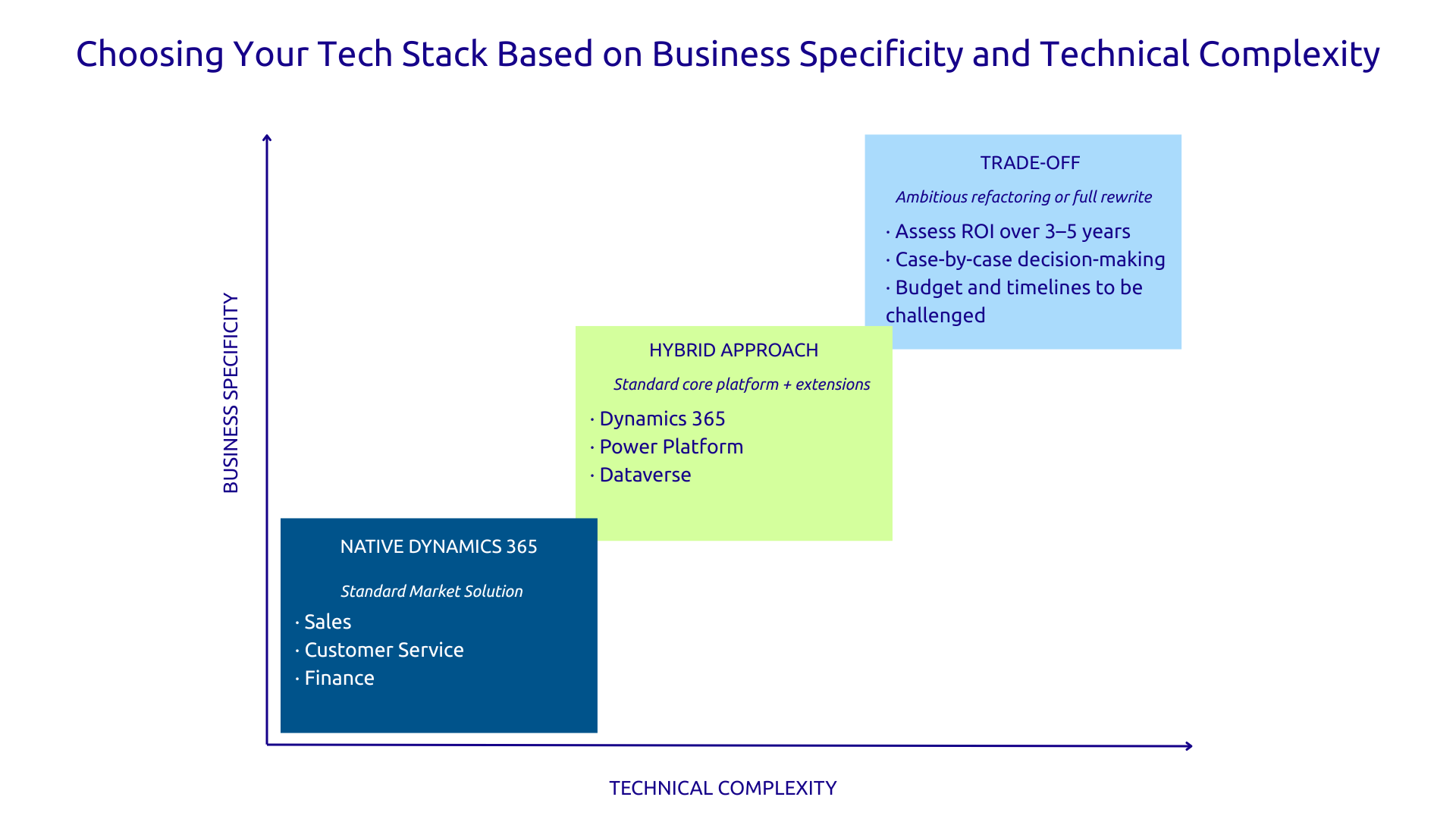
When faced with an obsolete application, three options are available, and they don't all carry the same cost or risk level:
The decision matrix can, for example, be formulated as follows: if 80% of your needs correspond to a standard process that a solution like Dynamics 365 Sales natively covers, then replacement is economically rational.
If your core business relies on very specific processes that no standard solution faithfully replicates, a custom redevelopment (potentially with Power Platform) remains the right option.
Keep in mind that redevelopment is not always the answer : the decision must be guided by actual business value, not by technical preference.
The so-called 'big bang' strategy (cutting off the old system, activating the new one) presents a generally unacceptable level of risk for critical applications. Instead, we recommend the phased migration which means starting by having both systems coexist, migrating users in successive waves, and deactivating the old one only when the stability of the new one is confirmed.
Concrete example: phase 1 with a pilot group of 10 users, validation over three weeks, then deployment by teams or regions until the complete shutdown of the old system by the twelfth week.
This scenario always involves a tested rollback plan : if a major problem occurs, how to revert in less than an hour?
Data is often more valuable than the application itself. A CRM legacy can easily contain ten years of customer history, hundreds of thousands of contacts, and millions of interactions. This wealth must not be lost during the transition.
Data migration is not a simple 'copy-paste': it's a full-fledged project. It begins with a quality audit of existing data (duplicates, empty fields, inconsistencies between repositories) before any migration. Next comes the definition of a batch migration strategy, with business validation at each step in a staging environment. Production migration only occurs after complete validation. Be aware that neglecting this phase is the primary cause of failure for redevelopment projects.
The best technical application will be of no help if your users reject it. Resistance to change is a real and predictable phenomenon, as changing work habits ingrained over years requires structured support.
The best way to achieve this is to:
Project scoping determines 80% of a project's success or failure. This phase begins with an audit of the existing system : what functionalities are actually used, what business processes does the application support, what workarounds have the teams developed?
This is followed by structured requirements gathering, conducted in workshops with users and business stakeholders. Here, we must distinguish genuine business needs from inherited practices and define the functionalities that absolutely must be retained. It is also at this stage that the make vs. buy decision is made: custom redesign or adoption of a market solution? The answer dictates all subsequent steps.
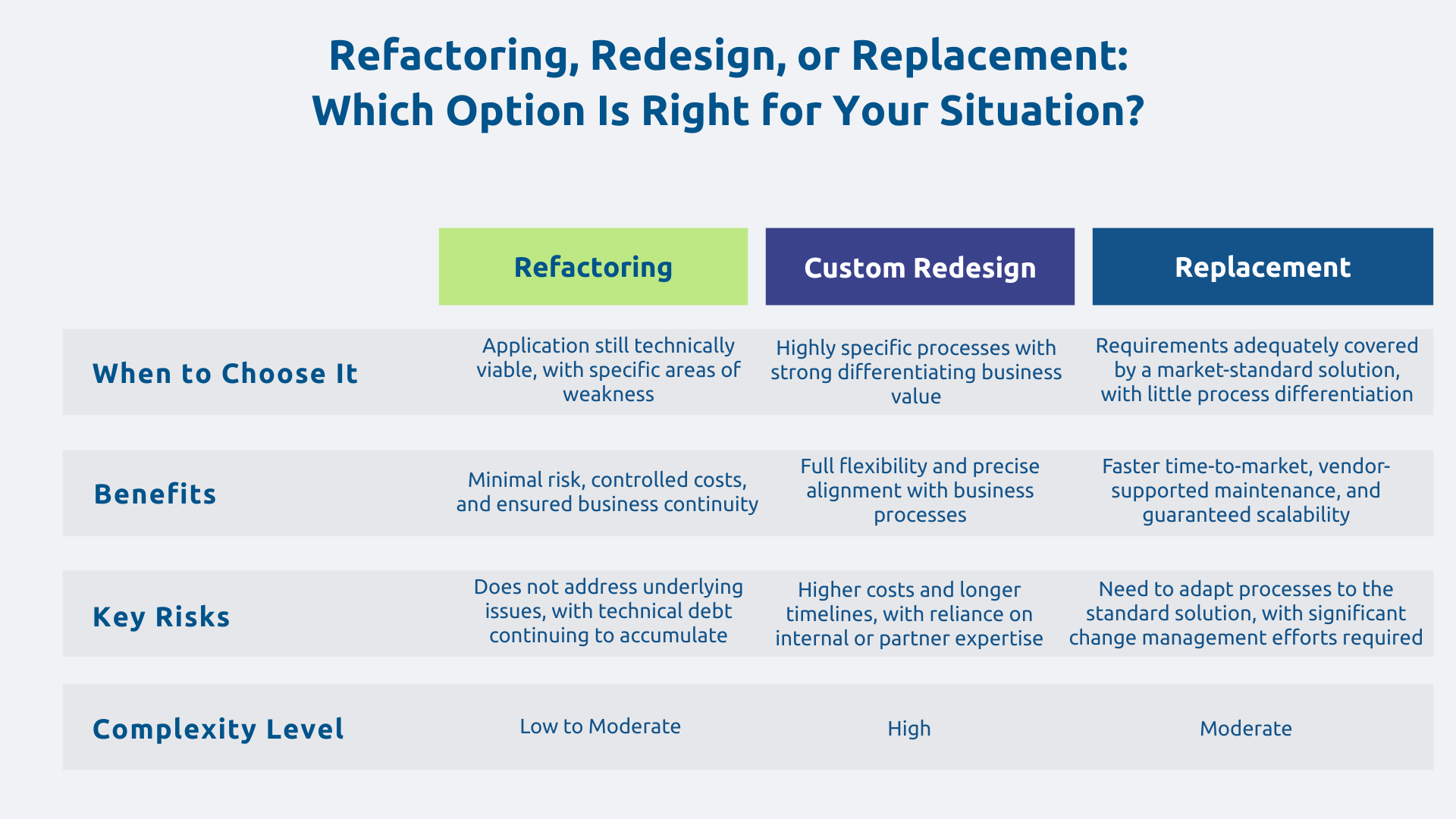
Three main options are available. When processes are largely standard, the adoption of a market solution like Dynamics 365 is the preferred choice: it reduces time-to-market, delegates maintenance to the vendor, and ensures scalability.
Conversely, when processes are highly specific, the custom development (in low-code with Power Platform or .NET on Azure) offers the necessary flexibility.
Between the two, the hybrid approach is often the most relevant: a standard Dynamics 365 foundation for common processes, with specific extensions on Power Platform for business-specific needs.
Example: an industrial company with standard sales management but a highly specific product configurator naturally opts for Dynamics 365 Sales as a foundation and a custom Power App for the configurator. The target architecture also includes hosting choices (Azure cloud, on-premise, or hybrid), taking into account sovereignty and performance constraints.
The agile sprint-based approach is the most suitable: it allows for rapid delivery of a first functional version, validation with business users at each iteration, and integration of adjustments before misunderstandings become entrenched.
The recommended sequence: the first two sprints establish the technical foundation and deliver the first critical functionality (often the most frequently used daily process). Subsequent sprints add modules, then integrations with third-party systems, and finally enhancements.
The MVP (Minimum Viable Product) should cover approximately 80% of daily needs and be put into the hands of pilot users for real-world validation. This field feedback helps prevent a significant gap between expectations and reality.
The cutover is a process that is prepared weeks in advance and managed with operational rigor. Before any production cutover, load tests validate the platform's performance under real usage volume, the rollback plan is documented and tested, and a reinforced support team is mobilized.
For added safety, it is advisable to opt for a phased migration in waves. This means a pilot team validates functionality under real-world conditions for two to three weeks, then feedback is integrated, and other teams migrate in successive waves. The old system remains active in read-only mode during the transition period and will only be deactivated once no users depend on it anymore.
For many standard business processes, Dynamics 365 today offers what custom development fifteen years ago was trying to build:
Dynamics 365 reduces time-to-market, delegates maintenance to Microsoft, and integrates natively with Power Platform, Microsoft 365, and Copilot, all of which are benefits that custom development cannot offer at the same cost.
Power Platform is Microsoft's answer to mid-sized business applications whose processes are too specific for a standard solution, but not complex enough to justify full .NET development.
Power Apps allows building modern and responsive interfaces connected to Dataverse and third-party systems. As for Power Automate, it replaces manual or fragile application workflows. Meanwhile, Power BI integrates analytics directly into the user experience.
The entire platform relies on Dataverse as a managed database with native security and auditing. Development cycles are significantly shortened compared to traditional custom development, and centralized governance reduces future technical debt.
Note that low-code is not "inferior development" : it's accelerated development, provided its limitations are respected.
When refactoring involves custom or hybrid development, Azure offers the cloud infrastructure that makes these applications modern, resilient, and economically viable.
Azure App Service hosts .NET web applications with high availability and automatic scalability. Azure SQL Database manages data with high availability guarantees, depending on the chosen service tier. Azure Functions supports asynchronous processing and event-driven integrations. Azure API Management secures and exposes business APIs for integrations.
Compared to aging on-premise infrastructure, the gain is immediate: increased availability, reduced hardware infrastructure costs, and the ability to scale according to actual needs. Refactoring is the ideal opportunity to move out of the data center and benefit from the advantages of the cloud that the legacy application did not allow.
Organizations that succeed in their refactoring efforts are not those with the best developers. They are those that have combined a clear business vision, a rigorous transition methodology, and human support for users. The technical dimension is necessary; it is not sufficient.
Askware supports CIOs in this complex transformation: application audit, definition of the refactoring strategy, development and integration within the Microsoft ecosystem, and change management. Contact our experts to frame your refactoring project.
It's achievable, but it requires careful preparation. The key is never to attempt a 'big bang' migration for a critical application: instead, we migrate in phases, allow both systems to coexist temporarily, and maintain a readily available rollback plan. Most importantly, test the switchover under real-world conditions before the go-live date.
It depends on the specificity of your processes. If most of your needs align with what Dynamics 365 natively covers (sales management, customer service, finance), then a replacement is often faster and less costly than a custom rebuild. If your processes are truly differentiating and difficult to standardize, a tailor-made rebuild with Power Platform might be more appropriate. The right answer comes from an audit, not an assumption.
The three most common risks are data loss during migration (avoidable with a preliminary quality audit and thorough testing), user rejection (avoidable with change management support from the outset), and budget overruns due to insufficient initial scoping. None of these risks are inevitable: they are all manageable with the right approach and the right partner.
Our experts share their vision of best practices and technological trends to ensure the success of your digital transformation.