How to build an efficient and sustainable IT cloud architecture?
Efficient and sustainable cloud architecture: principles, Azure best practices, and methodology to align IT and business. Expert guide.

Infrastructure as a Service (IaaS) offers the elasticity and power of the cloud while maintaining fine technical control over the infrastructure: the choice of operating systems, the configuration of networks, the management of application security. No abandonment of sovereignty, no expensive status quo.
In this article, we look at what the IaaS model really is, how it differs from PaaS and SaaS, when is it appropriate to adopt it, and how to intelligently integrate it into a hybrid cloud strategy on Azure.

IaaS is a model of Cloud computing in which a provider provides virtualized infrastructure resources (servers, storage, networks) that can be accessed on demand via the Internet. With IaaS, the customer maintains control over operating systems, middleware, applications, and data. In turn, the provider manages the underlying physical infrastructure.
Here, the founding principle is virtualization. That is, hardware resources are shared, abstract, and dynamically allocated. Regarding billing, it follows a model that is mostly based on use (Pay-as-you-go), although some resources (storage, static public IP addresses) are billed as soon as they are provisioned, regardless of actual use.
To visualize, we can imagine IaaS as the rental of an empty apartment. The owner provides and maintains the structure; the tenant chooses his furniture, removable equipment and how to arrange everything.
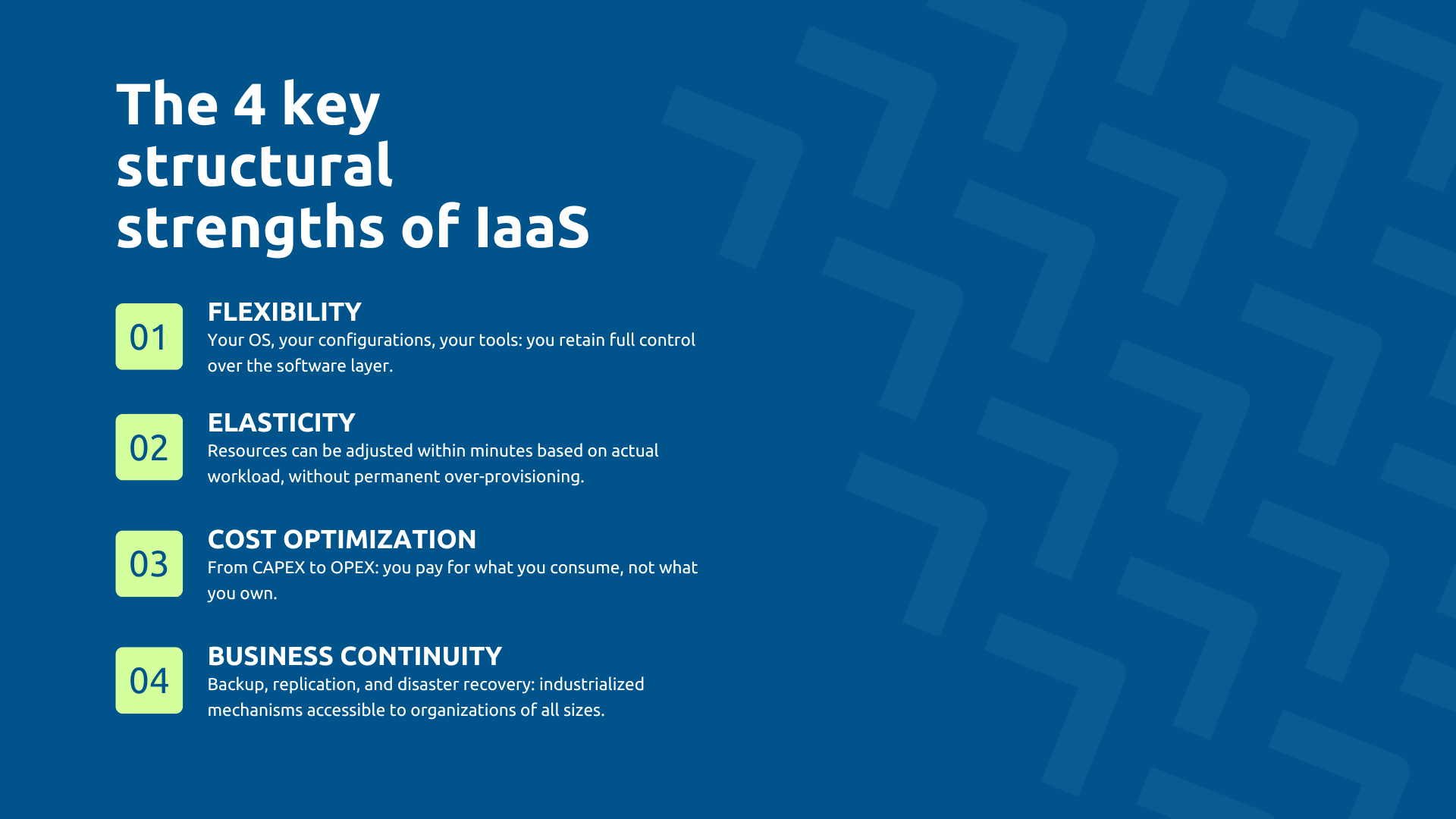
Thus, IaaS frees the client company from hardware management while leaving it with total control over the software layer.
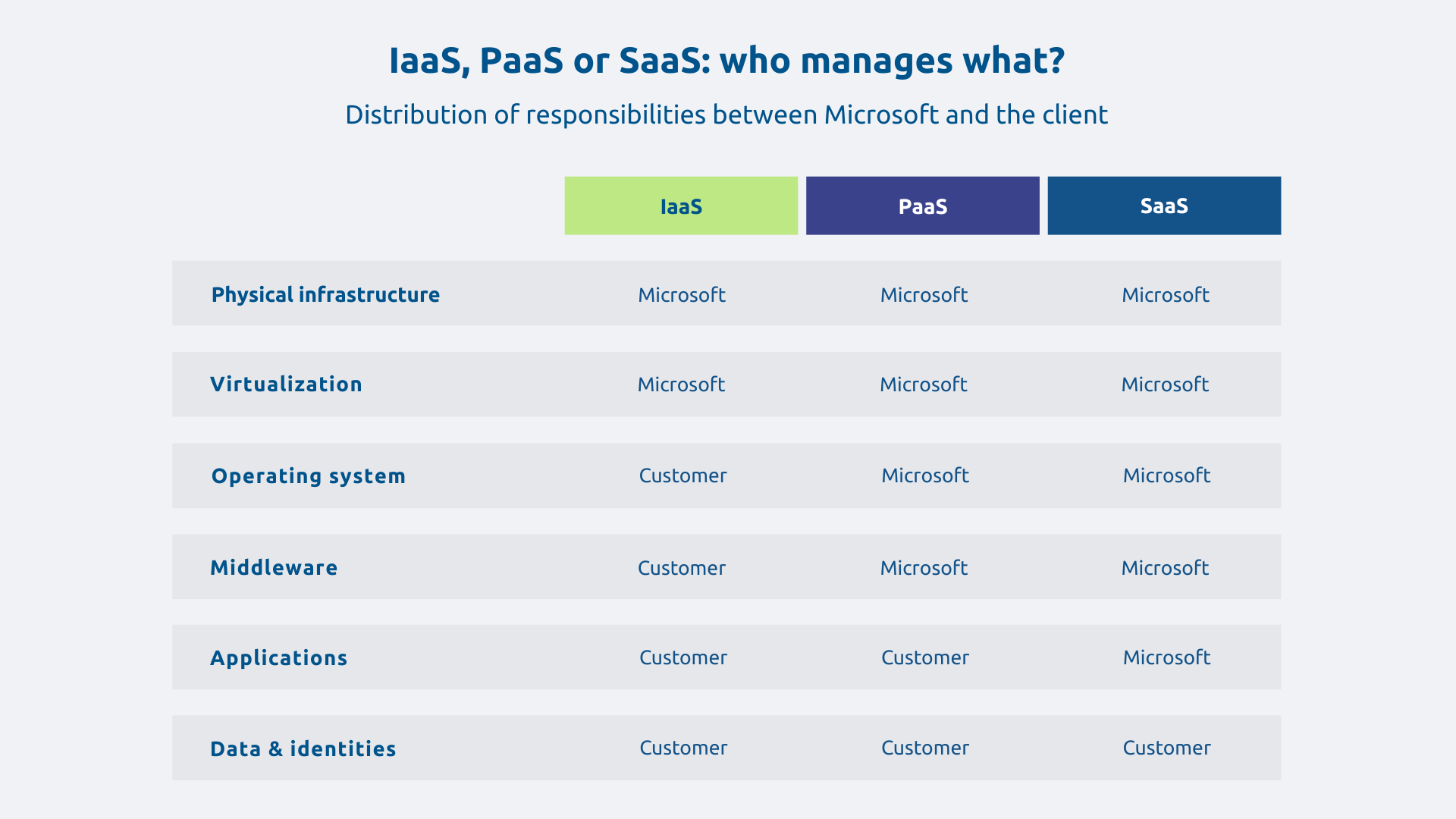
The three cloud models stand out for their level of abstraction and the distribution of responsibilities between the supplier and the customer:
Note that there is no model that is the best for all use cases. The right choice depends on the level of control you want, the nature of the workloads, and the maturity of the cloud of the organization. In practice, companies often combine the three models within the same IS.
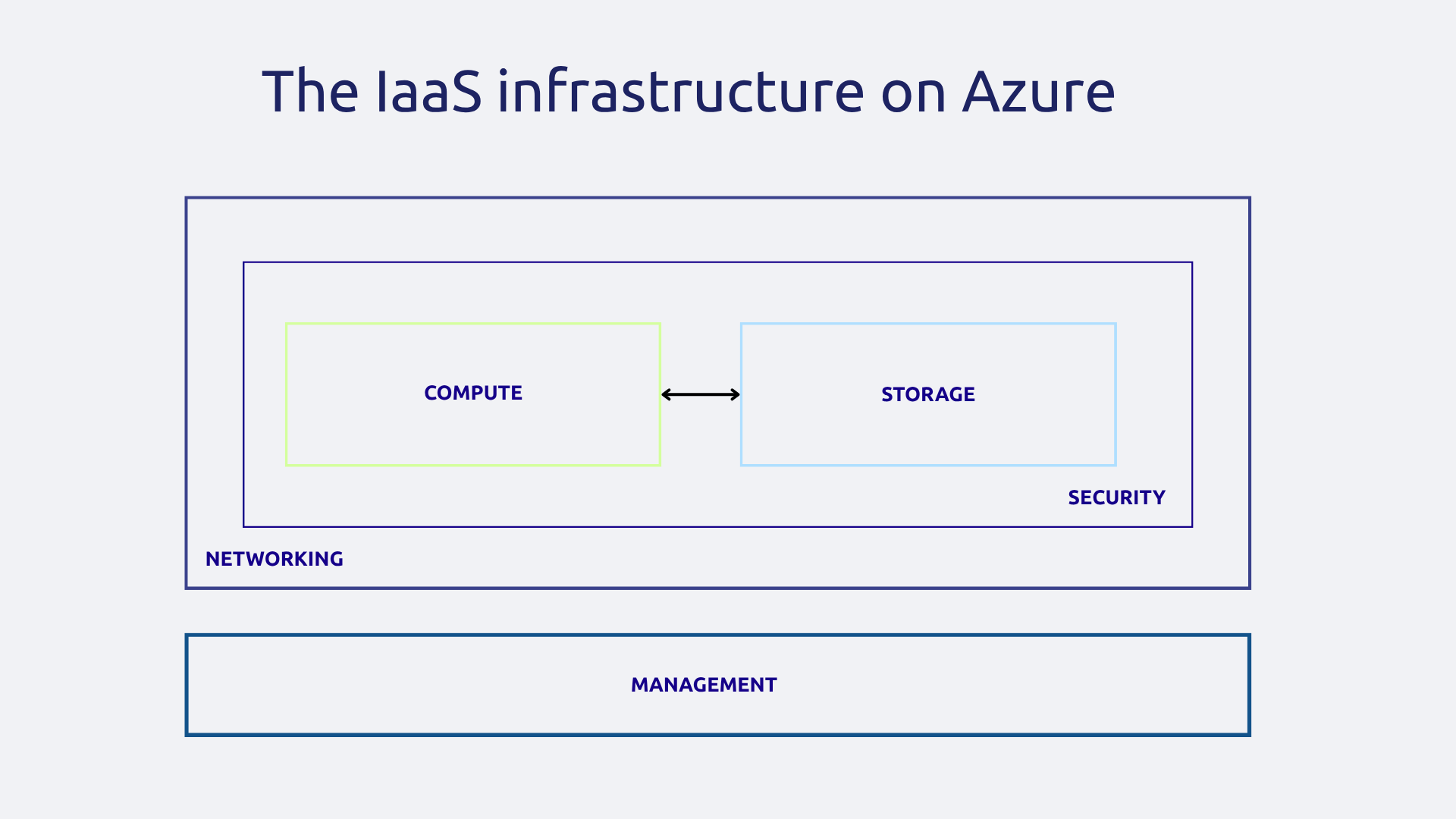
On Azure, an IaaS infrastructure is based on several complementary bricks. The Compute refers to Windows and Linux virtual machines (VMs), which can be scaled on demand according to load requirements.
There is also the storing, which covers managed disks: in Blob Storage for unstructured data, in File Storage for network shares.
The diaper network includes virtual networks (VNets), VPN gateways, ExpressRoute connections for dedicated private lines without public Internet transit, and load balancers to distribute traffic.
For its part, the security is provided by tools such as network security groups (NSG), Azure Firewall or Azure Bastion.
Finally, the Management builds on Azure Monitor, Log Analytics, Azure Backup, and Azure Site Recovery.
What is very interesting for a CIO is the fact that IaaS does not impose no application break (which preserves investments in this area). Indeed, your applications run as they are, in their usual environment. You choose your OS, your configurations, your security tools. You maintain your patching policies.
This freedom makes possible the scenario known as Lift-and-Shift, namely migrating an ERP or a legacy application to Azure without rewriting, keeping all existing customizations. Thus, scalability and cloud backup are added immediately, without functional overhauls.
Elasticity is arguably the most differentiating characteristic of the cloud model. With IaaS, it is in fact possible to increase or reduce resources (CPU, RAM, storage) in a few minutes, depending on the actual load.
A distinction should be made between 3 types of scaling:
For example, an e-commerce site can automatically triple its resources during Black Friday and then return to normal afterwards without human intervention.
Thanks to elasticity, the economic model changes dramatically since infrastructure costs go from a fixed investment (CAPEX) to a variable expense (OPEX) aligned with real activity.
Migrating to IaaS means drastically reducing or eliminating a series of burdensome fixed costs: hardware purchase, amortization, physical maintenance, electricity, air conditioning, data center space.
With this in mind, Azure provides dedicated financial management tools:
We can further improve the TCO control (Total Cost of Ownership) by implementing some best practices that will have to be actively managed: automatic shutdown of development environments outside of working hours, regular rightsizing of virtual machines, removal of orphaned resources.
Implement a business recovery plan (Disaster Recovery) on an on-premise infrastructure is expensive and complex so that we tend to neglect it. That's why Azure IaaS natively integrates mechanisms that make it accessible to all business profiles.
So, Azure Backup automates backups with configurable retention while Azure Site Recovery replicates VMs to a secondary Azure region, allowing for a quick restart in the event of a disaster.
Likewise, the Availability Zones guarantee high availability within the same region, with SLA varying according to the architecture deployed (single instance, local redundancy or multi-zone configuration) and detailed in the Microsoft official documentation.
Thanks to all these tools, the key indicators that are the RPO (Recovery Point Objective, the maximum acceptable data loss) and the RTO (Recovery Time Objective, the recovery period) become controllable and contractually guaranteed. As a result, business continuity is no longer reserved for large companies.
The migration Lift-and-Shift is to move an existing VM as it is to Azure, without changing the application. This is the quickest and least risky scenario to start a cloud strategy.
This strategy concerns in particular the Legacy apps (old business software, file servers, databases) that cannot be easily rewritten or that depend on a specific configuration. For targeted workloads, migration can be completed in a few weeks. The cloud benefits (scalability, backup, monitoring) are immediate.
Lift-and-shift is not an end in itself and once in IaaS, the organization can gradually optimize certain workloads by evolving them to PaaS when relevant, in a logic of Modernization of the IS towards a unified Microsoft ecosystem.
IaaS is particularly well suited to dev/test environments : they are provisioned in a few minutes, they are used for as long as necessary and then they are destroyed. No equipment is mobilized, no unnecessary costs are incurred.
In addition, the automation via the Infrastructure as Code (Terraform, ARM templates, Bicep) allows you to recreate an identical environment in a few commands. Each project can have its own isolated infrastructure, without interfering with production.
IaaS isn't just for secondary workloads. On the contrary, critical applications (ERP, production management tools, transaction platforms) can be hosted in Azure IaaS with availability guarantees that few businesses are able to reach on their own with their on-premise infrastructure.
Availability Sets and Availability Zones allow VMs to be distributed across distinct failure domains, with SLAs of up to 99.99% depending on multi-zone configurations. Combined with automatic load balancing and proactive monitoring via Computational observability, they offer contractually guaranteed availability, with 24/7 Microsoft support for production environments.
Not all applications are for the cloud. Some workloads remain on-premise for reasons of latency, regulatory constraints, or hardware dependency. IaaS integrates naturally into these hybrid architectures.
One secure connection via site-to-site VPN or via ExpressRoute (dedicated private line, without public Internet transit) makes it possible to extend the corporate network to Azure. Additionally, Active Directory can operate in hybrid mode. Critical data can be replicated between the two environments for disaster recovery.
An industrial company can thus maintain its ERP of on-premise production for reasons of latency, while migrating its development environments, backups, and disaster recovery plans to Azure IaaS.
With IaaS, you maintain control but also responsibilities. OS management, security patches, middleware configuration, application monitoring: all this remains your responsibility.
Without clear governance from the start With measures such as naming conventions, tagging policies, access rights management via RBAC, complexity can quickly get out of hand. Thus, a common scenario in unsupervised migrations can easily lead to dozens of undocumented VMs, inconsistent configurations or even untraceable costs.
Despite its qualities, IaaS cannot be managed by itself but requires operational expertise that many organizations cannot mobilize alone. It is on these points that the support of a specialized partner often makes the difference for a successful migration.
The elasticity of IaaS is an asset but can become a trap: VMs left active unnecessarily, forgotten test environments, oversized resources. In fact, Budgetary excesses happen quickly if cloud consumption is not rigorously monitored.
To prevent this risk, the Tagging systematic resources make it possible to identify costs per project, per team, per environment. Microsoft Cost Management offers real-time visibility and allows you to define budgets with automatic alerts.
As for Azure reservations, they reduce the costs of VMs with constant use thanks to a feature for scheduled shutdown of non-production environments. In fact, it is one of the simplest and most effective measures.
In IaaS, security is shared according to a specific perimeter, formally documented by Microsoft in its shared responsibility model (Shared Responsibility Model). Microsoft secures physical infrastructure, whether it's data centers, physical networks, or hypervisors. For your part, you secure the rest: operating systems, applications, applications, data, identities, network access.
This distribution is well defined on paper. In practice, it is less so. A Windows VM with the RDP port open on the Internet and a weak administrator password can be compromised in a few hours to a few days, depending on exposure conditions and ongoing automated attacks. We can also think of unactivated logs, unencrypted disks, or network security groups that are too permissive. In fact, every configuration gap is an attack surface.
Microsoft Defender for Cloud and Azure Policy help automate compliance auditing and detect misconfigurations. In addition, the Safety by design, applied from the design stage of the IaaS infrastructure, is the most effective way to avoid these pitfalls. Finally, a Zero Trust approach complements this system by limiting lateral propagation in the event of an incident.
Azure IaaS offers the best balance between technical control and the benefits of the cloud, provided you approach it methodically. Not all workloads fall under IaaS: some will benefit from evolving to PaaS, others will remain on-premise. The value of a cloud strategy lies precisely in this detailed analysis, conducted workload by workload.
Do you want to assess the potential of Azure IaaS to modernize your infrastructure? Contact Askware for an audit of your IS and a personalized strategic framework workshop.
Everything depends on the level of responsibility: in IaaS you manage the OS and applications, in PaaS this layer is abstract to focus on development, in SaaS you consume a service directly without managing any infrastructure.
Flexible configurations, elasticity of resources on demand, reduction of physical hardware costs, and business continuity much more accessible than with on-premise infrastructure.
Start by analyzing your workloads to determine what can migrate as is, what needs to be redesigned, and what remains on-premise. The scoping phase is the most critical to avoid costly mistakes that need to be corrected later.
Our experts share their vision of best practices and technological trends to ensure the success of your digital transformation.